
Blighted
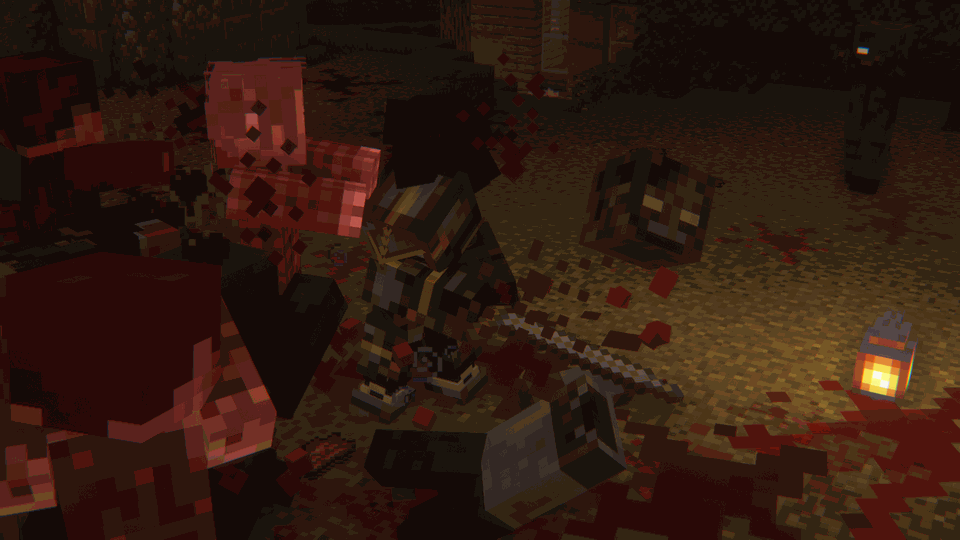
Zombie Apocalypse X Dark Fantasy themed Minecraft RPG Modpack. Travel through a corrupted, medieval world as a Vagabond warrior.
Screenshots


Über dieses Modpack

A terrible evil stalks the land, its darkness unchallenged. You alone must rise and end its reign.

Once, a great kingdom stood — its name now buried beneath ash and time.
Pride turned to rot when an ancient evil clawed its way from the depths, unleashing a plague that wrenched the dead from their graves.
The kingdom's stone walls cracked, its banners burned, and its people were torn apart in the streets.
Those few who survived fled into the broken wilds, their hope as brittle as the bones littering the earth.
Now, under a sky choked with ash and smoke, only the desperate claw at life in a world that has already been claimed by the dead.

🗡️RPG Aspects: Level up using a combination of simply skills, Epic Knights, and the ZsoltMolnarrr RPG Series modset
🛡️Defend: Defend from dangerous zombies that can scale walls, climb each other, and break into undefended bases
🗺️Terrain: A combination of WWOO, Antique Atlas, and Terralith create the most immersive world possible
🐉Bosses: If you travel far enough, you can fight epic bosses and get unique loot
🧭Exploration: Explore the incredible terrain to find epic structures, castles, and dungeons
🌐Multiplayer: Multiplayer is encoraged for the best experience

Q: Since the zombies can break blocks, how do I defend my base? A: You must use hard blocks like the various types of castle bricks from the Castle Blocks mod, and obsidian to defend your base.
Q Can I disable the gore? A: Yes. In the config for the mods; **Goop, Oooze, and Physics mod, you can customise and enable/disable all of the gore effects.
Q: Can I change the difficulty of the zombies? A: Yes. If you go into the config for the apocalypse mod, you can change diffrent aspects of the hordes.
Q Is this good with Texture Packs? A: Absolutely. the modpack comes with an optional preinstall of Excalibur by Maffhew, which looks incredible.
Verfügbare Versionen
Blighted Server einrichten
Server bestellen
Wähle mindestens 6 GB RAM (8 GB empfohlen für Blighted). Je nach Spieleranzahl: +1 GB pro 5 Spieler.
Modpack im Dashboard installieren
Öffne den Modpack-Browser im Dashboard, suche nach "Blighted" und klicke "Installieren". Der fabric-Loader und Minecraft 1.20.1 werden automatisch konfiguriert.
Server starten & spielen
Starte den Server – alle Mods werden automatisch geladen. Teile die Server-IP mit Freunden und spielt zusammen!
Häufige Fragen
Blighted Server crasht oder startet nicht – was tun?
Häufigste Ursachen: zu wenig RAM oder falscher fabric-Loader. Prüfe latest.log auf "OutOfMemoryError" → erhöhe RAM auf mindestens 8 GB. Bei "Mixin" oder "ClassNotFoundException": Modpack-Version und Loader stimmen nicht überein. Bei Mado Hosting werden Loader und Minecraft-Version beim Modpack-Install automatisch konfiguriert – das verhindert die meisten Startprobleme.
Wie viel RAM braucht ein Blighted Server wirklich?
Minimum 6 GB, empfohlen 8 GB für stabile Performance. +1 GB pro 5 Spieler. Wichtig: Minecraft-Modpacks brauchen mehr RAM als Vanilla – plane pro zusätzlichem Spieler extra ein. Bei Mado Hosting kannst du den RAM jederzeit live hochskalieren, ohne Datenverlust (ab €7.800000000000001/Monat).
Kann ich eigene Mods zu Blighted hinzufügen, ohne Konflikte?
Ja, aber achte auf die Kompatibilität: Nutze nur Mods für den gleichen Loader (fabric) und die gleiche Minecraft-Version (1.20.1). Häufige Probleme: ID-Konflikte bei Rezept-Mods und inkompatible Coremod-Versionen. Im Mado Dashboard zeigt der Mod-Browser nur kompatible Mods an und warnt bei bekannten Konflikten.
Blighted Server laggt – Performance-Tipps
1) RAM auf 8 GB+ erhöhen. 2) Server-View-Distance auf 8 reduzieren (server.properties). 3) Pre-Generiere Chunks mit dem "Chunky" Plugin. 4) Prüfe mit /spark profiler welche Mods die meiste Tick-Time verbrauchen. Bei Mado Hosting laufen alle Server auf NVMe-SSDs mit dedizierten CPU-Kernen – das eliminiert Hardware als Engpass.
Ähnliche Modpacks
![Cobblemon Official Modpack [Fabric]](https://cdn.modrinth.com/data/5FFgwNNP/e7f9ee2e9d361623847853fe2ddce42f519ee64f.png)
![COBBLEVERSE - Pokemon Adventure [Cobblemon]](https://cdn.modrinth.com/data/Jkb29YJU/581ecf54530972afb18a04660afd820f2f24f6c7.png)
![Better MC [FABRIC] - BMC2](https://cdn.modrinth.com/data/shFhR8Vx/a19c2bcb51d38f32f138d3607e91cb2b7b8e387f_96.webp)


![Better MC [FORGE] - BMC4](https://cdn.modrinth.com/data/4BV47HRn/7f5ef7cc61b2593609aabef3ed07a866a4f11b73_96.webp)
Blighted Server mieten
Starte deinen eigenen Server mit automatischer Modpack-Installation.
Unterstützte Versionen
Starte deinen Blighted Server jetzt
Ab €7.80/Monat; für die beste Performance werden 8 GB RAM empfohlen.
Server konfigurieren →