
CCNet Fabric
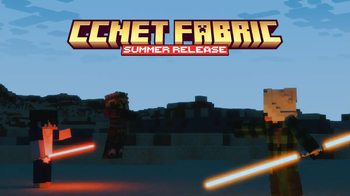
The unofficial modpack for CCNet. CCNet Nations is a unique geopolitical roleplay sandbox server set on a 1:1000 map of the Earth.
Screenshots
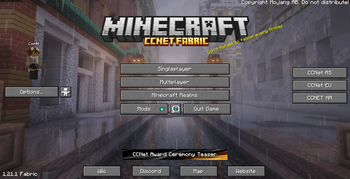
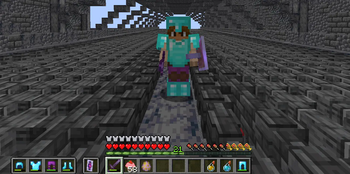
Über dieses Modpack
CCNet Fabric Modpack
CCNet Minecraft has strict rules for the allowed modification on their server.
This modpack contains all the allowed modifications on the Nations server of CCNet, and the ones listed on the official modpack here. Read more about the modification at the CCNet Rules Website (Global Rule 1 - Client Modifications).
⚡ Performance & Optimization
- Alternate Current (Optimises lag created by redstone dust)
- BadOptimizations (A collection of mostly micro optimizations)
- Cull Leaves (better leave culling)
- Dynamic FPS (Reduces resource consumption when the game is unfocused, more free resources)
- Enhanced Block Entities (ever enter konigsberg chest room and feel the lag? say no more!)
- Entity Culling (Uses async path-tracing to skip rendering Block/Entities that are not visible)
- FerriteCore (major memory optimisations so your pc doesnt crash out :>)
- ScalableLux (Optifine's starlight alternative, since they discontinued it)
- GPU Memory Leak Fix (A mod that fixes some bugs which leak resources within GPU memory)
- ThreadTweak (reliable fort of SmoothBoot)
- ImmediatelyFast (rendering optimisations)
- Krypton (optimises minecraft network stacking)
- Lithium (mutli-purpose optimisation mod)
- ModernFix (an all-in-one optimisation mod_
- MoreCulling (A mod that changes how multiple types of culling are handled in order to improve performance)
- Sodium (powerful rendering engine and optimisations)
- Sodium Extra (additional options however also allows particle management-disabled uneccessary particles to improve performance in sieges)
- VMP (very many players, probably tries to save your pc in pvp regions)
🎨 Graphics & Visual Enhancements
- AnimaTica (adds support for resource packs that use custom animated textures)
- CITResewn (supports custom armor and item texture on nations)
- Clumps (optimises your average spawner experience)
- BetterMountHUD (improves the ingame HUD while riding a horse, donkey or other mount)
- BetterShields (adds shield disable sounds which sorta are inaccurate for high pinged players as this is client based, however colors shield for self if they are disabled or held)
- Capes (supports for capes :3)
- Continuity (connects block textures)
- FancyMenu (shwos stereoIm and Fqrtex in menu and some useless splash texts and a random lofi mc song)
- Reeses Sodium Options (more options for sodium)
🛠 User Interface & QoL
Mods that improve the game's UI and general quality of life features.
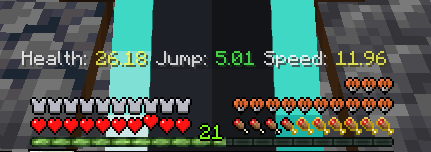
- AppleSkin (shows player saturation, good for pvp)
- Mr. Dynamic Torches (dynamic lights, carry a torch in your main hand for client side light area)
- ResourcePackCached (Tired of reloading pack everytime you join CCNet? Say no more we cache it for you!!)
- BetterPingDisplay (shows ping on TAB)
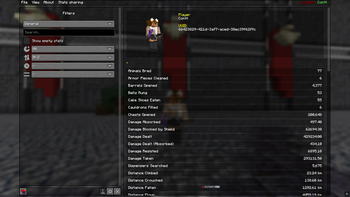
- BetterStats (better-compiled statistics cough cough Mojang)
- GammaUtils (Click N to toggle Night Vision)
- HorseStatsMod (Ride your horse to see their statistics)
- Mod Loading Screen (cool loading screen idk)
- Mod Menu (list of all modifications active, allows tweaks and changes)
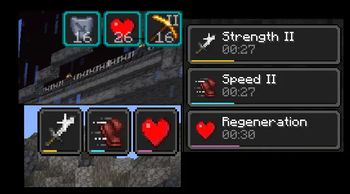
- Status Effect Bars (Shows a line thick bar on the bottom of effects icon)
- Status Effect Timer (Adds time to the effects icon so you can re-buff on time!!)
- UKUs Armor HUD (track your armor dura so you don't have to quickdrop)
- Zoomify (zoom in using C)
🌐 Multiplayer & Chat Enhancements
Mods designed to improve multiplayer interactions and chat functionality.
- AuthMe (dont relaunch your game when you can relog, thanks to authme)
- MoreChatHistory (unlimited chat history)
- NoChatReports [:)]
- RRLS (removes the reloading screen for ADHD users like me)
🔩 Fabric & Core Dependencies (remove these and your modpack dies)
- Fabric API
- Fabric Language Kotlin
- Fabric Loader
- Konkrete
- MixinTrace
- TCDCommons
- Yet Another Config Library
- ukulib
🎮 Gameplay Tweaks & Miscellaneous
These mods add general gameplay improvements and useful tweaks.
- Fabrishot (take high-res screenshots using F9
- KTNilcks
- ModelFix (fixes model gaps)
🗺️ Map & World Editing
- WorldEdit 7.3.8+6939-7d32b45
- Xaero’s Minimap 25.1.0
- Xaero’s World Map 1.39.4
🌅 Shaders
- Iris 1.8.1+mc1.21.1
- BSL Shaders (Click K to toggle)
Facing Issues/Bugs? Have Suggestions?
Contact @contt on Discord, or join the CCNet Discord
Some configs adapted from Fabulously Optimized, Copyright 2020-2026 Fabulously Optimized Authors (BSD 3-Clause License)
Verfügbare Versionen
CCNet Fabric Server einrichten
Server bestellen
Wähle mindestens 4 GB RAM (6 GB empfohlen für CCNet Fabric). Je nach Spieleranzahl: +1 GB pro 8 Spieler.
Modpack im Dashboard installieren
Öffne den Modpack-Browser im Dashboard, suche nach "CCNet Fabric" und klicke "Installieren". Der fabric-Loader und Minecraft 1.21.11 werden automatisch konfiguriert.
Server starten & spielen
Starte den Server – alle Mods werden automatisch geladen. Teile die Server-IP mit Freunden und spielt zusammen!
Häufige Fragen
CCNet Fabric Server crasht oder startet nicht – was tun?
Häufigste Ursachen: zu wenig RAM oder falscher fabric-Loader. Prüfe latest.log auf "OutOfMemoryError" → erhöhe RAM auf mindestens 6 GB. Bei "Mixin" oder "ClassNotFoundException": Modpack-Version und Loader stimmen nicht überein. Bei Mado Hosting werden Loader und Minecraft-Version beim Modpack-Install automatisch konfiguriert – das verhindert die meisten Startprobleme.
Wie viel RAM braucht ein CCNet Fabric Server wirklich?
Minimum 4 GB, empfohlen 6 GB für stabile Performance. +1 GB pro 8 Spieler. Wichtig: Minecraft-Modpacks brauchen mehr RAM als Vanilla – plane pro zusätzlichem Spieler extra ein. Bei Mado Hosting kannst du den RAM jederzeit live hochskalieren, ohne Datenverlust (ab €5.2/Monat).
Kann ich eigene Mods zu CCNet Fabric hinzufügen, ohne Konflikte?
Ja, aber achte auf die Kompatibilität: Nutze nur Mods für den gleichen Loader (fabric) und die gleiche Minecraft-Version (1.21.11). Häufige Probleme: ID-Konflikte bei Rezept-Mods und inkompatible Coremod-Versionen. Im Mado Dashboard zeigt der Mod-Browser nur kompatible Mods an und warnt bei bekannten Konflikten.
CCNet Fabric Server laggt – Performance-Tipps
1) RAM auf 6 GB+ erhöhen. 2) Server-View-Distance auf 8 reduzieren (server.properties). 3) Pre-Generiere Chunks mit dem "Chunky" Plugin. 4) Prüfe mit /spark profiler welche Mods die meiste Tick-Time verbrauchen. Bei Mado Hosting laufen alle Server auf NVMe-SSDs mit dedizierten CPU-Kernen – das eliminiert Hardware als Engpass.
Ähnliche Modpacks

![Cobblemon Official Modpack [Fabric]](https://cdn.modrinth.com/data/5FFgwNNP/e7f9ee2e9d361623847853fe2ddce42f519ee64f.png)
![COBBLEVERSE - Pokemon Adventure [Cobblemon]](https://cdn.modrinth.com/data/Jkb29YJU/581ecf54530972afb18a04660afd820f2f24f6c7.png)
![Better MC [FABRIC] - BMC2](https://cdn.modrinth.com/data/shFhR8Vx/a19c2bcb51d38f32f138d3607e91cb2b7b8e387f_96.webp)


CCNet Fabric Server mieten
Starte deinen eigenen Server mit automatischer Modpack-Installation.
Unterstützte Versionen
Starte deinen CCNet Fabric Server jetzt
Ab €5.20/Monat; für die beste Performance werden 6 GB RAM empfohlen.
Server konfigurieren →