
Cobblemon Earth The Mizuni Region
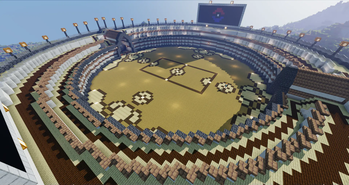
The Cobblemon Earth is a traditional SMP and roleplay server where you can build your own bases, forge rivals, and compete for glory. With 8 Player driven Gyms for Trainers to find and defeat.
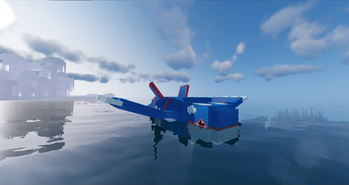
Screenshots

Über dieses Modpack
🌎 Cobblemon Earth: The Mizuni Region 🌍
The Cobblemon Earth is a traditional SMP and roleplay server where you can build your own bases, forge rivals, and compete for glory. With 8 Player driven Gyms for Trainers to find and defeat. After completion they get a ticket to the Pokémon League. Your chance to prove you are the greatest master of them all!
✨Gym Badges from Player-run Gyms!
✨Complete quests for rewards!
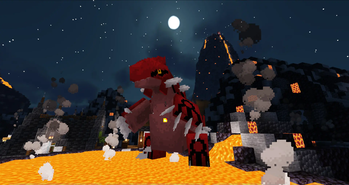
✨Naturally Spawning Legendaries, Mythicals, and Ultra Beasts!
✨Constantly adding even more official Pokémon!
✨Team up with others! Will you be an evil team or a good team?
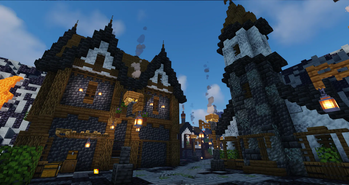
✨Build your own towns with your teams and perhaps it will become an official town!
✨Player-centric bartering!
✨Rank system based off time played
✨Pokémon variants such as Magikarp colors, Phantump woods, and Torterra trees!
✨UI to match Cobblemon.
✨Shiny Pokémon emit sparkles!
✨Pokémon Music for battling and exploring!
✨Claiming! Use a golden hoe from one corner to another to claim your area. Earn blocks overtime, or buy a chunk with a diamond block.
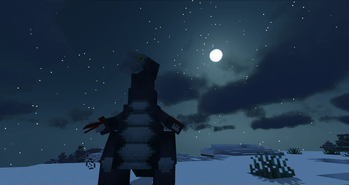
✨Sleep is for the weak, beds no longer skip night and hostile mobs don't spawn, so feel free to travel through the night to find unique Pokémon!
✨Chaining! Catch, KO, or a combination of both to increase your chances of IVs, Hidden Abilities, or Shinies!
✨Server run Events
✨The modpack will be updated to the latest version of Cobblemon upon the end of a season, along with a new map!
✨A custom competitive ruleset
✨New Biomes from Terralith, Incedium, and Nullscape
✨Many custom datapacks/resource packs made by the community.
✨New foods from Farmer's Delight, Bakery, Vinery and more!
✨Portable storage in the form of bundles and backpacks!
✨We welcome any content creators to come give our server a try!
✨We are always looking for model donations, of course we will always give credit where credit is due!
✨Never P2W (we don't support that)
✨And much, much more
✨MC Server is open for beta NOW!!!
✨Staff positions are needed, including creative minds, writers, mods, and IT personnel.
✨Model Donators:
- Astra
- GenotypeXD
** Join the Discord for server IP and more!**
List of Mods:
- Fabric API
- Architectury API
- Cobblemon
- Terralith
- Incedium
- Nullscape
- Continents
- Better Villages
- Patchouli
- Cobblepedia
- Xaero's Minimap
- Xaero's World Map
- Sound Physics Remastered
- Presence Footsteps
- Ambient Sounds 5
- Continuity
- Entity Culling
- Entity Model Features
- Entity Texture Features
- Sodium
- Indium
- Iris Shaders
- Konkrete
- GeckoLib
- Biomes in Jars
- Inertia Anti Cheat
- Waystones
- Balm
- Cloth Config API
- Creative Core
- Fabric Language Kotlin
- Forge Config API Port
- Inventory Profiles Next
- Just Enough Items
- LambDynamicLights
- libIPN
- Library Ferret
- Puzzles Lib
- Stacker
- Xaero Arrow Fix
- YetAnotherConfigLib
- Zoomify
- Ferrite Core
- Cobblemon Spawn Notifications
- Cobblemon Unimplemented Items
- Where Are My TMs?
- Connectivity
- AppleSkin
- Simple Voice Chat
- Nature's Compass
- Iron Chests: Restocked
- [Let's Do] API
- [Let's Do] Bakery
- [Let's Do] Candlelight
- [Let's Do] Vinery
- Cardinal Components
- Cobblemon Capture XP
- Cobblemon Counter
- Cobblemon Unchained
- Every Compat (Wood Good)
- Extended Drawers
- Smarter Farmers
- Supplementaries
- Traveler's Backpack
- Another Furniture
- Charm
- Immediately Fast
- Clumps
- Controlling
- Harvest with Ease
- KleeSlabs
- Variant Crafting Tables
- Recipe Book Delight
- No Resource Pack Warnings
- Trowel
- Polymorph
- Advancement Plaques
- Universal Bone Meal
- ModernFix
- Macaw's Windows
- Villager Names
- Sodium Extra
- Dark Paintings
- Reese's Sodium Options
- Lithium
- Lazy DFU
- Starlight
- Macaw's Paths and Pavings
- Macaw's Paintings
- Cobblemon Info
- Jade
- Macaw's Lights and Lamps
- Reacharound
- Stoneworks
- Chef's Delight
- Adorn
- Brewin' And Chewin'
- Farmer's Respite
- Chat Patches
- Chat Heads
- Macaw's Doors
- Macaw's Fences and Walls
- Macaw's Trapdoors
- Bookshelf
- Iceberg
- Collective
- Fabric Furnaces
- Beautify: Refabricated
- Piercing Paxels
- Macaw's Bridges
- Handcrafted
- Chipped
- Better Statistics Screen
- Macaw's Furniture
- Emojiful
- Display Case
- Supplementaries Squared (Permission)
- OpenBlocks Elevator
- No Night Vision Flickering (Fabric)
- Texels Paintings
- Cycle Paintings
- Enchant the Rainbow
- Customizable Elytra (Fabric)
- Furniture Expanded
- CIT Resewn
- Enchantment Descriptions
- Festive Delight
- Winterly
- Snowy Spirit
- Night Lights
- Playdate
- Mighty Mail
- Framework
- Cloth API
- Trinkets
- Charm of Undying
- Elytra Slot
- Vanity Slots
- Shulker Box Slot
- EMI
- EMI Loot
- EMI Trades
- EMIffect
- EMI Extra Integrations
- Adaptive Tooltips
Datapacks (For the Server, although most are Resource Packs for the Client):
- Alola Mons
- Buizel and Floatzel
- Caden's Model Addons
- Cobblemon Music
- DeCube's Mo Mons Pack
- Dracomon
- Drop Rates Edits
- Kyogre
- Lil Guy Addon
- Lost Mons
- Lugia
- Magikarp Jump Expansion
- Missing Mons
- More Mons
- Mystic Mons
- Pigeon Pack
- Pumpkaboo Fix
- Salt Mons Pack
- Shinier Shinies
- Wimpower
- (NotSo)Cobblemon Allone's Additions
- Cobblemon Missing Recipes
- Guzse's Additional Cobblemon
- Quinn's Missing Pokemon
- Ultimon
- GenoTypeXD's Mons
- Gigadeng's Addon
- Stunfisk
And of course, all credits go to the Cobblemon Team for allowing this experience to be possible!
Verfügbare Versionen
Cobblemon Earth The Mizuni Region Server einrichten
Server bestellen
Wähle mindestens 4 GB RAM (6 GB empfohlen für Cobblemon Earth The Mizuni Region). Je nach Spieleranzahl: +1 GB pro 8 Spieler.
Modpack im Dashboard installieren
Öffne den Modpack-Browser im Dashboard, suche nach "Cobblemon Earth The Mizuni Region" und klicke "Installieren". Der fabric-Loader und Minecraft 1.19.2 werden automatisch konfiguriert.
Server starten & spielen
Starte den Server – alle Mods werden automatisch geladen. Teile die Server-IP mit Freunden und spielt zusammen!
Häufige Fragen
Cobblemon Earth The Mizuni Region Server crasht oder startet nicht – was tun?
Häufigste Ursachen: zu wenig RAM oder falscher fabric-Loader. Prüfe latest.log auf "OutOfMemoryError" → erhöhe RAM auf mindestens 6 GB. Bei "Mixin" oder "ClassNotFoundException": Modpack-Version und Loader stimmen nicht überein. Bei Mado Hosting werden Loader und Minecraft-Version beim Modpack-Install automatisch konfiguriert – das verhindert die meisten Startprobleme.
Wie viel RAM braucht ein Cobblemon Earth The Mizuni Region Server wirklich?
Minimum 4 GB, empfohlen 6 GB für stabile Performance. +1 GB pro 8 Spieler. Wichtig: Minecraft-Modpacks brauchen mehr RAM als Vanilla – plane pro zusätzlichem Spieler extra ein. Bei Mado Hosting kannst du den RAM jederzeit live hochskalieren, ohne Datenverlust (ab €5.2/Monat).
Kann ich eigene Mods zu Cobblemon Earth The Mizuni Region hinzufügen, ohne Konflikte?
Ja, aber achte auf die Kompatibilität: Nutze nur Mods für den gleichen Loader (fabric) und die gleiche Minecraft-Version (1.19.2). Häufige Probleme: ID-Konflikte bei Rezept-Mods und inkompatible Coremod-Versionen. Im Mado Dashboard zeigt der Mod-Browser nur kompatible Mods an und warnt bei bekannten Konflikten.
Cobblemon Earth The Mizuni Region Server laggt – Performance-Tipps
1) RAM auf 6 GB+ erhöhen. 2) Server-View-Distance auf 8 reduzieren (server.properties). 3) Pre-Generiere Chunks mit dem "Chunky" Plugin. 4) Prüfe mit /spark profiler welche Mods die meiste Tick-Time verbrauchen. Bei Mado Hosting laufen alle Server auf NVMe-SSDs mit dedizierten CPU-Kernen – das eliminiert Hardware als Engpass.
Ähnliche Modpacks


![Cobblemon Official Modpack [Fabric]](https://cdn.modrinth.com/data/5FFgwNNP/e7f9ee2e9d361623847853fe2ddce42f519ee64f.png)
![COBBLEVERSE - Pokemon Adventure [Cobblemon]](https://cdn.modrinth.com/data/Jkb29YJU/581ecf54530972afb18a04660afd820f2f24f6c7.png)

![Better MC [FABRIC] - BMC2](https://cdn.modrinth.com/data/shFhR8Vx/a19c2bcb51d38f32f138d3607e91cb2b7b8e387f_96.webp)
Cobblemon Earth The Mizuni Region Server mieten
Starte deinen eigenen Server mit automatischer Modpack-Installation.
Details
- Lizenz
- LicenseRef-All-Rights-Reserved
- Server-seitig
- Erforderlich
- Client-seitig
- Erforderlich
Unterstützte Versionen
Starte deinen Cobblemon Earth The Mizuni Region Server jetzt
Ab €5.20/Monat; für die beste Performance werden 6 GB RAM empfohlen.
Server konfigurieren →