
Cogwork Continuum
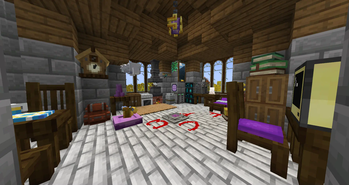
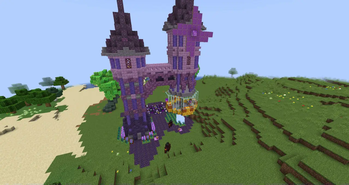
Step into a steampunk-inspired realm where machinery and magic converge. In "Cogwork Continuum", challenge your engineering acumen, craft intricate devices, and navigate a world where gears and steam power the imagination.
Screenshots

Über dieses Modpack
Step into a world where gears grind, steam hisses, and magic pulses beneath the surface.
Cogwork Continuum is a carefully curated steampunk-fantasy modpack that merges mechanical mastery with mystical might, offering a sandbox ripe for engineers, explorers, and enchanters alike.
Craft vast contraptions with the Create mod and its many powerful add-ons.
Unleash arcane potential through systems like Iron's Spells & Spellbooks or Ars Nouveau.
Brave dangerous dungeons, face down epic bosses, and traverse unique dimensions and places from the skies of the Aether to the icy abysses of Aquamirae.
With enhanced combat mechanics, rich exploration content, and robust automation systems,
Cogwork Continuum delivers a gameplay experience that’s both cinematic and deeply technical — whether you’re a redstone novice or a steampunk savant.
Core Features
- ⚙️ Create-powered Engineering & Automation
- ✨ Optional Magic Progression
- 🌍 Expanded Worldgen & Unique Dimensions
- ⚔️ Overhauled Combat with BetterCombat
- 🎮 High Performance + Quality-of-Life Mods
- 🧩 Synergistic Mod Selection, Minimal Bloat
Click to expand: Core Mods & Features Breakdown
🛠 Create & Add-ons
The mechanical heart of Cogwork Continuum. Use rotating shafts, sequenced gearshifts, conveyor belts, and mechanical arms to build:
- Complex farms
- Logistics systems
- Decorative steampunk contraptions
Includes several Create extensions (e.g. Encased, Steam 'n' Rails) for expanded utility and visual flair.
🔮 Magic Systems
Whether you're a spell-slinging scholar or prefer a purely mechanical route, you’ll find options here:
- Iron’s Spells & Spellbooks for structured, tiered spell progression
- Atlas’ Additions expands ISS with elemental weapons and curios
- Ars Nouveau (in optional packs) for free-form spell crafting
Magic is entirely optional and balanced for tech-first playthroughs.
⚔️ Combat & Exploration Enhancements
- Better Combat brings fluid weapon animations and real collision-based attacks
- Cataclysm adds challenging bosses and Dark Souls-inspired dungeons
- Twilight Forest, Blue Skies, and others add lush new worlds to explore
📦 Quality of Life Mods
- Carry On lets you move chests, machines, and even mobs with your hands
- Jade, Waystones, Controlling, and more smooth out the experience
📸 Immersion & Aesthetics
- Exposure adds analog cameras, film rolls, lightroom development, and photography
- FramedBlocks allows you to build with any texture
- Supplementaries, Decorative Blocks, and other mods help you bring your steampunk world to life
Technical Requirements
- Client: 4GB RAM minimum (6–8GB recommended)
- Server: 6GB RAM for up to 10 players (8–12GB recommended)
Bugs, Issues & Suggestions
Join us on Discord to report bugs or suggest mods/config tweaks!
Issues are tracked and forwarded to mod developers when necessary.
**Credits for Mods from Curseforge:**
- Apotheosis and Apothic Attributes from Shadows_of_Fire
- **Ars Elemental** from Alexth99 - [Ars Elemental](https://www.curseforge.com/minecraft/mc-mods/ars-elemental)
- **Citadel** and **Rats** from sbom_xela - [Citadel](https://www.curseforge.com/minecraft/mc-mods/citadel) - [Rats](https://www.curseforge.com/minecraft/mc-mods/rats)
- **Create Recycle Everything** from nocubeyt - [Create Recycle Everything](https://www.curseforge.com/minecraft/mc-mods/create-recycle-everything)
- Sophisticated Backpacks and Sophisticated Core from P3pp3rF1y
- **Too Many Glyphs** from derringercubed - [Too Many Glyphs](https://www.curseforge.com/minecraft/mc-mods/too-many-glyphs)
- **NoMoWanderer** from TheJDill - [NoMoWanderer](https://www.curseforge.com/minecraft/mc-mods/nomowanderer)
- **FramedBlocks** from XFactHD - [FramedBlocks](https://www.curseforge.com/minecraft/mc-mods/framedblocks)
- **Placebo** from Shadows_of_Fire - [Placebo](https://www.curseforge.com/minecraft/mc-mods/placebo)
Verfügbare Versionen
Cogwork Continuum Server einrichten
Server bestellen
Wähle mindestens 6 GB RAM (10 GB empfohlen für Cogwork Continuum). Je nach Spieleranzahl: +1 GB pro 4 Spieler.
Modpack im Dashboard installieren
Öffne den Modpack-Browser im Dashboard, suche nach "Cogwork Continuum" und klicke "Installieren". Der forge-Loader und Minecraft 1.20.1 werden automatisch konfiguriert.
Server starten & spielen
Starte den Server – alle Mods werden automatisch geladen. Teile die Server-IP mit Freunden und spielt zusammen!
Häufige Fragen
Cogwork Continuum Server crasht oder startet nicht – was tun?
Häufigste Ursachen: zu wenig RAM oder falscher forge-Loader. Prüfe latest.log auf "OutOfMemoryError" → erhöhe RAM auf mindestens 10 GB. Bei "Mixin" oder "ClassNotFoundException": Modpack-Version und Loader stimmen nicht überein. Bei Mado Hosting werden Loader und Minecraft-Version beim Modpack-Install automatisch konfiguriert – das verhindert die meisten Startprobleme.
Wie viel RAM braucht ein Cogwork Continuum Server wirklich?
Minimum 6 GB, empfohlen 10 GB für stabile Performance. +1 GB pro 4 Spieler. Wichtig: Minecraft-Modpacks brauchen mehr RAM als Vanilla – plane pro zusätzlichem Spieler extra ein. Bei Mado Hosting kannst du den RAM jederzeit live hochskalieren, ohne Datenverlust (ab €7.800000000000001/Monat).
Kann ich eigene Mods zu Cogwork Continuum hinzufügen, ohne Konflikte?
Ja, aber achte auf die Kompatibilität: Nutze nur Mods für den gleichen Loader (forge) und die gleiche Minecraft-Version (1.20.1). Häufige Probleme: ID-Konflikte bei Rezept-Mods und inkompatible Coremod-Versionen. Im Mado Dashboard zeigt der Mod-Browser nur kompatible Mods an und warnt bei bekannten Konflikten.
Cogwork Continuum Server laggt – Performance-Tipps
1) RAM auf 10 GB+ erhöhen. 2) Server-View-Distance auf 8 reduzieren (server.properties). 3) Pre-Generiere Chunks mit dem "Chunky" Plugin. 4) Prüfe mit /spark profiler welche Mods die meiste Tick-Time verbrauchen. Bei Mado Hosting laufen alle Server auf NVMe-SSDs mit dedizierten CPU-Kernen – das eliminiert Hardware als Engpass.
Ähnliche Modpacks


Cogwork Continuum Server mieten
Starte deinen eigenen Server mit automatischer Modpack-Installation.
Unterstützte Versionen
Starte deinen Cogwork Continuum Server jetzt
Ab €7.80/Monat; für die beste Performance werden 10 GB RAM empfohlen.
Server konfigurieren →