Copper
Copper is a modpack aimed at getting a real enjoyment and for the player to get a comfortable game from minecraft both on servers and alone.
Screenshots
Über dieses Modpack
Why Copper?
⚙️ Perfomance
Copper uses only proven modern mods for optimization, thanks to which you can enjoy a stable game 24/7 without any problems with high fps even when loading chunks.Below will be attached screenshots confirming this statement.
Tests
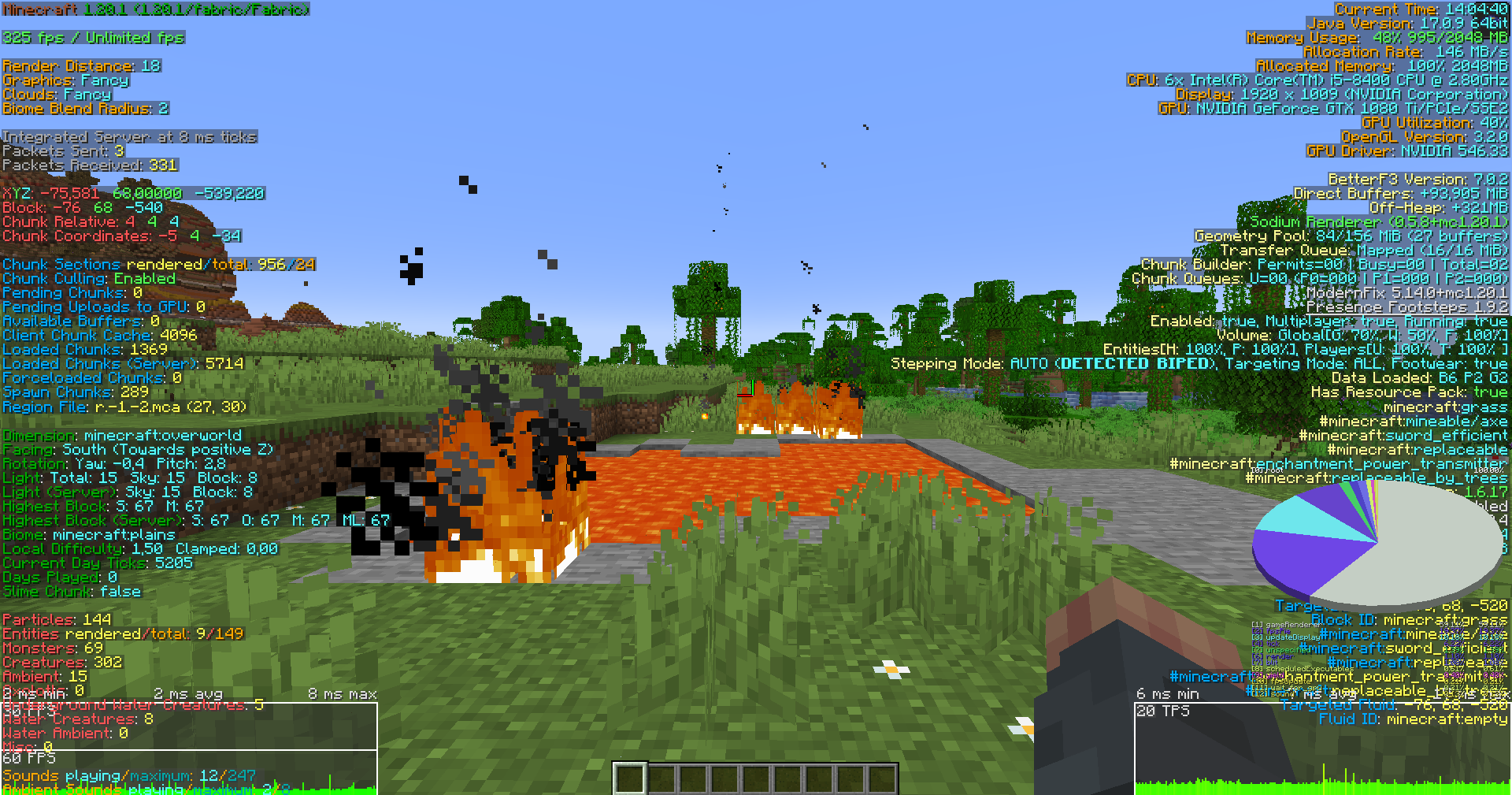
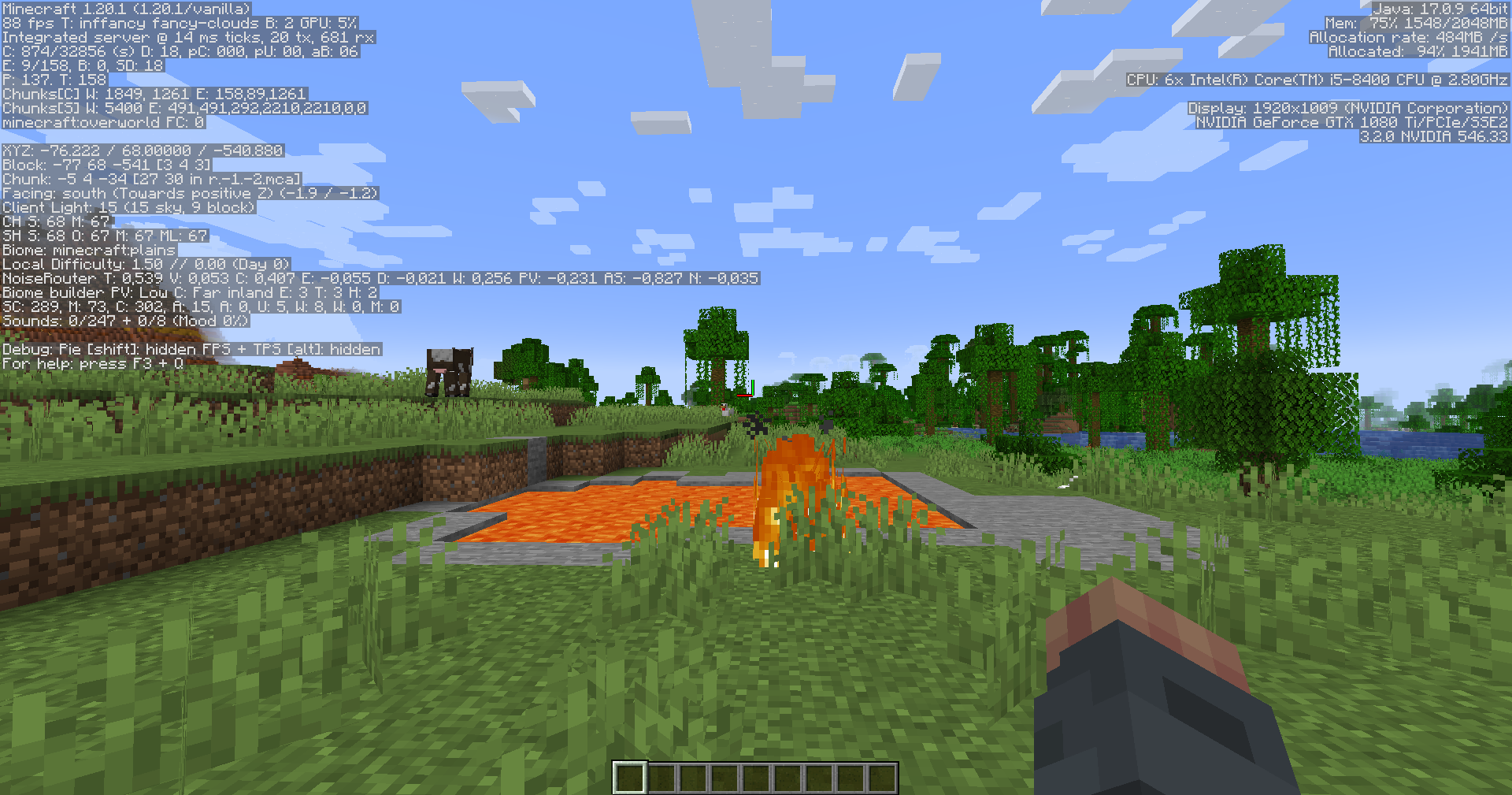
The tests were conducted on components: i5-8400, GTX 1080 Ti, and 16gb RAM. 2048 megabytes of RAM was available for both tests.With graphics settings: 18 chunks,18 simulation chunks,12 shadow chunks, graphics-detail,particles-all.
✔️ The delights of Optifine
Copper modpack includes all the charms of optifine, it is connected textures, the use of zoom, support for shaders, and even resourcepacks. If the resourcepack will require optifine, it will run on the build without problems.
⭐ ALL IN ONE
Copper is an ALL IN ONE build so every aspect of minecraft has been improved. Visuals, functionality, optimization, comfort of the game, all this has been improved in times. Everything has been specially selected so that you get only positive emotions during the game.You can also easily add your favorite mods to this modpack without any problems.
What are the versions of LW and FL?
The LW version is specially designed for weak computers or for those who only care about optimization. It contains mostly only optimization mods, but there are also mods for Optifine functions and some other features complementary to minecraft .(This version is on hold for now)
The FL version is intended for medium and stronger computers (it can also run on a weak one, but we haven't tested it on weak PCs, so we don't know how the assembly will behave). and for those who care about details, many features for convenience, and an improved atmosphere in the game. It contains many mods, both optimizing the game and improving it from the side of the atmosphere in the game and from the side of functionality.
🌏 Works everywhere
On both versions of modpack there are no any mods for content. Therefore, you can play as a server and in a single with friends.Also, the collection is easy to download in popular launchers such as MultiMC, AtLanucher and many others.
🔎 Why Fabric?
Copper uses the fabric mod loader because it is lightweight,stable, has good optimization, and it also supports many mods that improve minecraft.
🤝 How do I get in contact with the moderation of the modpack?
You can contact us via our discord ID:
- 399212343705206795
Resources used
Shaderpacks
Complementary Shaders - Reimagined:https://modrinth.com/shader/complementary-reimagined
Complementary Shaders - Unbound:https://modrinth.com/shader/complementary-unbound
Rethinking Voxels:https://modrinth.com/shader/rethinking-voxels
Solas Shader:https://modrinth.com/shader/solas-shader
VECTOR:https://modrinth.com/shader/vector
Resourcepacks
1.Hazardous Hoglins
author:creepermax123(Owner)
https://www.planetminecraft.com/member/creepermax123/
https://www.planetminecraft.com/texture-pack/hazardous-hoglins/
2.Unstable blocks
author:Manuel XXVI(Owner)
https://www.planetminecraft.com/member/manuel_xxvi/
https://www.planetminecraft.com/texture-pack/xxvi-s-unstable-blocks/
3.flowering leavs
author:Manuel XXVI(Owner)
https://www.planetminecraft.com/member/manuel_xxvi/
https://www.planetminecraft.com/texture-pack/xxvi-s-flowering-leaves/
4.Icons Advertisement Removal
author:vexcenot(Owner)
https://modrinth.com/user/vexcenot
https://modrinth.com/resourcepack/icons-advertisement-removal
6.Better Endermen x Fresh Animations
aurhor:creepermax123(Owner)
https://www.planetminecraft.com/member/creepermax123/
https://www.planetminecraft.com/texture-pack/better-endermen-x-fresh-animations/
7.Animated Items — v1.1.1
author:vrabb-gh(Owner)
https://modrinth.com/user/vrabb-gh
https://modrinth.com/resourcepack/animated-items
8.Better Lanterns — v1.1.2
author:Nico4play(Owner)
https://modrinth.com/user/Nico4play
https://modrinth.com/resourcepack/better-lanterns
9.Fresh Animations — v1.8.1
author:FreshLX(Owner)
https://modrinth.com/user/FreshLX
https://modrinth.com/resourcepack/fresh-animations
10.Icons — v1.9.17
author:mr_ch0c0late(Owner) Zartrix(Co-Owner)
https://modrinth.com/user/mr_ch0c0late
https://modrinth.com/user/Zartrix
https://modrinth.com/resourcepack/icons
11.l3Df Ladders — v1.1
author:Nico4play(Owner)
https://modrinth.com/user/Nico4play
https://modrinth.com/resourcepack/3d-ladders
12.nan2uu Visual Spawn Egg — v1.1
author:Nan2uu(Owner)
https://xenolith.ru/texture-packs/830-nan2uu-visual-spawn-egg-120-1194-1182-117-1165.html
13.OR — Legenary Tooltips — v1.3.1
author:Gous(Owner)
https://modrinth.com/user/Gous
https://modrinth.com/resourcepack/origin-realms-legendary-tooltips
14.Ore Variants — v2.8
author:CrystalZink(Owner)
https://modrinth.com/user/CrystalZink
https://modrinth.com/resourcepack/ore-variants
15.Sodium Translations
author:robotkoer(Owner) FlashyReese(Co-Owner)
https://modrinth.com/user/robotkoer
https://modrinth.com/user/FlashyReese
https://modrinth.com/resourcepack/translations-for-sodium
16.Toad Dmine
author:DmineShop(Owner)
https://modrinth.com/user/DMineShop
https://modrinth.com/resourcepack/toad-dmine
17.Totem 4
18.Visual Titles
author:un_roman(Owner)
https://www.planetminecraft.com/member/un_roman/
https://www.planetminecraft.com/texture-pack/visual-traveler-s-                              titles/ysclid=lplaepvwg6252486571
19.xali's Enchanced Biome River Pond — v1.2.2
author:xalixilax(Owner)
https://modrinth.com/user/xalixilax
https://modrinth.com/resourcepack/xalis-enhanced-biome-river-pond
20.xali's Potions — v1
author:xalixilax(Owner)
https://modrinth.com/user/xalixilax
https://modrinth.com/resourcepack/xalis-potion
21.xali's White Diamond — v1:
Стол зачарования
author:xalixilax(Owner)
https://modrinth.com/user/xalixilax
https://modrinth.com/resourcepack/xalis-white-diamond
22.Superior Sugar Cane
aurhor:creepermax123(Ow
ner)
https://www.planetminecraft.com/member/creepermax123/
https://www.planetminecraft.com/texture-pack/superior-sugar-cane/
23.Blinking Ender Eyes
author:Futureazoo(Owner)
https://modrinth.com/user/Futureazoo
https://modrinth.com/resourcepack/blinking-ender-eyes/version/1.20.2_v3.1
24Axolotl bucket
author:manyrandomthings(Owner)
https://modrinth.com/user/manyrandomthings
https://modrinth.com/resourcepack/axolotl-bucket-variants
25.A New Perception - ANEP
author:AQSIDE(Owner)
https://modrinth.com/user/AQSIDE
https://modrinth.com/resourcepack/a-new-perception
26.More Nether Roots
author:_daggsy_(Owner)
https://modrinth.com/user/_daggsy_
https://modrinth.com/resourcepack/more-nether-roots
27.More Nether Fungi
author:_daggsy_(Owner)
https://modrinth.com/user/_daggsy_
https://modrinth.com/resourcepack/more-nether-fungi
28.Simple Grass Flowers
author:JamieCubed(Owner)
https://modrinth.com/user/JamieCubed
https://modrinth.com/resourcepack/simple-grass-flowers
29.Artisanal Default
author:JamieCubed(Owner)
https://modrinth.com/user/JamieCubed
https://modrinth.com/resourcepack/artisanal-default
30.Better Illagers x Fresh Animations
author:creepermax123(Owner)
https://www.planetminecraft.com/member/creepermax123/submissions/?morder=order_latest&p=3
https://www.planetminecraft.com/texture-pack/better-illagers-x-fresh-animations/?ysclid=lplavzmai4450812750
31.Old+New boat
author:zozozrob_zadrot(Owner)
https://www.curseforge.com/members/zozozrob_zadrot/projects
https://www.curseforge.com/minecraft/texture-packs/old-new-boat/files/4981319
32.Dark GUI Experience+
author:Kryqu(Owner)
https://modrinth.com/user/Kryqu
https://modrinth.com/resourcepack/dark-gui-exp
33.Observer
 author:putty(Owner)
 https://modrinth.com/user/putty
 https://modrinth.com/resourcepack/better_observer
34.BifPV
 author:Ysach(Owner)
 https://modrinth.com/user/Ysach
 https://modrinth.com/resourcepack/bifpv
Other languages
Русское описание
Почему Copper?
⚙️ Производительность
Copper использует только проверенные современные моды для оптимизации, благодаря чему вы сможете наслаждаться стабильной игрой 24/7 без каких-либо проблем с высоким fps даже при загрузке чанков.Ниже будут приложены скриншоты, подтверждающие это утверждение.
Тесты
Тесты проводились на комплектующих: i5-8400, GTX 1080 Ti и 16 гб оперативной памяти. Для обоих тестов было выделено 2048 мегабайт оперативной памяти. С настройками графики: 18 чанков, 18 чанков симуляции, 12 чанков теней, графика-детально, частицы-все.
✔️ Прелести Optifine
Copper modpack включает в себя все функции optifine, это и подключенные текстуры, и использование зума, и поддержка шейдеров, и даже ресурспаки. Если ресурспак будет требовать optifine, то он без проблем запустится в сборке.
⭐ всё в одном
Copper - это сборка "все в одном", поэтому каждый аспект minecraft был улучшен. Визуальный ряд, функциональность, оптимизация, удобство игры - все это было улучшено в разы. Все было специально подобрано так, чтобы вы получали только положительные эмоции во время игры.Вы также можете легко добавить свои любимые моды в этот модпак без каких либо проблем.
Что за версии LW и FL?
LW версия специально разработана для слабых компьютеров или для тех, кто заботится только об оптимизации. Она содержит в основном только моды на оптимизацию, но есть также моды на функции Optifine и некоторые другие возможности, дополняющие minecraft.(Обновленние этой версии пока приостановлено)
FL-версия предназначена для средних и сильных компьютеров (может запуститься и на слабом, но мы не тестировали ее на слабых ПК, поэтому не знаем, как поведет себя сборка).И для тех, кому важны детали, множество функций для удобства и улучшенная атмосфера в игре. Она содержит множество модов, как оптимизирующих игру, так и улучшающих ее со стороны атмосферы в игре и со стороны функциональности.
🌏 Работает везде
На обеих версиях модпака нет никаких модов на контент. Поэтому вы можете играть как на сервере, так и в одиночной игре с друзьями. Кроме того, модпак легко загружается в популярные лаунчеры, такие как MultiMC, AtLanucher и многие другие.
🔎 Почему Fabric?
Copper использует загрузчик модов fabric, потому что он легкий, стабильный, имеет хорошую оптимизацию, а также поддерживает множество модов, которые улучшают minecraft.
🤝 Как мне связаться с модерацией модпака?
Связаться с нами можно через наши ID в дискорде:
- 399212343705206795
Verfügbare Versionen
Copper Server einrichten
Server bestellen
Wähle mindestens 6 GB RAM (8 GB empfohlen für Copper). Je nach Spieleranzahl: +1 GB pro 5 Spieler.
Modpack im Dashboard installieren
Öffne den Modpack-Browser im Dashboard, suche nach "Copper" und klicke "Installieren". Der quilt-Loader und Minecraft 1.20.4 werden automatisch konfiguriert.
Server starten & spielen
Starte den Server – alle Mods werden automatisch geladen. Teile die Server-IP mit Freunden und spielt zusammen!
Häufige Fragen
Copper Server crasht oder startet nicht – was tun?
Häufigste Ursachen: zu wenig RAM oder falscher quilt-Loader. Prüfe latest.log auf "OutOfMemoryError" → erhöhe RAM auf mindestens 8 GB. Bei "Mixin" oder "ClassNotFoundException": Modpack-Version und Loader stimmen nicht überein. Bei Mado Hosting werden Loader und Minecraft-Version beim Modpack-Install automatisch konfiguriert – das verhindert die meisten Startprobleme.
Wie viel RAM braucht ein Copper Server wirklich?
Minimum 6 GB, empfohlen 8 GB für stabile Performance. +1 GB pro 5 Spieler. Wichtig: Minecraft-Modpacks brauchen mehr RAM als Vanilla – plane pro zusätzlichem Spieler extra ein. Bei Mado Hosting kannst du den RAM jederzeit live hochskalieren, ohne Datenverlust (ab €7.800000000000001/Monat).
Kann ich eigene Mods zu Copper hinzufügen, ohne Konflikte?
Ja, aber achte auf die Kompatibilität: Nutze nur Mods für den gleichen Loader (quilt) und die gleiche Minecraft-Version (1.20.4). Häufige Probleme: ID-Konflikte bei Rezept-Mods und inkompatible Coremod-Versionen. Im Mado Dashboard zeigt der Mod-Browser nur kompatible Mods an und warnt bei bekannten Konflikten.
Copper Server laggt – Performance-Tipps
1) RAM auf 8 GB+ erhöhen. 2) Server-View-Distance auf 8 reduzieren (server.properties). 3) Pre-Generiere Chunks mit dem "Chunky" Plugin. 4) Prüfe mit /spark profiler welche Mods die meiste Tick-Time verbrauchen. Bei Mado Hosting laufen alle Server auf NVMe-SSDs mit dedizierten CPU-Kernen – das eliminiert Hardware als Engpass.
Ähnliche Modpacks


![Cobblemon Official Modpack [Fabric]](https://cdn.modrinth.com/data/5FFgwNNP/e7f9ee2e9d361623847853fe2ddce42f519ee64f.png)
![COBBLEVERSE - Pokemon Adventure [Cobblemon]](https://cdn.modrinth.com/data/Jkb29YJU/581ecf54530972afb18a04660afd820f2f24f6c7.png)

![Better MC [FABRIC] - BMC2](https://cdn.modrinth.com/data/shFhR8Vx/a19c2bcb51d38f32f138d3607e91cb2b7b8e387f_96.webp)
Copper Server mieten
Starte deinen eigenen Server mit automatischer Modpack-Installation.
Unterstützte Versionen
Starte deinen Copper Server jetzt
Ab €7.80/Monat; für die beste Performance werden 8 GB RAM empfohlen.
Server konfigurieren →