
CoreCraft
Make and share core memories in our Minecraft modpack! New content to expand upon Vanilla Minecraft Java.
Screenshots

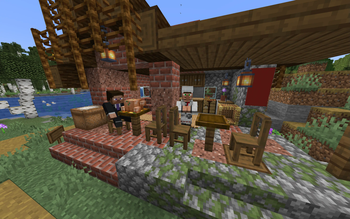
Über dieses Modpack

CoreCraft
CoreCraft is a semi-lightweight Minecraft Java modpack, meaning there is some modded content to discover, while still maintaining many (improved) vanilla elements to give users a sense of familiarity while being able to run well on most machines. Here to making new experiences and core memories in our favourite block game!
What does CoreCraft feature in your gameplay?
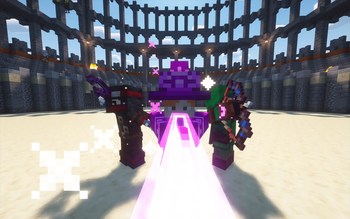
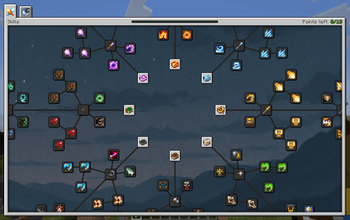
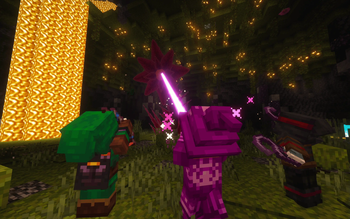
🗡️ Better Combat: Pick between a variety of classes that each have their own equipment and abilities. Enhance your power by unlocking new spells, uncovering new trinkets, and advancing through the skill tree. Dominate your opponents with combat roll, trinkets, and new enchantments.
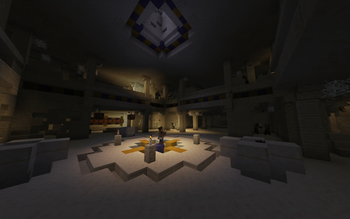
🌎 A Remodelled World: Find overhauled vanilla structures, new structures and biomes loaded with new and existing mobs that still fits the vanilla feel. Whether you find jungle temples or sand temples filled with puzzles, traps, and treasure or find massive volcanoes and mountains, or even encounter battle arenas with bosses in them.
🚀 Handpicked Quality of Life Features: QOL features such as sort, loot, restock, quick stack in inventories, backpacks with abilities, being able to hold right-click to build fast, bone meal working for all crops, auto harvesting and planting with hoes, and much more.
👥 Parties and Guilds: Create parties and guilds with other players that disables accidental friendly fire on your teammates
🎤 Proximity Voice Chat: Talk to nearby players! But be careful as your voice can also trigger sculk sensors and can be heard by the warden
🎮 Newbie Friendly: Does installing a modpack seem daunting to you? No problem, we have a variety of mods to help new players like EMI mod which is an item and crafting recipe browser in your inventory, Jade mod to display information from blocks or entities that you are looking at, Controlling mod which helps you configure your keybinds, and much more!
[1.20.1, waiting for a Quest mod for Fabric 1.21.1 that is available for Modrinth]
- 📜 Quests: Quests guide players on progression and mod content. Like advancements, they create extrinsic goals for the player.
Recommendations
Our recommendations for an optimal experience:
💻 Allocate at least 3 GB of RAM to the instance if playing single-player. More RAM allocated would be recommended for higher player counts and loading big structures
🗺️ Pregenerate chunks using Chunky. to avoid unnecessary lag loading chunks and to create clean looking map renders for the world. This guide also has a world size calculator to calculate the storage needed to generate the world size
🖥️ Cap your FPS to your monitor refresh rate and turn off V-sync
☕️ Setting Java installation to Adoptium Temurin
⬇️ Install the modpack through Modrinth App or Prism Launcher as it allows you to automatically install the modpack and configure microphone permissions for Simple Voice Chat
💾 Whenever you update the modpack, backup your worlds for good practice
⚙️ Copying the configureddefaults files to your main installation after each modpack update and enabling updated resourcepacks
💬 Feel free to join the Discord server for inquiries and to share core memories together
Credits
thricebite and SaviorD22 for developing the CoreCraft modpack
thricebite and SaviorD22 for creating the logos and banners for CoreCraft
thricebite for writing the Modrinth description and gallery page
thricebite for creating the tutorial world
Special thanks to thriceassist for helping to create the tutorial world, finding exploits and bugs, and contributing to the Modrinth gallery
Thanks to S19D for suggesting a few mods in CoreCraft 1.20.1 such as Bosses of Mass Destruction, Aquamirae, and Exposure
Thanks to Mojang/Microsoft as this modpack is a modification to Minecraft
This modpack contains Vanilla Tweaks' resource packs and data packs: https://vanillatweaks.net/
Thanks to modders, resource pack, and shader pack developers for allowing their creations to be used in modpacks
Verfügbare Versionen
CoreCraft Server einrichten
Server bestellen
Wähle mindestens 6 GB RAM (8 GB empfohlen für CoreCraft). Je nach Spieleranzahl: +1 GB pro 5 Spieler.
Modpack im Dashboard installieren
Öffne den Modpack-Browser im Dashboard, suche nach "CoreCraft" und klicke "Installieren". Der fabric-Loader und Minecraft 26.1.2 werden automatisch konfiguriert.
Server starten & spielen
Starte den Server – alle Mods werden automatisch geladen. Teile die Server-IP mit Freunden und spielt zusammen!
Häufige Fragen
CoreCraft Server crasht oder startet nicht – was tun?
Häufigste Ursachen: zu wenig RAM oder falscher fabric-Loader. Prüfe latest.log auf "OutOfMemoryError" → erhöhe RAM auf mindestens 8 GB. Bei "Mixin" oder "ClassNotFoundException": Modpack-Version und Loader stimmen nicht überein. Bei Mado Hosting werden Loader und Minecraft-Version beim Modpack-Install automatisch konfiguriert – das verhindert die meisten Startprobleme.
Wie viel RAM braucht ein CoreCraft Server wirklich?
Minimum 6 GB, empfohlen 8 GB für stabile Performance. +1 GB pro 5 Spieler. Wichtig: Minecraft-Modpacks brauchen mehr RAM als Vanilla – plane pro zusätzlichem Spieler extra ein. Bei Mado Hosting kannst du den RAM jederzeit live hochskalieren, ohne Datenverlust (ab €7.800000000000001/Monat).
Kann ich eigene Mods zu CoreCraft hinzufügen, ohne Konflikte?
Ja, aber achte auf die Kompatibilität: Nutze nur Mods für den gleichen Loader (fabric) und die gleiche Minecraft-Version (26.1.2). Häufige Probleme: ID-Konflikte bei Rezept-Mods und inkompatible Coremod-Versionen. Im Mado Dashboard zeigt der Mod-Browser nur kompatible Mods an und warnt bei bekannten Konflikten.
CoreCraft Server laggt – Performance-Tipps
1) RAM auf 8 GB+ erhöhen. 2) Server-View-Distance auf 8 reduzieren (server.properties). 3) Pre-Generiere Chunks mit dem "Chunky" Plugin. 4) Prüfe mit /spark profiler welche Mods die meiste Tick-Time verbrauchen. Bei Mado Hosting laufen alle Server auf NVMe-SSDs mit dedizierten CPU-Kernen – das eliminiert Hardware als Engpass.
Ähnliche Modpacks
![Cobblemon Official Modpack [Fabric]](https://cdn.modrinth.com/data/5FFgwNNP/e7f9ee2e9d361623847853fe2ddce42f519ee64f.png)
![COBBLEVERSE - Pokemon Adventure [Cobblemon]](https://cdn.modrinth.com/data/Jkb29YJU/581ecf54530972afb18a04660afd820f2f24f6c7.png)
![Better MC [FABRIC] - BMC2](https://cdn.modrinth.com/data/shFhR8Vx/a19c2bcb51d38f32f138d3607e91cb2b7b8e387f_96.webp)


![Better MC [FORGE] - BMC4](https://cdn.modrinth.com/data/4BV47HRn/7f5ef7cc61b2593609aabef3ed07a866a4f11b73_96.webp)
CoreCraft Server mieten
Starte deinen eigenen Server mit automatischer Modpack-Installation.
Details
- Lizenz
- LicenseRef-All-Rights-Reserved
- Server-seitig
- Erforderlich
- Client-seitig
- Erforderlich
Unterstützte Versionen
Starte deinen CoreCraft Server jetzt
Ab €7.80/Monat; für die beste Performance werden 8 GB RAM empfohlen.
Server konfigurieren →