
CozyHaven
Welcome to the coziest modpack, filled with tons of explorable, beautiful lands and building blocks for your tiny haven. I hope you enjoy this pack!
Screenshots
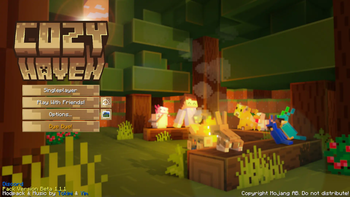

Über dieses Modpack
WE ARE NO LONGER UPDATING OR GIVING SUPPORT FOR COZYHAVEN DUE TO OUR NEW MODPACK 👀
🍂Dive into the ULTIMATE cozy adventure with Cozy Haven!🍂
🧸This thoughtfully crafted modpack elevates your Minecraft journey with stunning aesthetics, practical features, and limitless exploration. Whether you're adventuring solo or teaming up with friends, this pack delivers the ideal mix of creativity, performance, and enjoyment.🧸
- 🖥️ Recommended Settings: For the best experience, allocate 4GB - 8GB of RAM to ensure smooth gameplay and stability.
- 🚀 Peak Performance for All: Enjoy seamless gameplay on both low-end and high-end devices with robust optimizations.
- ⚙️ Ingenious Innovations: Unleash your creativity with the Create mod and its powerful addons.
- 🌱 Bountiful Harvests: Dive into enriched farming adventures with Farmer's Delight and its numerous addons.
- 🏗️ Creative Building Tools: Design and decorate with mods such as Chipped, Beautify, Hearth & Home, and more.
- 🌎 Boundless Biomes: Discover awe-inspiring biomes with mods like Terralith, Regions Unexplored, Tectonic, and YUNG's world-enhancing tweaks.
- ⛵ Adventures Beyond Limits: Soar the skies with Immersive Aircraft, navigate the seas with Small Ships, and explore the dramatic Better End.
- 🤝 Multiplayer Made Better: Share treasures with Lootr, team up with Friends & Foes, and elevate your co-op experience.
- ☁️ Stunning Shaders: Enjoy the Complimentary Reimagined shaders from EminGT with amazing looking graphics while also being performance-friendly!
- 🎶 Custom Made OSTs: Experience a unique musical journey with original soundtracks created by me and my friend Yim.wav, designed to enhance the atmosphere and immerse you in the game’s world.
With over 300 mods to explore, Cozy Haven transforms your Minecraft world into a vibrant, dynamic realm of endless adventure. Plus, we're always evolving—so join the community to share your ideas and feedback!
💬 Join our Discord! https://discord.gg/cozycord
🌿Some amazing videos by the creator Tokimi on the Modpack!🌿
How To Allocate More Ram for your Modpacks
Verfügbare Versionen
CozyHaven Server einrichten
Server bestellen
Wähle mindestens 6 GB RAM (8 GB empfohlen für CozyHaven). Je nach Spieleranzahl: +1 GB pro 5 Spieler.
Modpack im Dashboard installieren
Öffne den Modpack-Browser im Dashboard, suche nach "CozyHaven" und klicke "Installieren". Der fabric-Loader und Minecraft 1.20.1 werden automatisch konfiguriert.
Server starten & spielen
Starte den Server – alle Mods werden automatisch geladen. Teile die Server-IP mit Freunden und spielt zusammen!
Häufige Fragen
CozyHaven Server crasht oder startet nicht – was tun?
Häufigste Ursachen: zu wenig RAM oder falscher fabric-Loader. Prüfe latest.log auf "OutOfMemoryError" → erhöhe RAM auf mindestens 8 GB. Bei "Mixin" oder "ClassNotFoundException": Modpack-Version und Loader stimmen nicht überein. Bei Mado Hosting werden Loader und Minecraft-Version beim Modpack-Install automatisch konfiguriert – das verhindert die meisten Startprobleme.
Wie viel RAM braucht ein CozyHaven Server wirklich?
Minimum 6 GB, empfohlen 8 GB für stabile Performance. +1 GB pro 5 Spieler. Wichtig: Minecraft-Modpacks brauchen mehr RAM als Vanilla – plane pro zusätzlichem Spieler extra ein. Bei Mado Hosting kannst du den RAM jederzeit live hochskalieren, ohne Datenverlust (ab €7.800000000000001/Monat).
Kann ich eigene Mods zu CozyHaven hinzufügen, ohne Konflikte?
Ja, aber achte auf die Kompatibilität: Nutze nur Mods für den gleichen Loader (fabric) und die gleiche Minecraft-Version (1.20.1). Häufige Probleme: ID-Konflikte bei Rezept-Mods und inkompatible Coremod-Versionen. Im Mado Dashboard zeigt der Mod-Browser nur kompatible Mods an und warnt bei bekannten Konflikten.
CozyHaven Server laggt – Performance-Tipps
1) RAM auf 8 GB+ erhöhen. 2) Server-View-Distance auf 8 reduzieren (server.properties). 3) Pre-Generiere Chunks mit dem "Chunky" Plugin. 4) Prüfe mit /spark profiler welche Mods die meiste Tick-Time verbrauchen. Bei Mado Hosting laufen alle Server auf NVMe-SSDs mit dedizierten CPU-Kernen – das eliminiert Hardware als Engpass.
Ähnliche Modpacks
![Cobblemon Official Modpack [Fabric]](https://cdn.modrinth.com/data/5FFgwNNP/e7f9ee2e9d361623847853fe2ddce42f519ee64f.png)
![COBBLEVERSE - Pokemon Adventure [Cobblemon]](https://cdn.modrinth.com/data/Jkb29YJU/581ecf54530972afb18a04660afd820f2f24f6c7.png)
![Better MC [FABRIC] - BMC2](https://cdn.modrinth.com/data/shFhR8Vx/a19c2bcb51d38f32f138d3607e91cb2b7b8e387f_96.webp)


![Better MC [FORGE] - BMC4](https://cdn.modrinth.com/data/4BV47HRn/7f5ef7cc61b2593609aabef3ed07a866a4f11b73_96.webp)
CozyHaven Server mieten
Starte deinen eigenen Server mit automatischer Modpack-Installation.
Details
- Lizenz
- LicenseRef-All-Rights-Reserved
- Server-seitig
- Erforderlich
- Client-seitig
- Erforderlich
Unterstützte Versionen
Starte deinen CozyHaven Server jetzt
Ab €7.80/Monat; für die beste Performance werden 8 GB RAM empfohlen.
Server konfigurieren →