
Create Potato
A lightweight vanilla Create modpack with needed utility designed for smooth performance on low-end PCs. Experience the latest Create Mod in its purest form!
Screenshots


Über dieses Modpack
🥔 Create Potato
A simple Minecraft Create modpack that focuses on performance and utility.

Up to 100% more FPS on Low-End PCs (12 Chunks), performance tested on integrated graphics (Ryzen 5 4500U, Vega 6).
🚀 Performance
Create Potato ensures an optimized and smooth playing experience across all devices. Faster load times, more efficient chunk-loading and an overall smoother experience, allowing for more Creating!
🛠️ Utility
Create Potato includes a number of utility mods that make the overall playing experience more comfortable. These are:
- Full Brightness Toggle (G)
- EMI (+EMI Enchanting, EMI Loot, EMI Ores and JEI)
- Mouse Tweaks (please refer to mod page for details)
- Xaero's Minimap
- Xaero's World Map (M)
[!NOTE]
These mods are all client-side and DO NOT AFFECT performance.
🎨 Shaders & Resource Packs
Thanks to Iris Shaders and Continuity, this modpack supports shaders and resourcepacks. This allows for better performance even on high-end PCs.
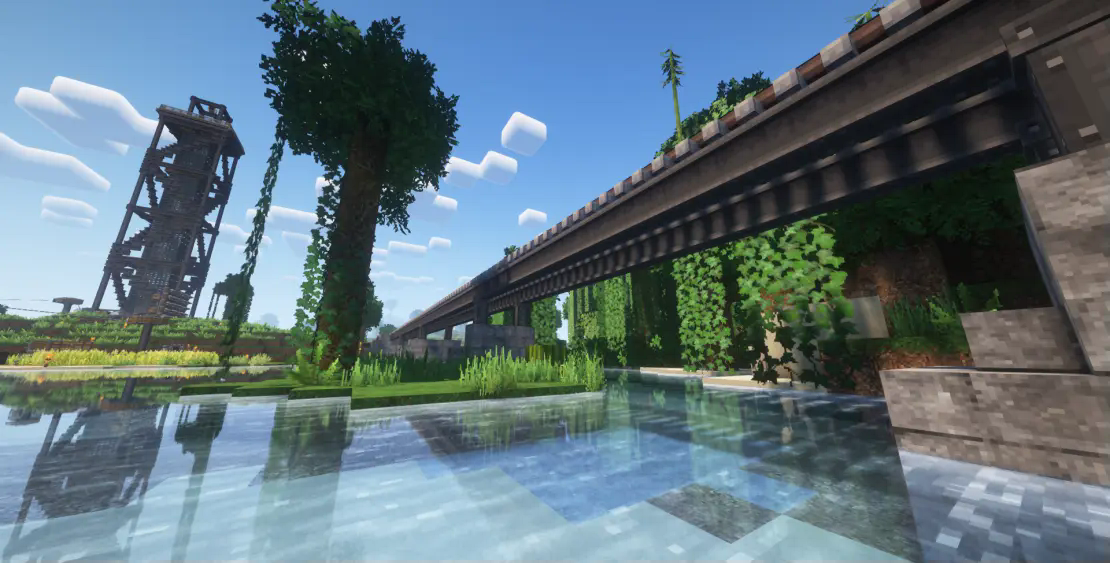
Patrix 32x + Complementary Shaders - Reimagined
❤️ Thank You!
I would like to extend a huge thank you to all the amazing mod developers whose hard work and creativity made this modpack possible. Your contributions bring incredible depth, innovation, and fun to the game, and we are deeply grateful for everything you do.
A full list of credits, including all mod authors and licenses, can be found in the provided file named !CREDITS inside the modpack files.
Special thanks to simibubi and contributors behind Create, whose groundbreaking work has revolutionized technical Minecraft mods. Your imagination and dedication continue to inspire the entire community!
Thank you again — this modpack wouldn't exist without you!
⚙️ Create Patreon
Consider supporting the Create Mod!
Patreon: https://www.patreon.com/simibubi
Verfügbare Versionen
Create Potato Server einrichten
Server bestellen
Wähle mindestens 6 GB RAM (8 GB empfohlen für Create Potato). Je nach Spieleranzahl: +1 GB pro 5 Spieler.
Modpack im Dashboard installieren
Öffne den Modpack-Browser im Dashboard, suche nach "Create Potato" und klicke "Installieren". Der neoforge-Loader und Minecraft 1.21.1 werden automatisch konfiguriert.
Server starten & spielen
Starte den Server – alle Mods werden automatisch geladen. Teile die Server-IP mit Freunden und spielt zusammen!
Häufige Fragen
Create Potato Server crasht oder startet nicht – was tun?
Häufigste Ursachen: zu wenig RAM oder falscher neoforge-Loader. Prüfe latest.log auf "OutOfMemoryError" → erhöhe RAM auf mindestens 8 GB. Bei "Mixin" oder "ClassNotFoundException": Modpack-Version und Loader stimmen nicht überein. Bei Mado Hosting werden Loader und Minecraft-Version beim Modpack-Install automatisch konfiguriert – das verhindert die meisten Startprobleme.
Wie viel RAM braucht ein Create Potato Server wirklich?
Minimum 6 GB, empfohlen 8 GB für stabile Performance. +1 GB pro 5 Spieler. Wichtig: Minecraft-Modpacks brauchen mehr RAM als Vanilla – plane pro zusätzlichem Spieler extra ein. Bei Mado Hosting kannst du den RAM jederzeit live hochskalieren, ohne Datenverlust (ab €7.800000000000001/Monat).
Kann ich eigene Mods zu Create Potato hinzufügen, ohne Konflikte?
Ja, aber achte auf die Kompatibilität: Nutze nur Mods für den gleichen Loader (neoforge) und die gleiche Minecraft-Version (1.21.1). Häufige Probleme: ID-Konflikte bei Rezept-Mods und inkompatible Coremod-Versionen. Im Mado Dashboard zeigt der Mod-Browser nur kompatible Mods an und warnt bei bekannten Konflikten.
Create Potato Server laggt – Performance-Tipps
1) RAM auf 8 GB+ erhöhen. 2) Server-View-Distance auf 8 reduzieren (server.properties). 3) Pre-Generiere Chunks mit dem "Chunky" Plugin. 4) Prüfe mit /spark profiler welche Mods die meiste Tick-Time verbrauchen. Bei Mado Hosting laufen alle Server auf NVMe-SSDs mit dedizierten CPU-Kernen – das eliminiert Hardware als Engpass.
Ähnliche Modpacks

![Cobblemon Official Modpack [Fabric]](https://cdn.modrinth.com/data/5FFgwNNP/e7f9ee2e9d361623847853fe2ddce42f519ee64f.png)
![COBBLEVERSE - Pokemon Adventure [Cobblemon]](https://cdn.modrinth.com/data/Jkb29YJU/581ecf54530972afb18a04660afd820f2f24f6c7.png)
![Better MC [FABRIC] - BMC2](https://cdn.modrinth.com/data/shFhR8Vx/a19c2bcb51d38f32f138d3607e91cb2b7b8e387f_96.webp)


Create Potato Server mieten
Starte deinen eigenen Server mit automatischer Modpack-Installation.
Unterstützte Versionen
Starte deinen Create Potato Server jetzt
Ab €7.80/Monat; für die beste Performance werden 8 GB RAM empfohlen.
Server konfigurieren →