
DB's Minecraft REFINED
A collection of mostly client-side mods that aim to polish the overall vanilla Minecraft experience.
Screenshots

Über dieses Modpack
DB's Minecraft REFINED is a new modpack created by disrtuptive builds for Minecraft 1.21. It's based on the DB's Minecraft Plus modpack, however all mods that alter the game have been stripped away in favour of mostly client-side only mods (with a few exceptions).
A REFINED VANILLA MINECRAFT EXPERIENCE
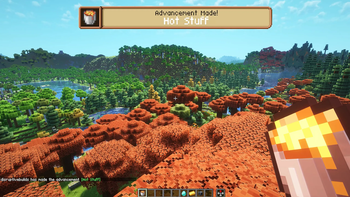
Every single mod and resource pack in this mod pack is aimed to polish the Minecraft experience, enhancing everything from the UI, QOL, sounds, building, structures, biomes and plenty more.
PERFORMANCE
Countless mods improve performance in almost every way possible from world generation and entity culling to memory usage and even the rendering of text in game.
EXPLORE
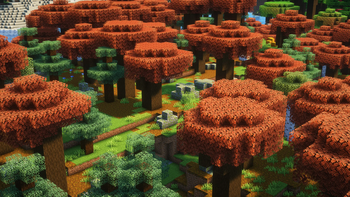
Blooming Biosphere overhauls existing biomes and adds several new ones, all without adding a single new block or item. Forests have fallen logs and taller trees, plains have bushes and plenty other features.
Explorify adds plenty of new structures in the vanilla style like campsites, dark forest settlements and taverns.
POLISHED UI
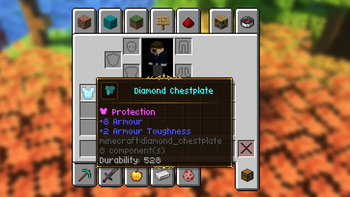
Plenty of mods enhance the UI, adding animations to opening and closing the inventory, moving items, smoothly scrolling inventories and plenty more.
DETAILS
Particle Rain overhauls the rain and snow, making it feel more natural. Deserts have dust storms instead of just nothing while it's raining.
3D crops, ladders, doors, vines, glow lichen, rails, lanterns and chains all for some added depth.
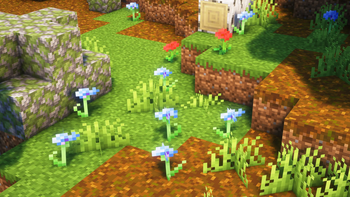
Spring Flowers & More Grass Heights add several variations to each flower and height variation to tall and short grass.
Mods that require a link in the description
https://vanillatweaks.net
Verfügbare Versionen
DB's Minecraft REFINED Server einrichten
Server bestellen
Wähle mindestens 6 GB RAM (8 GB empfohlen für DB's Minecraft REFINED). Je nach Spieleranzahl: +1 GB pro 5 Spieler.
Modpack im Dashboard installieren
Öffne den Modpack-Browser im Dashboard, suche nach "DB's Minecraft REFINED" und klicke "Installieren". Der fabric-Loader und Minecraft 1.21 werden automatisch konfiguriert.
Server starten & spielen
Starte den Server – alle Mods werden automatisch geladen. Teile die Server-IP mit Freunden und spielt zusammen!
Häufige Fragen
DB's Minecraft REFINED Server crasht oder startet nicht – was tun?
Häufigste Ursachen: zu wenig RAM oder falscher fabric-Loader. Prüfe latest.log auf "OutOfMemoryError" → erhöhe RAM auf mindestens 8 GB. Bei "Mixin" oder "ClassNotFoundException": Modpack-Version und Loader stimmen nicht überein. Bei Mado Hosting werden Loader und Minecraft-Version beim Modpack-Install automatisch konfiguriert – das verhindert die meisten Startprobleme.
Wie viel RAM braucht ein DB's Minecraft REFINED Server wirklich?
Minimum 6 GB, empfohlen 8 GB für stabile Performance. +1 GB pro 5 Spieler. Wichtig: Minecraft-Modpacks brauchen mehr RAM als Vanilla – plane pro zusätzlichem Spieler extra ein. Bei Mado Hosting kannst du den RAM jederzeit live hochskalieren, ohne Datenverlust (ab €7.800000000000001/Monat).
Kann ich eigene Mods zu DB's Minecraft REFINED hinzufügen, ohne Konflikte?
Ja, aber achte auf die Kompatibilität: Nutze nur Mods für den gleichen Loader (fabric) und die gleiche Minecraft-Version (1.21). Häufige Probleme: ID-Konflikte bei Rezept-Mods und inkompatible Coremod-Versionen. Im Mado Dashboard zeigt der Mod-Browser nur kompatible Mods an und warnt bei bekannten Konflikten.
DB's Minecraft REFINED Server laggt – Performance-Tipps
1) RAM auf 8 GB+ erhöhen. 2) Server-View-Distance auf 8 reduzieren (server.properties). 3) Pre-Generiere Chunks mit dem "Chunky" Plugin. 4) Prüfe mit /spark profiler welche Mods die meiste Tick-Time verbrauchen. Bei Mado Hosting laufen alle Server auf NVMe-SSDs mit dedizierten CPU-Kernen – das eliminiert Hardware als Engpass.
Ähnliche Modpacks
![Cobblemon Official Modpack [Fabric]](https://cdn.modrinth.com/data/5FFgwNNP/e7f9ee2e9d361623847853fe2ddce42f519ee64f.png)
![COBBLEVERSE - Pokemon Adventure [Cobblemon]](https://cdn.modrinth.com/data/Jkb29YJU/581ecf54530972afb18a04660afd820f2f24f6c7.png)
![Better MC [FABRIC] - BMC2](https://cdn.modrinth.com/data/shFhR8Vx/a19c2bcb51d38f32f138d3607e91cb2b7b8e387f_96.webp)


![Better MC [FORGE] - BMC4](https://cdn.modrinth.com/data/4BV47HRn/7f5ef7cc61b2593609aabef3ed07a866a4f11b73_96.webp)
DB's Minecraft REFINED Server mieten
Starte deinen eigenen Server mit automatischer Modpack-Installation.
Unterstützte Versionen
Starte deinen DB's Minecraft REFINED Server jetzt
Ab €7.80/Monat; für die beste Performance werden 8 GB RAM empfohlen.
Server konfigurieren →