
Evil Hunter: The Horror Within
Survive the absolute darkness where your mind plays tricks on you, and a glowing, molten silhouette stalks your every move.
Screenshots
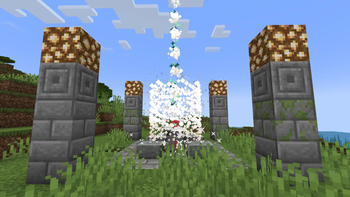
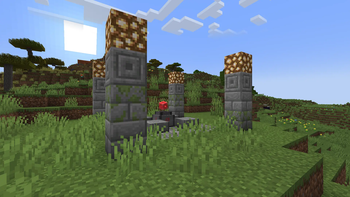
Über dieses Modpack
⚠️ THE RITUAL WENT WRONG...
Evil Hunter: The Horror Within is an atmospheric, psychological horror modpack built entirely around the dark lore of the Evil Hunter mod. You found an old, unmarked hard drive belonging to your missing son. But loading his Minecraft world was a terrible mistake. The ascension rite was interrupted, and now something is in the world with you.
🛠️ KEY FEATURES:
- 🔴 The Entity in Red: Face the terrifying, scorched silhouette of the Evil Hunter. Avoid his gaze, hunt for ancient silver, and try to complete the banishment ritual before he finds you.
- 🌑 True Darkness: Nights and deep caves are pitch black. The vanilla brightness slider is locked. Without a light source, you are completely blind.
- 🔊 Immersive Ambience: No music, just heavy silence, echoing cave noises, and disturbing ambient sounds that change based on light levels.
💻 TECHNICAL NOTES:
- Modloader: Forge 1.20.1
- Includes Embeddium and Oculus for maximum FPS and pre-installed shader packs.
IF YOU HAVE AN OLD VERSION, THAT IS 1.0.2, 1.0.1, 1.0.0, THEN READ THIS MESSAGE
⚠️ IMPORTANT NOTE / IMPORTANT:
- Is your game glitching? If you experience items disappearing from your inventory and returning later, or blocks bugging out/rubberbanding—this is NOT a bug! This is completely intentional and caused by the Paranoia mod to simulate insanity. If you don't like this mechanic, you can easily disable
⚠️ UNNECESSARY MODS
- If you don't need the powerful ore, you can disable the Ore Heart mod.
Verfügbare Versionen
Evil Hunter: The Horror Within Server einrichten
Server bestellen
Wähle mindestens 6 GB RAM (8 GB empfohlen für Evil Hunter: The Horror Within). Je nach Spieleranzahl: +1 GB pro 5 Spieler.
Modpack im Dashboard installieren
Öffne den Modpack-Browser im Dashboard, suche nach "Evil Hunter: The Horror Within" und klicke "Installieren". Der forge-Loader und Minecraft 1.20.1 werden automatisch konfiguriert.
Server starten & spielen
Starte den Server – alle Mods werden automatisch geladen. Teile die Server-IP mit Freunden und spielt zusammen!
Häufige Fragen
Evil Hunter: The Horror Within Server crasht oder startet nicht – was tun?
Häufigste Ursachen: zu wenig RAM oder falscher forge-Loader. Prüfe latest.log auf "OutOfMemoryError" → erhöhe RAM auf mindestens 8 GB. Bei "Mixin" oder "ClassNotFoundException": Modpack-Version und Loader stimmen nicht überein. Bei Mado Hosting werden Loader und Minecraft-Version beim Modpack-Install automatisch konfiguriert – das verhindert die meisten Startprobleme.
Wie viel RAM braucht ein Evil Hunter: The Horror Within Server wirklich?
Minimum 6 GB, empfohlen 8 GB für stabile Performance. +1 GB pro 5 Spieler. Wichtig: Minecraft-Modpacks brauchen mehr RAM als Vanilla – plane pro zusätzlichem Spieler extra ein. Bei Mado Hosting kannst du den RAM jederzeit live hochskalieren, ohne Datenverlust (ab €7.800000000000001/Monat).
Kann ich eigene Mods zu Evil Hunter: The Horror Within hinzufügen, ohne Konflikte?
Ja, aber achte auf die Kompatibilität: Nutze nur Mods für den gleichen Loader (forge) und die gleiche Minecraft-Version (1.20.1). Häufige Probleme: ID-Konflikte bei Rezept-Mods und inkompatible Coremod-Versionen. Im Mado Dashboard zeigt der Mod-Browser nur kompatible Mods an und warnt bei bekannten Konflikten.
Evil Hunter: The Horror Within Server laggt – Performance-Tipps
1) RAM auf 8 GB+ erhöhen. 2) Server-View-Distance auf 8 reduzieren (server.properties). 3) Pre-Generiere Chunks mit dem "Chunky" Plugin. 4) Prüfe mit /spark profiler welche Mods die meiste Tick-Time verbrauchen. Bei Mado Hosting laufen alle Server auf NVMe-SSDs mit dedizierten CPU-Kernen – das eliminiert Hardware als Engpass.
Ähnliche Modpacks
![Cobblemon Official Modpack [Fabric]](https://cdn.modrinth.com/data/5FFgwNNP/e7f9ee2e9d361623847853fe2ddce42f519ee64f.png)
![COBBLEVERSE - Pokemon Adventure [Cobblemon]](https://cdn.modrinth.com/data/Jkb29YJU/581ecf54530972afb18a04660afd820f2f24f6c7.png)
![Better MC [FABRIC] - BMC2](https://cdn.modrinth.com/data/shFhR8Vx/a19c2bcb51d38f32f138d3607e91cb2b7b8e387f_96.webp)


![Better MC [FORGE] - BMC4](https://cdn.modrinth.com/data/4BV47HRn/7f5ef7cc61b2593609aabef3ed07a866a4f11b73_96.webp)
Evil Hunter: The Horror Within Server mieten
Starte deinen eigenen Server mit automatischer Modpack-Installation.
Unterstützte Versionen
Starte deinen Evil Hunter: The Horror Within Server jetzt
Ab €7.80/Monat; für die beste Performance werden 8 GB RAM empfohlen.
Server konfigurieren →