
ExceptionallyOptimized
[1.21.5] [Fabric📜] An open-source modpack that optimizes the overall UX and the performance, while staying true to the vanilla Minecraft experience.
Screenshots


Über dieses Modpack
ExceptionallyOptimized



For Fabric📜 and NeoForge🦊
An open-source modpack that optimizes the overall UX and performance, while staying true to the vanilla Minecraft experience.
While most performance-focused modpacks aim at just higher FPS, this modpack focuses on optimizing the user experience and stability, as well, and yet still manages to outperform many in benchmarks.
The modpack does not provide any QoL or OptiFine-parity mods, but some deliberately selected mods to boost your gaming experience! Besides these optimization mods, the modpack also provides some essentials, like No Chat Reports, and other modpack-centric mods.
You are expected to add any non-optimization mods you want, yourself. If you face any issues, you are free to ask for help on our Discord server.
If you find a bug or want to suggest any feature, you can issue a 🐞Bug Report | 💡Suggestion. Alternatively, you can ask for help or give a suggestion on our Discord server.
📈Further Ways to Increase the Performance
- Recommended JVM arguments.
-XX:+UseZGC -XX:+ZGenerational - Mods that do not go hand-in-hand with the modpack's approach:
- Exordium, Let Me Despawn, Leaves Be Gone, Alternate Current, ServerCore, Fast Item Frames
- and more...
- Lowering down various vanilla options. You don't need the highest settings if you can't play the game.
- Disabling particles and other things using Sodium Extra.
🖥️Benchmarks
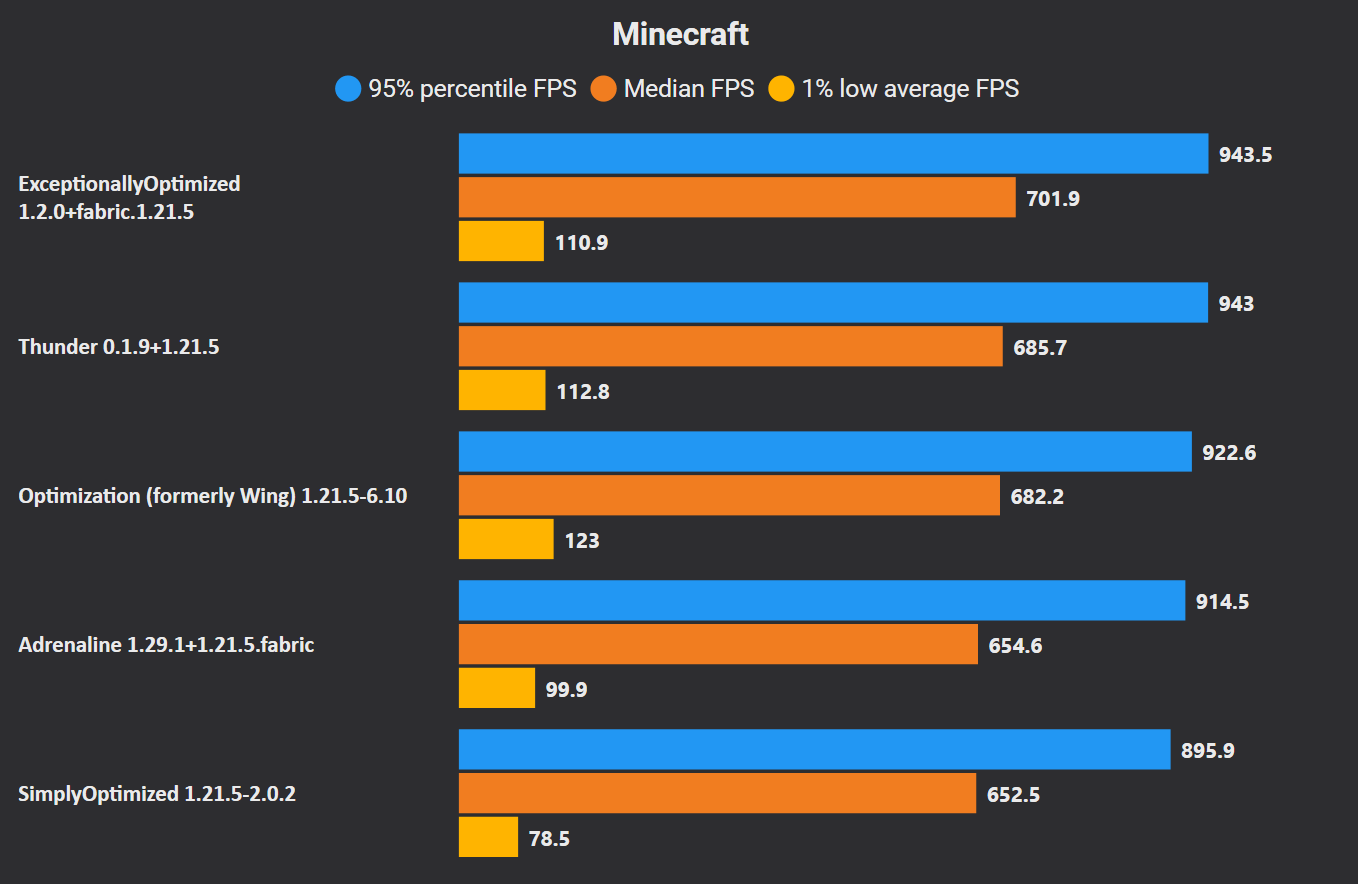
Here is a benchmark with some of the most popular modpacks.
- The following things were taken into account with the benchmark:
- VSync is turned
OFFand the Max FPS is set toUnlimited. - Nvidium is disabled for a fair benchmark for those modpacks that do not include it.
- No other changes were made, so do not take this benchmark AS seriously.
- The same world file is copied to all the packs.
- VSync is turned
Although, ExceptionallyOptimized does manage to outperform these modpacks, you should not just look at the numbers. Here is a summary of the results:
- ExceptionallyOptimized, Thunder and Optimization (silly name ;p) are well-within the error margin and perform almost exactly the same in this scenario. These modpacks might perform differently in different scenarios.
- It should also be noted that ExceptionallyOptimized is not limited to only optimization mods.
- Thunder mostly uses the default vanilla/mod configurations, and thus, also has a slight disadvantage.
- Adrenaline also has a disadvantage as it does not include any unofficial/unpublished mod files.
- SimplyOptimized is clearly the worst one of all. It uses very experimental options and has most vanilla options set to their lower values and still performs the worst. It is not recommended to use this modpack anymore.
❔FAQs
- Why is Fast Better Grass included?
There is a slight performance gain noticed with this resource-pack, while also making the grass look good.
📈Automated Publishing
All releases are published using Kir-Antipov's GitHub Action. The workflow files can be found here.
📜License
You are free to use this modpack as a base for your own modpack and publish it to a mod-hosting platform, provided you comply with all terms of the license.
Here is a summary of the license and important points you need to consider:
Apache License 2.0
Verfügbare Versionen
ExceptionallyOptimized Server einrichten
Server bestellen
Wähle mindestens 4 GB RAM (6 GB empfohlen für ExceptionallyOptimized). Je nach Spieleranzahl: +1 GB pro 5 Spieler.
Modpack im Dashboard installieren
Öffne den Modpack-Browser im Dashboard, suche nach "ExceptionallyOptimized" und klicke "Installieren". Der fabric-Loader und Minecraft 1.21.5 werden automatisch konfiguriert.
Server starten & spielen
Starte den Server – alle Mods werden automatisch geladen. Teile die Server-IP mit Freunden und spielt zusammen!
Häufige Fragen
ExceptionallyOptimized Server crasht oder startet nicht – was tun?
Häufigste Ursachen: zu wenig RAM oder falscher fabric-Loader. Prüfe latest.log auf "OutOfMemoryError" → erhöhe RAM auf mindestens 6 GB. Bei "Mixin" oder "ClassNotFoundException": Modpack-Version und Loader stimmen nicht überein. Bei Mado Hosting werden Loader und Minecraft-Version beim Modpack-Install automatisch konfiguriert – das verhindert die meisten Startprobleme.
Wie viel RAM braucht ein ExceptionallyOptimized Server wirklich?
Minimum 4 GB, empfohlen 6 GB für stabile Performance. +1 GB pro 5 Spieler. Wichtig: Minecraft-Modpacks brauchen mehr RAM als Vanilla – plane pro zusätzlichem Spieler extra ein. Bei Mado Hosting kannst du den RAM jederzeit live hochskalieren, ohne Datenverlust (ab €5.2/Monat).
Kann ich eigene Mods zu ExceptionallyOptimized hinzufügen, ohne Konflikte?
Ja, aber achte auf die Kompatibilität: Nutze nur Mods für den gleichen Loader (fabric) und die gleiche Minecraft-Version (1.21.5). Häufige Probleme: ID-Konflikte bei Rezept-Mods und inkompatible Coremod-Versionen. Im Mado Dashboard zeigt der Mod-Browser nur kompatible Mods an und warnt bei bekannten Konflikten.
ExceptionallyOptimized Server laggt – Performance-Tipps
1) RAM auf 6 GB+ erhöhen. 2) Server-View-Distance auf 8 reduzieren (server.properties). 3) Pre-Generiere Chunks mit dem "Chunky" Plugin. 4) Prüfe mit /spark profiler welche Mods die meiste Tick-Time verbrauchen. Bei Mado Hosting laufen alle Server auf NVMe-SSDs mit dedizierten CPU-Kernen – das eliminiert Hardware als Engpass.
Ähnliche Modpacks

![Cobblemon Official Modpack [Fabric]](https://cdn.modrinth.com/data/5FFgwNNP/e7f9ee2e9d361623847853fe2ddce42f519ee64f.png)
![COBBLEVERSE - Pokemon Adventure [Cobblemon]](https://cdn.modrinth.com/data/Jkb29YJU/581ecf54530972afb18a04660afd820f2f24f6c7.png)
![Better MC [FABRIC] - BMC2](https://cdn.modrinth.com/data/shFhR8Vx/a19c2bcb51d38f32f138d3607e91cb2b7b8e387f_96.webp)


ExceptionallyOptimized Server mieten
Starte deinen eigenen Server mit automatischer Modpack-Installation.
Details
- Lizenz
- Apache License 2.0
- Server-seitig
- Nicht unterstützt
- Client-seitig
- Erforderlich
Unterstützte Versionen
Starte deinen ExceptionallyOptimized Server jetzt
Ab €5.20/Monat; für die beste Performance werden 6 GB RAM empfohlen.
Server konfigurieren →