
Explorers' Toolkit
New biomes, hidden structures, and smoother performance in a simple, exploration-focused package. Forge 1.20.1!
Screenshots

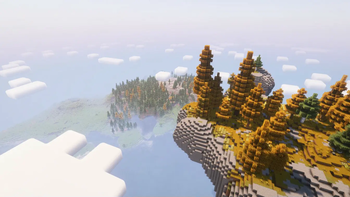
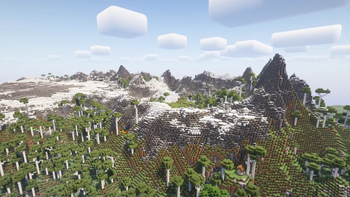
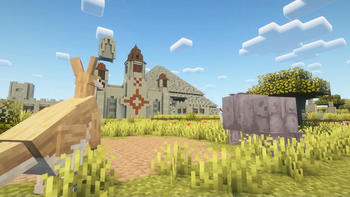
Über dieses Modpack
🪓 Explorers' Toolkit
Exploration-focused world generation
The main goal of this modpack is to make exploration more meaningful. The world is filled with new places to discover: temples hidden in the forest, expanded cave systems, ancient ruins beneath the surface, detailed villages, strange monuments in the sea, and custom-built dungeons scattered around the map.
These additions are designed to blend naturally into the world, encouraging exploration without making things feel too chaotic or cluttered. You can still recognize your surroundings — there’s just a lot more waiting to be found.
Lightweight and optimized
Mods like Embeddium, Rubidium Eats, and other backend optimizations are included to improve FPS and reduce lag, especially during exploration or when loading complex structures.
The pack avoids heavy overhauls and large mod systems to keep load times fast and performance stable, even on mid-range hardware. If you’ve had trouble running large modpacks before, this one aims to stay accessible.
Vanilla-friendly balance
Despite the extra content, the game still plays like Minecraft. There are no complex RPG systems, massive tech trees, or drastic gameplay changes. Instead, this pack focuses on expanding what’s already there.
It’s easy to jump in and play — no wiki reading or tutorials required. The mods are chosen to feel like natural extensions of the base game, making it perfect for casual survival players, builders, and explorers alike.
Verfügbare Versionen
Explorers' Toolkit Server einrichten
Server bestellen
Wähle mindestens 6 GB RAM (8 GB empfohlen für Explorers' Toolkit). Je nach Spieleranzahl: +1 GB pro 5 Spieler.
Modpack im Dashboard installieren
Öffne den Modpack-Browser im Dashboard, suche nach "Explorers' Toolkit" und klicke "Installieren". Der forge-Loader und Minecraft 1.20.1 werden automatisch konfiguriert.
Server starten & spielen
Starte den Server – alle Mods werden automatisch geladen. Teile die Server-IP mit Freunden und spielt zusammen!
Häufige Fragen
Explorers' Toolkit Server crasht oder startet nicht – was tun?
Häufigste Ursachen: zu wenig RAM oder falscher forge-Loader. Prüfe latest.log auf "OutOfMemoryError" → erhöhe RAM auf mindestens 8 GB. Bei "Mixin" oder "ClassNotFoundException": Modpack-Version und Loader stimmen nicht überein. Bei Mado Hosting werden Loader und Minecraft-Version beim Modpack-Install automatisch konfiguriert – das verhindert die meisten Startprobleme.
Wie viel RAM braucht ein Explorers' Toolkit Server wirklich?
Minimum 6 GB, empfohlen 8 GB für stabile Performance. +1 GB pro 5 Spieler. Wichtig: Minecraft-Modpacks brauchen mehr RAM als Vanilla – plane pro zusätzlichem Spieler extra ein. Bei Mado Hosting kannst du den RAM jederzeit live hochskalieren, ohne Datenverlust (ab €7.800000000000001/Monat).
Kann ich eigene Mods zu Explorers' Toolkit hinzufügen, ohne Konflikte?
Ja, aber achte auf die Kompatibilität: Nutze nur Mods für den gleichen Loader (forge) und die gleiche Minecraft-Version (1.20.1). Häufige Probleme: ID-Konflikte bei Rezept-Mods und inkompatible Coremod-Versionen. Im Mado Dashboard zeigt der Mod-Browser nur kompatible Mods an und warnt bei bekannten Konflikten.
Explorers' Toolkit Server laggt – Performance-Tipps
1) RAM auf 8 GB+ erhöhen. 2) Server-View-Distance auf 8 reduzieren (server.properties). 3) Pre-Generiere Chunks mit dem "Chunky" Plugin. 4) Prüfe mit /spark profiler welche Mods die meiste Tick-Time verbrauchen. Bei Mado Hosting laufen alle Server auf NVMe-SSDs mit dedizierten CPU-Kernen – das eliminiert Hardware als Engpass.
Ähnliche Modpacks
![Cobblemon Official Modpack [Fabric]](https://cdn.modrinth.com/data/5FFgwNNP/e7f9ee2e9d361623847853fe2ddce42f519ee64f.png)
![COBBLEVERSE - Pokemon Adventure [Cobblemon]](https://cdn.modrinth.com/data/Jkb29YJU/581ecf54530972afb18a04660afd820f2f24f6c7.png)
![Better MC [FABRIC] - BMC2](https://cdn.modrinth.com/data/shFhR8Vx/a19c2bcb51d38f32f138d3607e91cb2b7b8e387f_96.webp)


![Better MC [FORGE] - BMC4](https://cdn.modrinth.com/data/4BV47HRn/7f5ef7cc61b2593609aabef3ed07a866a4f11b73_96.webp)
Explorers' Toolkit Server mieten
Starte deinen eigenen Server mit automatischer Modpack-Installation.
Details
- Lizenz
- LicenseRef-All-Rights-Reserved
- Server-seitig
- Erforderlich
- Client-seitig
- Erforderlich
Unterstützte Versionen
Starte deinen Explorers' Toolkit Server jetzt
Ab €7.80/Monat; für die beste Performance werden 8 GB RAM empfohlen.
Server konfigurieren →