
Modrinth · Forge · Clientpack
Forge Optimized
Dieses Pack ist clientseitig. Installiere es auf deinem Rechner; es ist keine Serverdistribution. Zum gemeinsamen Spielen brauchst du einen kompatiblen Minecraft-Server.
The best Forge optimization modpack for 1.21.8 | FPS 200+ For comfortable play with friends or on servers without lags
- Downloads
- 3.5K
- Follower
- 0
- Loader
- Forge
- Minecraft
- 1.21.10 – 1.21.8
- Aktualisiert
- –
Screenshots
So sieht Forge Optimized aus


Bilder: Forge Optimized auf Modrinth, vom Projektteam veröffentlicht.
Versionen
Veröffentlichte Pack-Versionen
Server und Spieler brauchen dieselbe Pack-Version. Wähle sie im Modpack-Browser passend zu den Clients deiner Gruppe.
Forge Optimized · ModrinthOriginalbeschreibung des Projektautors
🍉 Optimized Forge | 200+ FPS



The smallest Forge optimization modpack.
200+ FPS, no lag, perfect for servers & friends.
🚀 What is ArbuzOptimized Forge?
ArbuzOptimized Forge is a lightweight Forge modpack focused purely on performance. No bloat — just maximum FPS with minimum size. Perfect for low-end PCs, multiplayer servers, and massive builds.
🔥 Key Features
- ✅ 200+ FPS — consistent high framerate
- ✅ Smallest size — only essential mods
- ✅ Multiplayer ready — optimized for servers
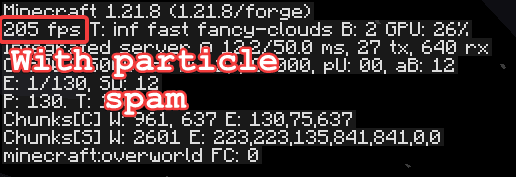
- ✅ Stress tested — handles TNT & particles without lag
- ✅ Vanilla gameplay — nothing changed, just faster
⚙️ Core Mods
| Mod | Description |
|---|---|
| Rubidium | Rendering optimization (Forge port of Sodium) |
| Canary | Entity & server logic optimization |
| Radon | Lighting engine optimization |
| Entity Culling | Stops rendering invisible entities |
| FerriteCore | Reduces RAM usage by 20-30% |
📥 Installation
- Download the
.mrpackor.zipfile. - Import into your launcher (Modrinth, CurseForge, Prism).
- Launch and enjoy 200+ FPS!
Manual Setup
- Install Forge for your Minecraft version
- Place all
.jarfiles in.minecraft/mods - Launch with Forge profile
🛠️ Performance Tips
- Allocate 2-4 GB RAM (more = worse!)
- Set Render Distance to 8-12 chunks
- Turn VSync OFF
- Use recommended JVM arguments:
-XX:+UseG1GC -XX:MaxGCPauseMillis=50
📊 FPS Tests
| Scenario | FPS |
|---|---|
| Normal gameplay | 200+ |
| TNT explosion | 90-150 |
| Particle spam | 90-150 |
Ähnliche Packs
Weitere server-fähige Modpacks
 Server-fähig

Zombie Invade 100 Days
von FlameFire
僵尸入侵 100 天(高版本惊变重制)—— Same as Forge Labs 100 Days Zombie Apocalypse in new Minecraft
 Server-fähig

Cobblemon Official Modpack [Fabric]
von CobbledStudios
The official modpack of the Cobblemon mod, for Fabric!
 Server-fähig

COBBLEVERSE - Pokemon Adventure [Cobblemon]
von LUMYVERSE
Start a true Pokémon adventure in Minecraft: Cobblemon 1.8.4 | ALL 1025 Pokémon! | Mega Evolutions | Gyms & Badges | Starter Kit | Unique Structures | Custom Music | Shaders | Optimized | So much more! [1.21.1]
 Server-fähig

BattleArmory TACZ
von JZ_zhenmeng
厌倦了每次开局都是一样的钻石剑和弓?BattleArmory 让你每场重生都像开盲盒——400+ 现代枪械随机配发,从使命召唤的经典步枪到赛博朋克科幻杀器,配上 CS 经典地图和战术投掷物,开局就是 80 帧+丝滑刚枪。** 这不是模组体验卡,这是完全免费的 1.20.1 战术枪战整合包,下载启动,直接开战。
Ein Pack für den eigenen Server gesucht?
Im Katalog findest du Modpacks mit bestätigter Serverunterstützung.