
Fear of the Death
RPG Server
Screenshots
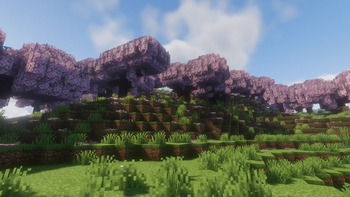
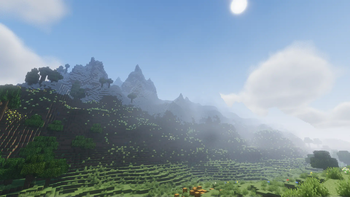
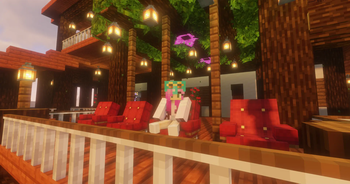
Über dieses Modpack
JOIN OUR DISCORD!
Fear of the Death - Minecraft RPG Zombie Survival
at=webp&quality=lossless)
In the fateful lands of Minecraft, where blocks tell stories and the world comes to life in pixels, lies an apocalyptic dimension plagued by relentless hordes of zombies. The once vibrant world now echoes with the groans of the undead...
As the sun sets on the horizon, a group of brave survivors emerges. United by a common goal - to defy the impending darkness and restore hope to the desolate lands. Among the survivors, a chosen few stand out, destined to confront the very essence of fear itself.
Embark on a journey through abandoned cities and treacherous landscapes. Craft weapons and armor from the remnants of civilization to face the relentless zombie onslaught. Unravel the mysteries behind the apocalyptic event and confront the malevolent force that seeks to plunge the world into eternal night.
Will you be the hero who defies the Fear of the Death and leads humanity to salvation, or will you become a mere echo in the haunting symphony of the undead? The fate of the world rests in your hands...
More Details soon!
Mods outside from Modrinth Special Thanks
| Author | Mod | Version | Plattform |
|---|---|---|---|
| Kaworru | Easy NPC | 3.5.0 | Curseforge |
| ElocinDev | Necronomicon API | 1.0.9 | Curseforge |
| ElocinDev | yosby | 1.0.0 | Curseforge |
| Keksuccino | FancyMenu Forge | v2.14.9-3 | Curseforge |
| P3pp3rF1y | Sophisticated Backpacks | 3.19.4.978 | Curseforge |
| P3pp3rF1y | Sophisticated Core | 0.5.111.517 | Curseforge |
| junglestalkerpredator predator97427fr | Horror Elements | 1.5.7 | Curseforge |
Verfügbare Versionen
Fear of the Death Server einrichten
Server bestellen
Wähle mindestens 6 GB RAM (8 GB empfohlen für Fear of the Death). Je nach Spieleranzahl: +1 GB pro 5 Spieler.
Modpack im Dashboard installieren
Öffne den Modpack-Browser im Dashboard, suche nach "Fear of the Death" und klicke "Installieren". Der forge-Loader und Minecraft 1.20.1 werden automatisch konfiguriert.
Server starten & spielen
Starte den Server – alle Mods werden automatisch geladen. Teile die Server-IP mit Freunden und spielt zusammen!
Häufige Fragen
Fear of the Death Server crasht oder startet nicht – was tun?
Häufigste Ursachen: zu wenig RAM oder falscher forge-Loader. Prüfe latest.log auf "OutOfMemoryError" → erhöhe RAM auf mindestens 8 GB. Bei "Mixin" oder "ClassNotFoundException": Modpack-Version und Loader stimmen nicht überein. Bei Mado Hosting werden Loader und Minecraft-Version beim Modpack-Install automatisch konfiguriert – das verhindert die meisten Startprobleme.
Wie viel RAM braucht ein Fear of the Death Server wirklich?
Minimum 6 GB, empfohlen 8 GB für stabile Performance. +1 GB pro 5 Spieler. Wichtig: Minecraft-Modpacks brauchen mehr RAM als Vanilla – plane pro zusätzlichem Spieler extra ein. Bei Mado Hosting kannst du den RAM jederzeit live hochskalieren, ohne Datenverlust (ab €7.800000000000001/Monat).
Kann ich eigene Mods zu Fear of the Death hinzufügen, ohne Konflikte?
Ja, aber achte auf die Kompatibilität: Nutze nur Mods für den gleichen Loader (forge) und die gleiche Minecraft-Version (1.20.1). Häufige Probleme: ID-Konflikte bei Rezept-Mods und inkompatible Coremod-Versionen. Im Mado Dashboard zeigt der Mod-Browser nur kompatible Mods an und warnt bei bekannten Konflikten.
Fear of the Death Server laggt – Performance-Tipps
1) RAM auf 8 GB+ erhöhen. 2) Server-View-Distance auf 8 reduzieren (server.properties). 3) Pre-Generiere Chunks mit dem "Chunky" Plugin. 4) Prüfe mit /spark profiler welche Mods die meiste Tick-Time verbrauchen. Bei Mado Hosting laufen alle Server auf NVMe-SSDs mit dedizierten CPU-Kernen – das eliminiert Hardware als Engpass.
Ähnliche Modpacks
![Cobblemon Official Modpack [Fabric]](https://cdn.modrinth.com/data/5FFgwNNP/e7f9ee2e9d361623847853fe2ddce42f519ee64f.png)
![COBBLEVERSE - Pokemon Adventure [Cobblemon]](https://cdn.modrinth.com/data/Jkb29YJU/581ecf54530972afb18a04660afd820f2f24f6c7.png)
![Better MC [FABRIC] - BMC2](https://cdn.modrinth.com/data/shFhR8Vx/a19c2bcb51d38f32f138d3607e91cb2b7b8e387f_96.webp)


![Better MC [FORGE] - BMC4](https://cdn.modrinth.com/data/4BV47HRn/7f5ef7cc61b2593609aabef3ed07a866a4f11b73_96.webp)
Fear of the Death Server mieten
Starte deinen eigenen Server mit automatischer Modpack-Installation.
Details
- Lizenz
- LicenseRef-All-Rights-Reserved
- Server-seitig
- Erforderlich
- Client-seitig
- Erforderlich
Unterstützte Versionen
Starte deinen Fear of the Death Server jetzt
Ab €7.80/Monat; für die beste Performance werden 8 GB RAM empfohlen.
Server konfigurieren →