
Fabric Performance Pack
Boost your game and FPS as much as possible. Configurable, Experimental.
Screenshots
Über dieses Modpack
Introduction
Initially made for my friends, this modpack will be needed by anyone who lacks the performance of vanilla Minecraft for a comfortable game without lags. The modpack, inspired by the new graphics engine from JellySquid (aka Sodium), was originally focused mainly on the client, but now it contains all the optimizations available that don't affect vanilla mechanics (be calm, your redstone schemes are safe 😉).
Why FPP?
The first distinguishing feature of the Fabric Performance Pack is that there are no unnecessary features and vanilla-changing optimizations, only the most necessary functions for players. This is the same vanilla, but faster and smoother. FPP includes all compatible (and not only) performance mods that I know of.
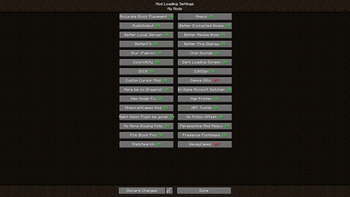
The second (and main) feature is flexibility. Thanks to the amazing mod of EZForever, you can switch the loading of any mod or part of a modpack right in the game at any time, as well as conveniently manage the launch of additional mods that you added yourself (just put them in the mods/My mods folder).
Features
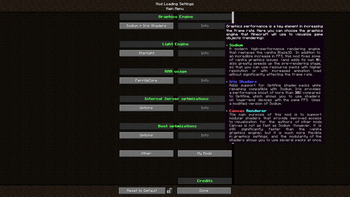
- Choose the renderer that works best on your hardware: Vanilla, Sodium, Sodium + Iris Shaders or Canvas Renderer
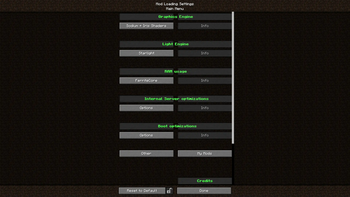
- Optimize the composition of the modpack for the available power of your PC: turn off CPU-intensive optimizations if your CPU is too weak, or vice versa, turn them on if the CPU is much more powerful than your GPU and can take on extra work for less expensive rendering
- Add your mods and manage their launch. Put the mods you want in the
My Modsfolder to be able to switch them in a special screen. You can also change the folder name to any of the supported translations (currently onlyМои модыis supported) - Create and use resource and data packs with extended functionality by activating the
Developer Toolsmodule (most of the features will be available in 1.17.1, WIP)
What is planned?
- 1.17.1 (available here, extremely outdated)
- GitHub and Discord (felix14_v2)
- Translate mods descriptions in Mod Menu
- Add more developer tools for resource and data packs (made in 1.17.1)
- Add performance impact indication to tooltips
- Add translations into other languages
Credits
The main mods
- Fabric API (by modmuss50)
- Cloth Config API (by shedaniel)
- LibJF (by JFronny)
- Mod Menu (by ProspectorDev)
- ThatOrThis (by EZForever)
- Loading Timer (by Blobanium)
Graphics Engine|Rendering
- Sodium (by jellysquid3)
- Sodium Extra (by FlashyReese)
- Reese's Sodium Options (by FlashyReese)
- Better Sodium Video Settings Button (by LimeShulkerBox)
- Indium (by comp500)
- Iris Shaders (by coderbot)
- Canvas Renderer (by grondag)
Light Engine
- Starlight (by spottedleaf)
- Phosphor (by jellysquid3)
RAM
- FerriteCore (by malte0811)
- Hydrogen (by jellysquid3)
Server
- Lithium (by jellysquid3)
- Tic-Tacs (by Gegy1000)
- Concurrent Chunk Management Engine (by ishland)
- Recipe Cache (by biom4st3r1)
- Krypton (by astei)
Boot
- DashLoader (by alphaqu)
- LazyDFU (by astei)
- Smooth Boot (by UltimateBoomer)
Rendering Simplification
- Better Beds (by Motschen)
- Fast Chest (by FakeDomi)
- Enhanced Block Entities (by FoundationGames)
- Selective Entity Removal (by x3rmination)
- Entity Culling (by tr7zw)
Game window
- Borderless Mining (by comp500)
- Dynamic FPS (by juliand665)
- WindowThonk (by AMereBagatelle)
- Debrand (by haykam)
Other tools (may change in the future))
- Not Enough Crashes (by natanfudge)
- Ksyxis (by VidTu)
- Bobby (by Johni0702)
- Ok Zoomer (by Ennui)
- LambDynamicLights (by LambdAurora)
Resource/datapack possibilities
- Custom Entity Models (by dorianpb)
- Respackopts (by JFronny)
- FabricSkyboxes (by AMereBagatelle)
Modpack logo is the cropped copy of the photo by Gregg M. Erickson distributed under the Creative Commons Attribution 3.0 Unported license.
Verfügbare Versionen
Fabric Performance Pack Server einrichten
Server bestellen
Wähle mindestens 4 GB RAM (6 GB empfohlen für Fabric Performance Pack). Je nach Spieleranzahl: +1 GB pro 8 Spieler.
Modpack im Dashboard installieren
Öffne den Modpack-Browser im Dashboard, suche nach "Fabric Performance Pack" und klicke "Installieren". Der fabric-Loader und Minecraft 1.16.5 werden automatisch konfiguriert.
Server starten & spielen
Starte den Server – alle Mods werden automatisch geladen. Teile die Server-IP mit Freunden und spielt zusammen!
Häufige Fragen
Fabric Performance Pack Server crasht oder startet nicht – was tun?
Häufigste Ursachen: zu wenig RAM oder falscher fabric-Loader. Prüfe latest.log auf "OutOfMemoryError" → erhöhe RAM auf mindestens 6 GB. Bei "Mixin" oder "ClassNotFoundException": Modpack-Version und Loader stimmen nicht überein. Bei Mado Hosting werden Loader und Minecraft-Version beim Modpack-Install automatisch konfiguriert – das verhindert die meisten Startprobleme.
Wie viel RAM braucht ein Fabric Performance Pack Server wirklich?
Minimum 4 GB, empfohlen 6 GB für stabile Performance. +1 GB pro 8 Spieler. Wichtig: Minecraft-Modpacks brauchen mehr RAM als Vanilla – plane pro zusätzlichem Spieler extra ein. Bei Mado Hosting kannst du den RAM jederzeit live hochskalieren, ohne Datenverlust (ab €5.2/Monat).
Kann ich eigene Mods zu Fabric Performance Pack hinzufügen, ohne Konflikte?
Ja, aber achte auf die Kompatibilität: Nutze nur Mods für den gleichen Loader (fabric) und die gleiche Minecraft-Version (1.16.5). Häufige Probleme: ID-Konflikte bei Rezept-Mods und inkompatible Coremod-Versionen. Im Mado Dashboard zeigt der Mod-Browser nur kompatible Mods an und warnt bei bekannten Konflikten.
Fabric Performance Pack Server laggt – Performance-Tipps
1) RAM auf 6 GB+ erhöhen. 2) Server-View-Distance auf 8 reduzieren (server.properties). 3) Pre-Generiere Chunks mit dem "Chunky" Plugin. 4) Prüfe mit /spark profiler welche Mods die meiste Tick-Time verbrauchen. Bei Mado Hosting laufen alle Server auf NVMe-SSDs mit dedizierten CPU-Kernen – das eliminiert Hardware als Engpass.
Ähnliche Modpacks

![Cobblemon Official Modpack [Fabric]](https://cdn.modrinth.com/data/5FFgwNNP/e7f9ee2e9d361623847853fe2ddce42f519ee64f.png)
![COBBLEVERSE - Pokemon Adventure [Cobblemon]](https://cdn.modrinth.com/data/Jkb29YJU/581ecf54530972afb18a04660afd820f2f24f6c7.png)
![Better MC [FABRIC] - BMC2](https://cdn.modrinth.com/data/shFhR8Vx/a19c2bcb51d38f32f138d3607e91cb2b7b8e387f_96.webp)


Fabric Performance Pack Server mieten
Starte deinen eigenen Server mit automatischer Modpack-Installation.
Unterstützte Versionen
Starte deinen Fabric Performance Pack Server jetzt
Ab €5.20/Monat; für die beste Performance werden 6 GB RAM empfohlen.
Server konfigurieren →