
Fungal Outbreak
A deadly fungus has started to spread in the world. It starts out as a small relatively harmless mushroom. This mushroom has the ability to wipe out the entire world. What will you do when the fungal infection reaches the creatures of the world?
Screenshots


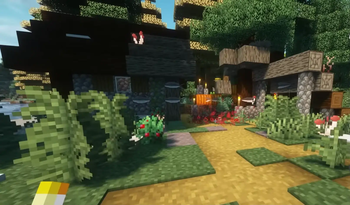
Über dieses Modpack
Fungal Outbreak by ForgeLabs

A deadly fungus has started to spread in the world. It starts out as a small relatively harmless mushroom. This mushroom has the ability to wipe out the entire world. What will you do when the fungal infection reaches the creatures of the world?
Notice
Shaders and Resource Packs are supported out of the box. Go to Options > Video Settings > Shaderpacks and choose a shader to use.
If any mods are missing from the video, report them on our discord server in a ticket.
Socials




🧪 Content Mods
AppleSkin
Entity Culling
Embeddium
Essential Mod
Clumps
Dynamic FPS
Dynamic Trees
[EMF] Entity Model Features
[ETF] Entity Texture Features
Fastload
Fungal Infection:Spore
Hardcore Revival
Just Enough Items
Memory Leak Fix
Mouse Tweaks
Model Gap Fix
Oculus
Remove Terralith Intro Message
Simple Voice Chat
Terralith
TerraBlender
The Hordes
🧬 Library Mods
⚗️ Shader Packs
Verfügbare Versionen
Fungal Outbreak Server einrichten
Server bestellen
Wähle mindestens 6 GB RAM (8 GB empfohlen für Fungal Outbreak). Je nach Spieleranzahl: +1 GB pro 5 Spieler.
Modpack im Dashboard installieren
Öffne den Modpack-Browser im Dashboard, suche nach "Fungal Outbreak" und klicke "Installieren". Der forge-Loader und Minecraft 1.20.1 werden automatisch konfiguriert.
Server starten & spielen
Starte den Server – alle Mods werden automatisch geladen. Teile die Server-IP mit Freunden und spielt zusammen!
Häufige Fragen
Fungal Outbreak Server crasht oder startet nicht – was tun?
Häufigste Ursachen: zu wenig RAM oder falscher forge-Loader. Prüfe latest.log auf "OutOfMemoryError" → erhöhe RAM auf mindestens 8 GB. Bei "Mixin" oder "ClassNotFoundException": Modpack-Version und Loader stimmen nicht überein. Bei Mado Hosting werden Loader und Minecraft-Version beim Modpack-Install automatisch konfiguriert – das verhindert die meisten Startprobleme.
Wie viel RAM braucht ein Fungal Outbreak Server wirklich?
Minimum 6 GB, empfohlen 8 GB für stabile Performance. +1 GB pro 5 Spieler. Wichtig: Minecraft-Modpacks brauchen mehr RAM als Vanilla – plane pro zusätzlichem Spieler extra ein. Bei Mado Hosting kannst du den RAM jederzeit live hochskalieren, ohne Datenverlust (ab €7.800000000000001/Monat).
Kann ich eigene Mods zu Fungal Outbreak hinzufügen, ohne Konflikte?
Ja, aber achte auf die Kompatibilität: Nutze nur Mods für den gleichen Loader (forge) und die gleiche Minecraft-Version (1.20.1). Häufige Probleme: ID-Konflikte bei Rezept-Mods und inkompatible Coremod-Versionen. Im Mado Dashboard zeigt der Mod-Browser nur kompatible Mods an und warnt bei bekannten Konflikten.
Fungal Outbreak Server laggt – Performance-Tipps
1) RAM auf 8 GB+ erhöhen. 2) Server-View-Distance auf 8 reduzieren (server.properties). 3) Pre-Generiere Chunks mit dem "Chunky" Plugin. 4) Prüfe mit /spark profiler welche Mods die meiste Tick-Time verbrauchen. Bei Mado Hosting laufen alle Server auf NVMe-SSDs mit dedizierten CPU-Kernen – das eliminiert Hardware als Engpass.
Ähnliche Modpacks
![Cobblemon Official Modpack [Fabric]](https://cdn.modrinth.com/data/5FFgwNNP/e7f9ee2e9d361623847853fe2ddce42f519ee64f.png)
![COBBLEVERSE - Pokemon Adventure [Cobblemon]](https://cdn.modrinth.com/data/Jkb29YJU/581ecf54530972afb18a04660afd820f2f24f6c7.png)
![Better MC [FABRIC] - BMC2](https://cdn.modrinth.com/data/shFhR8Vx/a19c2bcb51d38f32f138d3607e91cb2b7b8e387f_96.webp)


![Better MC [FORGE] - BMC4](https://cdn.modrinth.com/data/4BV47HRn/7f5ef7cc61b2593609aabef3ed07a866a4f11b73_96.webp)
Fungal Outbreak Server mieten
Starte deinen eigenen Server mit automatischer Modpack-Installation.
Details
- Lizenz
- LicenseRef-All-Rights-Reserved
- Server-seitig
- Erforderlich
- Client-seitig
- Erforderlich
Unterstützte Versionen
Starte deinen Fungal Outbreak Server jetzt
Ab €7.80/Monat; für die beste Performance werden 8 GB RAM empfohlen.
Server konfigurieren →