
Hope and despair
The high version of the popular gameplay "100 Days of Shock" is remastered and unique!
Screenshots
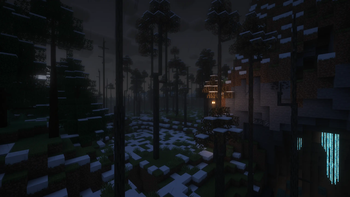
Über dieses Modpack
Remade based on the "100 Days of Shock: Zombie Apocalypse" Modpack
如果你要查看中文版简介,应该点这里。

Gameplay
This modpack introduces a variety of hardcore survival mechanics, faithfully recreating the popular "100 Days of Shock" gameplay. Key features include:
- Dimension Lockdown: You cannot enter the Nether or the End. However, all materials from those dimensions can be found or crafted in the Overworld. Check JEI for recipes.
- Evolving Threat: Over time, zombies will mutate, gaining the ability to break and place blocks. The longer you survive, the more dangerous they become.
- Body Temperature Management: Monitor your temperature gauge above the hotbar. Extreme heat or cold will cause damage. Avoid areas with thin air (above Y=160, below Y=-16, or near lava) as they induce suffocation.
- Mental State: Your character needs rest. Staying awake for extended periods will lead to exhaustion and negative effects. Sleep regularly to stay sharp.
- Survival Goal: Your only objective is to survive. Build a fortified shelter and endure for 100 days.
Starting the Game
The modpack is currently undergoing a major remake. As of version 19.0, city generation is temporarily disabled.
- Create a new world – you may generate a normal Overworld.
- Upon entering the world, the game will start automatically. If it does not, click the [here] link in the chat to launch the gameplay loop.
- You can adjust the difficulty at any time through the game settings.
FAQ
Q: Does this modpack require high-end hardware?
A: In the latest version (19.0) and future updates, significant optimizations have been made to improve performance. However, we cannot guarantee that every computer will run it smoothly. Please ensure your graphics card supports OpenGL 4.0 or higher.
Q: Why do I keep dying unexpectedly?
A: Check your body temperature indicator above the hotbar. If it is too high or too low, you will take damage. If the temperature is normal, you might be in an area with thin air (Y > 160, Y < -16, or near lava), which causes suffocation damage.
Q: I got infected by a zombie. How do I cure it?
A: Craft a cure using 1 Milk Bucket, 3 Glass Bottles, and 2 Wheat to obtain three Milk Bottles. Drink one to cure infection.
Note: In older versions (18.x), the antidote syringe crafted with foxgrass has been removed, and a plain Milk Bucket no longer works.
Q: I can't enter the Nether/End. How do I obtain materials like Blaze Rods or Ender Pearls?
A: Use JEI to look up recipes. Most Nether and End materials can be crafted from Overworld resources. This modpack is not designed for defeating the Ender Dragon; it focuses on survival.
Q: Can I migrate my old world (version 18.x) to the new version (19.0)?
A: Not recommended. Version 19.0 introduces major changes, including furniture mod replacements, disabled city generation, and configuration tweaks. Migrating an old save is very likely to corrupt it. Please start a fresh world.
Q: Where can I download the server files?
A: Server files are still in preparation. Please stay tuned for their release. Thank you for your patience.
Verfügbare Versionen
Hope and despair Server einrichten
Server bestellen
Wähle mindestens 4 GB RAM (6 GB empfohlen für Hope and despair). Je nach Spieleranzahl: +1 GB pro 5 Spieler.
Modpack im Dashboard installieren
Öffne den Modpack-Browser im Dashboard, suche nach "Hope and despair" und klicke "Installieren". Der forge-Loader und Minecraft 1.20.1 werden automatisch konfiguriert.
Server starten & spielen
Starte den Server – alle Mods werden automatisch geladen. Teile die Server-IP mit Freunden und spielt zusammen!
Häufige Fragen
Hope and despair Server crasht oder startet nicht – was tun?
Häufigste Ursachen: zu wenig RAM oder falscher forge-Loader. Prüfe latest.log auf "OutOfMemoryError" → erhöhe RAM auf mindestens 6 GB. Bei "Mixin" oder "ClassNotFoundException": Modpack-Version und Loader stimmen nicht überein. Bei Mado Hosting werden Loader und Minecraft-Version beim Modpack-Install automatisch konfiguriert – das verhindert die meisten Startprobleme.
Wie viel RAM braucht ein Hope and despair Server wirklich?
Minimum 4 GB, empfohlen 6 GB für stabile Performance. +1 GB pro 5 Spieler. Wichtig: Minecraft-Modpacks brauchen mehr RAM als Vanilla – plane pro zusätzlichem Spieler extra ein. Bei Mado Hosting kannst du den RAM jederzeit live hochskalieren, ohne Datenverlust (ab €5.2/Monat).
Kann ich eigene Mods zu Hope and despair hinzufügen, ohne Konflikte?
Ja, aber achte auf die Kompatibilität: Nutze nur Mods für den gleichen Loader (forge) und die gleiche Minecraft-Version (1.20.1). Häufige Probleme: ID-Konflikte bei Rezept-Mods und inkompatible Coremod-Versionen. Im Mado Dashboard zeigt der Mod-Browser nur kompatible Mods an und warnt bei bekannten Konflikten.
Hope and despair Server laggt – Performance-Tipps
1) RAM auf 6 GB+ erhöhen. 2) Server-View-Distance auf 8 reduzieren (server.properties). 3) Pre-Generiere Chunks mit dem "Chunky" Plugin. 4) Prüfe mit /spark profiler welche Mods die meiste Tick-Time verbrauchen. Bei Mado Hosting laufen alle Server auf NVMe-SSDs mit dedizierten CPU-Kernen – das eliminiert Hardware als Engpass.
Ähnliche Modpacks

![COBBLEVERSE - Pokemon Adventure [Cobblemon]](https://cdn.modrinth.com/data/Jkb29YJU/581ecf54530972afb18a04660afd820f2f24f6c7.png)




Hope and despair Server mieten
Starte deinen eigenen Server mit automatischer Modpack-Installation.
Details
- Lizenz
- Creative Commons Attribution Non Commercial No Derivatives 4.0 International
- Server-seitig
- Nicht unterstützt
- Client-seitig
- Nicht unterstützt
Unterstützte Versionen
Starte deinen Hope and despair Server jetzt
Ab €5.20/Monat; für die beste Performance werden 6 GB RAM empfohlen.
Server konfigurieren →