
HORIZONS
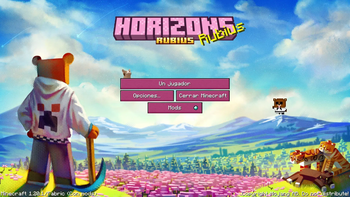
The Horizons Project is a modpack created for rubius. Released so that others can enjoy the same experience as well.
Screenshots
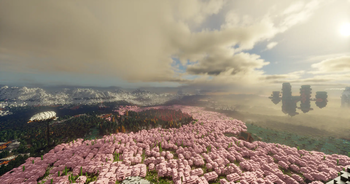
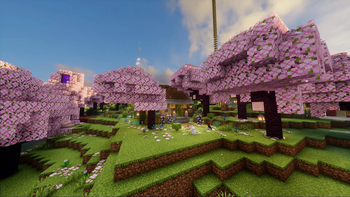
Über dieses Modpack
Horizons es el tan esperado modpack de la serie de Rubius!
Read below for english desc :)
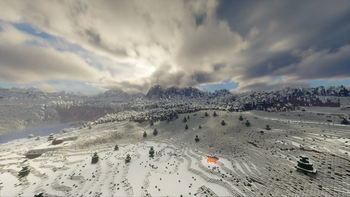
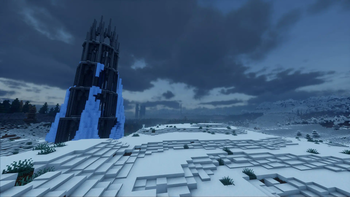
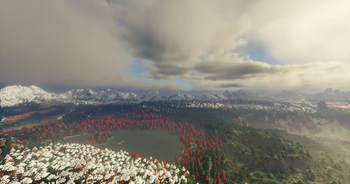
Ahora podrás disfrutar de todo el contenido de la serie con mods característicos como Distant Horizons, Terralith/Tectonic, Iris shaders, Bosses de Destrucción Masiva, y más, que te darán una experiencia vanilla 
Este modpack se estará actualizando a lo largo de la serie, añadiendo contenido nuevo y balanceando algunas cosas para que sea una experiencia única.
 Cosas a tener en cuenta:
- 8gb de RAM hacia arriba para un rendimiento óptimo, pero si puedes alocar más es mejor, nosotros usamos entre 8 a 16.
- Es extremadamente recomendable el uso del mod chunky para que pre-carguen los chunks/horizontes y así evitar problemas de rendimiento.
- Tendrás que descargar los shaders por tu cuenta ya que no están disponibles en Modrinth (los que usa rubius son los bliss).
- Es posible jugar multiplayer con el mod que viene incluido (ver el tutorial para más información).
- Algunos mods están en beta, por lo tanto, puede haber bugs y hacer el juego inestable.
- Si añades tus propios mods no garantizamos que funcione todo bien, pero en principio no debería haber problema.
Chunky essentials:
/chunky world [dimension]
/chunky center
/chunky shape circle
/chunky radius <1000> <- radio en bloques
/chunky start
English Description: 
Horizons is the long awaited modpack of the Rubius series!
Now you will be able to enjoy all the content of the series with mods like Distant Horizons, Terralith/Tectonic, Iris shaders, Bosses of mass destruction, and more, giving you a vanilla+ experience
This modpack will be updating throughout the series, adding new content and balancing some things to make it a unique experience.
Things to keep in mind:
- 8gb of RAM upwards for optimal performance, but if you can set more it's better, we use between 10 to 16.
- It is highly recommended that you use the chunky mod to get the horizons to load properly and avoid performance problems as the world is so big.
- You will have to download the Distant Horizons compatible Bliss shaders on your own as they are not available in Modrinth.
- Some mods are in beta, therefore, there may be bugs and make the game unstable.
- If you add your own mods we do not guarantee that everything will work fine, but there should be no problem.
Chunky essentials:
/chunky world [dimension]
/chunky center
/chunky shape [shape]
/chunky radius <1000> <- radius in blocks
/chunky start


Verfügbare Versionen
HORIZONS Server einrichten
Server bestellen
Wähle mindestens 6 GB RAM (8 GB empfohlen für HORIZONS). Je nach Spieleranzahl: +1 GB pro 5 Spieler.
Modpack im Dashboard installieren
Öffne den Modpack-Browser im Dashboard, suche nach "HORIZONS" und klicke "Installieren". Der fabric-Loader und Minecraft 1.20.1 werden automatisch konfiguriert.
Server starten & spielen
Starte den Server – alle Mods werden automatisch geladen. Teile die Server-IP mit Freunden und spielt zusammen!
Häufige Fragen
HORIZONS Server crasht oder startet nicht – was tun?
Häufigste Ursachen: zu wenig RAM oder falscher fabric-Loader. Prüfe latest.log auf "OutOfMemoryError" → erhöhe RAM auf mindestens 8 GB. Bei "Mixin" oder "ClassNotFoundException": Modpack-Version und Loader stimmen nicht überein. Bei Mado Hosting werden Loader und Minecraft-Version beim Modpack-Install automatisch konfiguriert – das verhindert die meisten Startprobleme.
Wie viel RAM braucht ein HORIZONS Server wirklich?
Minimum 6 GB, empfohlen 8 GB für stabile Performance. +1 GB pro 5 Spieler. Wichtig: Minecraft-Modpacks brauchen mehr RAM als Vanilla – plane pro zusätzlichem Spieler extra ein. Bei Mado Hosting kannst du den RAM jederzeit live hochskalieren, ohne Datenverlust (ab €7.800000000000001/Monat).
Kann ich eigene Mods zu HORIZONS hinzufügen, ohne Konflikte?
Ja, aber achte auf die Kompatibilität: Nutze nur Mods für den gleichen Loader (fabric) und die gleiche Minecraft-Version (1.20.1). Häufige Probleme: ID-Konflikte bei Rezept-Mods und inkompatible Coremod-Versionen. Im Mado Dashboard zeigt der Mod-Browser nur kompatible Mods an und warnt bei bekannten Konflikten.
HORIZONS Server laggt – Performance-Tipps
1) RAM auf 8 GB+ erhöhen. 2) Server-View-Distance auf 8 reduzieren (server.properties). 3) Pre-Generiere Chunks mit dem "Chunky" Plugin. 4) Prüfe mit /spark profiler welche Mods die meiste Tick-Time verbrauchen. Bei Mado Hosting laufen alle Server auf NVMe-SSDs mit dedizierten CPU-Kernen – das eliminiert Hardware als Engpass.
Ähnliche Modpacks
![Cobblemon Official Modpack [Fabric]](https://cdn.modrinth.com/data/5FFgwNNP/e7f9ee2e9d361623847853fe2ddce42f519ee64f.png)
![COBBLEVERSE - Pokemon Adventure [Cobblemon]](https://cdn.modrinth.com/data/Jkb29YJU/581ecf54530972afb18a04660afd820f2f24f6c7.png)
![Better MC [FABRIC] - BMC2](https://cdn.modrinth.com/data/shFhR8Vx/a19c2bcb51d38f32f138d3607e91cb2b7b8e387f_96.webp)


![Better MC [FORGE] - BMC4](https://cdn.modrinth.com/data/4BV47HRn/7f5ef7cc61b2593609aabef3ed07a866a4f11b73_96.webp)
HORIZONS Server mieten
Starte deinen eigenen Server mit automatischer Modpack-Installation.
Details
- Lizenz
- LicenseRef-All-Rights-Reserved
- Server-seitig
- Erforderlich
- Client-seitig
- Erforderlich
Unterstützte Versionen
Starte deinen HORIZONS Server jetzt
Ab €7.80/Monat; für die beste Performance werden 8 GB RAM empfohlen.
Server konfigurieren →