
Humanity
Humanity is a modpack aimed at creating a living Minecraft experience.
Screenshots
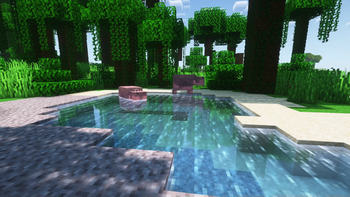
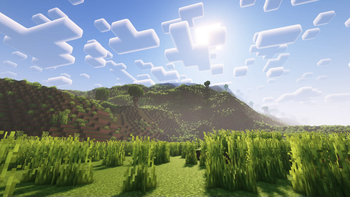
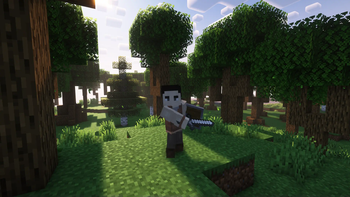
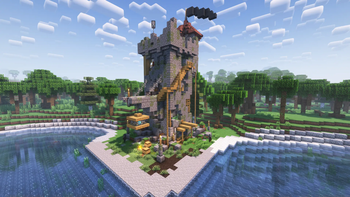
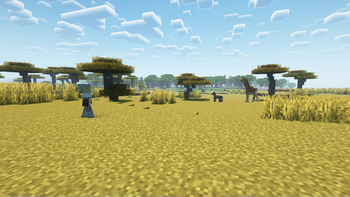
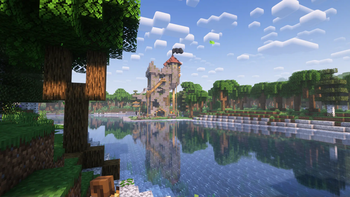
Über dieses Modpack
Humanity
Humanity is a modpack aimed at creating a living Minecraft experience. Humanity adds quality-of-life features, visual improvements, more realistic world generation, new combat, human mobs, simple technology, and much more. The modpack is still in alpha, so things may be 100% complete nor stable. Some mods do have some conflicts; However, Humanity tries its best to sort these out through configuration options.
Performance
Testing with a Ryzen 5 1600, 32GB of RAM (~8GB allocated to Minecraft), and a NVIDIA GTX 1660ti, the modpack runs rather smoothly, even with shaders. That being said, as this is modded Minecraft, some issues may arise, however, it depends on the individual specifications of your computer. World generation is generally slower than the vanilla game, as Humanity uses multiple world-generation mods to create a visually appealing world. If the world generation is too heavy on your system, you can try disabling the Tectonic mod, which is used for the overall terrain shaping.
Mod Compatibility
Every mod included in Humanity generally works well together. Humanity uses a mod which enables the third-person view model in first person. This can cause some clipping with Better Combat, however, the modpack has been configured to reduce this as much as possible. Additionally, in the Minecraft Comes Alive character creation screen, it appears that skin color and type is not changeable; This is not the case and is just a visual bug in the menu, and your options will appear correct in game. If you find anything else that isn't working right, please let us know on our Discord server.
Attribution
All mods are linked back to their respective CurseForge page in the changelog. Permission has been received from both Continents and Moonlight to be used in this modpack.
Verfügbare Versionen
Humanity Server einrichten
Server bestellen
Wähle mindestens 6 GB RAM (8 GB empfohlen für Humanity). Je nach Spieleranzahl: +1 GB pro 5 Spieler.
Modpack im Dashboard installieren
Öffne den Modpack-Browser im Dashboard, suche nach "Humanity" und klicke "Installieren". Der quilt-Loader und Minecraft 1.19.2 werden automatisch konfiguriert.
Server starten & spielen
Starte den Server – alle Mods werden automatisch geladen. Teile die Server-IP mit Freunden und spielt zusammen!
Häufige Fragen
Humanity Server crasht oder startet nicht – was tun?
Häufigste Ursachen: zu wenig RAM oder falscher quilt-Loader. Prüfe latest.log auf "OutOfMemoryError" → erhöhe RAM auf mindestens 8 GB. Bei "Mixin" oder "ClassNotFoundException": Modpack-Version und Loader stimmen nicht überein. Bei Mado Hosting werden Loader und Minecraft-Version beim Modpack-Install automatisch konfiguriert – das verhindert die meisten Startprobleme.
Wie viel RAM braucht ein Humanity Server wirklich?
Minimum 6 GB, empfohlen 8 GB für stabile Performance. +1 GB pro 5 Spieler. Wichtig: Minecraft-Modpacks brauchen mehr RAM als Vanilla – plane pro zusätzlichem Spieler extra ein. Bei Mado Hosting kannst du den RAM jederzeit live hochskalieren, ohne Datenverlust (ab €7.800000000000001/Monat).
Kann ich eigene Mods zu Humanity hinzufügen, ohne Konflikte?
Ja, aber achte auf die Kompatibilität: Nutze nur Mods für den gleichen Loader (quilt) und die gleiche Minecraft-Version (1.19.2). Häufige Probleme: ID-Konflikte bei Rezept-Mods und inkompatible Coremod-Versionen. Im Mado Dashboard zeigt der Mod-Browser nur kompatible Mods an und warnt bei bekannten Konflikten.
Humanity Server laggt – Performance-Tipps
1) RAM auf 8 GB+ erhöhen. 2) Server-View-Distance auf 8 reduzieren (server.properties). 3) Pre-Generiere Chunks mit dem "Chunky" Plugin. 4) Prüfe mit /spark profiler welche Mods die meiste Tick-Time verbrauchen. Bei Mado Hosting laufen alle Server auf NVMe-SSDs mit dedizierten CPU-Kernen – das eliminiert Hardware als Engpass.
Ähnliche Modpacks
![Cobblemon Official Modpack [Fabric]](https://cdn.modrinth.com/data/5FFgwNNP/e7f9ee2e9d361623847853fe2ddce42f519ee64f.png)
![COBBLEVERSE - Pokemon Adventure [Cobblemon]](https://cdn.modrinth.com/data/Jkb29YJU/581ecf54530972afb18a04660afd820f2f24f6c7.png)
![Better MC [FABRIC] - BMC2](https://cdn.modrinth.com/data/shFhR8Vx/a19c2bcb51d38f32f138d3607e91cb2b7b8e387f_96.webp)


![Better MC [FORGE] - BMC4](https://cdn.modrinth.com/data/4BV47HRn/7f5ef7cc61b2593609aabef3ed07a866a4f11b73_96.webp)
Humanity Server mieten
Starte deinen eigenen Server mit automatischer Modpack-Installation.
Details
- Lizenz
- BSD 3-Clause "New" or "Revised" License
- Server-seitig
- Erforderlich
- Client-seitig
- Erforderlich
Unterstützte Versionen
Starte deinen Humanity Server jetzt
Ab €7.80/Monat; für die beste Performance werden 8 GB RAM empfohlen.
Server konfigurieren →