
KompotikIvun's BareBones - Optimized
Enchance your vanila gaming experience!
Screenshots
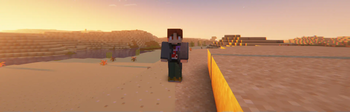
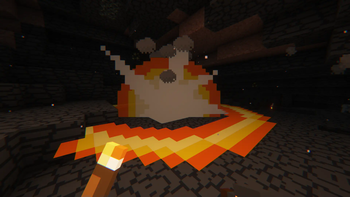
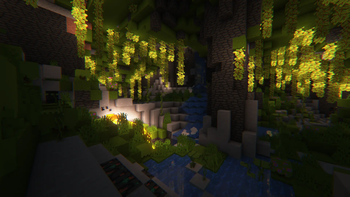
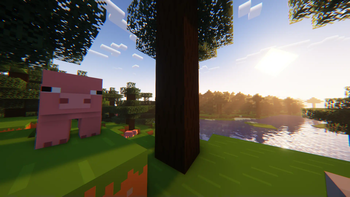
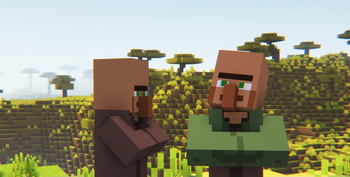
Über dieses Modpack


"BareBones - Optimized" is a modpack inspired by minecraft trailers and content maker @lowresbones on youtube.
This particular modpack contains no game-changing mods and every single one of the mods are either performance enchaners, texture/animation patchers or simply cosmetics.
Some Tips about modpack
- There's no usual zoom mod in this modpack but you can craft spyglass and bind it zoom in controls (binded to "C" by default). Spyglass itself can be wherever in your inventory!
- There's a Dynamic Light mod.
- There's a ReplayMod for any of you Content Creators.
- Also there's an "Infinite Music" mod installed so enjoy all the tunes at all times :)
- If you don't like seeing yourself in first-person mode you can turn it off by pressing "F6".
Disclaimer and Credits
First of all I'm not associated with any of mod/resorucepack teams and it's simply modpack for me and you to have fun with!
also I'm not amazing with modpack making so if you see any mistake or an Issue let me know! I'll try and fix them in the future!
SUPPORT ORIGINAL CREATORS <3
Credit to:
| https://www.curseforge.com/minecraft/texture-packs/bare-bones-eating-animation-addon |
https://www.curseforge.com/minecraft/texture-packs/barebones-leaves |
https://vanillatweaks.net |
Recommend to Install aswell
Since the Copyright issues arise and some of the creators won't answer me if I could include their stuff in the modpack I really recommend you to add these 2 resource packs for full immersion:https://www.curseforge.com/minecraft/texture-packs/bare-bones-visuality-addon
https://www.curseforge.com/minecraft/texture-packs/fancy-gui-overhaul
This modpack is a prequel to my next modpack - "BareBones - Create Edition"
If you have any question you can contact me on discord trough discord tab under modpack to the left and you can support me if you want (๑•ᴗ•๑)
Also I should note that this modpack includes mod e4mc made by vgskye, what it does that its basicaly makes "Open to LAN" button easier, you can just click it once or twice and when port will be announced in chat - also will be an adress for any of your friends to easily connect!
It's an amazing mod and I personally shocked on how good it is so check out the original on: https://modrinth.com/mod/e4mc and have fun with your friends!
Sadly I wasn't able to impliment voicechat with e4mc just by pressing "Open to LAN" so you'll have to figure it out how to play this modpack with your friends yourself (づ ᴗ͈༝ᴗ͈)づ
Check out my Create inspired BareBones modpack - https://modrinth.com/modpack/kompotikivuns-barebones-create-edition
Verfügbare Versionen
KompotikIvun's BareBones - Optimized Server einrichten
Server bestellen
Wähle mindestens 6 GB RAM (8 GB empfohlen für KompotikIvun's BareBones - Optimized). Je nach Spieleranzahl: +1 GB pro 5 Spieler.
Modpack im Dashboard installieren
Öffne den Modpack-Browser im Dashboard, suche nach "KompotikIvun's BareBones - Optimized" und klicke "Installieren". Der fabric-Loader und Minecraft 1.19.2 werden automatisch konfiguriert.
Server starten & spielen
Starte den Server – alle Mods werden automatisch geladen. Teile die Server-IP mit Freunden und spielt zusammen!
Häufige Fragen
KompotikIvun's BareBones - Optimized Server crasht oder startet nicht – was tun?
Häufigste Ursachen: zu wenig RAM oder falscher fabric-Loader. Prüfe latest.log auf "OutOfMemoryError" → erhöhe RAM auf mindestens 8 GB. Bei "Mixin" oder "ClassNotFoundException": Modpack-Version und Loader stimmen nicht überein. Bei Mado Hosting werden Loader und Minecraft-Version beim Modpack-Install automatisch konfiguriert – das verhindert die meisten Startprobleme.
Wie viel RAM braucht ein KompotikIvun's BareBones - Optimized Server wirklich?
Minimum 6 GB, empfohlen 8 GB für stabile Performance. +1 GB pro 5 Spieler. Wichtig: Minecraft-Modpacks brauchen mehr RAM als Vanilla – plane pro zusätzlichem Spieler extra ein. Bei Mado Hosting kannst du den RAM jederzeit live hochskalieren, ohne Datenverlust (ab €7.800000000000001/Monat).
Kann ich eigene Mods zu KompotikIvun's BareBones - Optimized hinzufügen, ohne Konflikte?
Ja, aber achte auf die Kompatibilität: Nutze nur Mods für den gleichen Loader (fabric) und die gleiche Minecraft-Version (1.19.2). Häufige Probleme: ID-Konflikte bei Rezept-Mods und inkompatible Coremod-Versionen. Im Mado Dashboard zeigt der Mod-Browser nur kompatible Mods an und warnt bei bekannten Konflikten.
KompotikIvun's BareBones - Optimized Server laggt – Performance-Tipps
1) RAM auf 8 GB+ erhöhen. 2) Server-View-Distance auf 8 reduzieren (server.properties). 3) Pre-Generiere Chunks mit dem "Chunky" Plugin. 4) Prüfe mit /spark profiler welche Mods die meiste Tick-Time verbrauchen. Bei Mado Hosting laufen alle Server auf NVMe-SSDs mit dedizierten CPU-Kernen – das eliminiert Hardware als Engpass.
Ähnliche Modpacks
![Cobblemon Official Modpack [Fabric]](https://cdn.modrinth.com/data/5FFgwNNP/e7f9ee2e9d361623847853fe2ddce42f519ee64f.png)
![COBBLEVERSE - Pokemon Adventure [Cobblemon]](https://cdn.modrinth.com/data/Jkb29YJU/581ecf54530972afb18a04660afd820f2f24f6c7.png)
![Better MC [FABRIC] - BMC2](https://cdn.modrinth.com/data/shFhR8Vx/a19c2bcb51d38f32f138d3607e91cb2b7b8e387f_96.webp)


![Better MC [FORGE] - BMC4](https://cdn.modrinth.com/data/4BV47HRn/7f5ef7cc61b2593609aabef3ed07a866a4f11b73_96.webp)
KompotikIvun's BareBones - Optimized Server mieten
Starte deinen eigenen Server mit automatischer Modpack-Installation.
Details
- Lizenz
- LicenseRef-All-Rights-Reserved
- Server-seitig
- Optional
- Client-seitig
- Optional
Unterstützte Versionen
Starte deinen KompotikIvun's BareBones - Optimized Server jetzt
Ab €7.80/Monat; für die beste Performance werden 8 GB RAM empfohlen.
Server konfigurieren →