
Kults Magic Pack
Magic and Exploration. Get a taste and avoid feeling overwhelmed with complicated technology or magic mods. Using simple but exciting magic and structure mods! Experience a plethora fancy and magical weapons using old combat mechanics (1.8/pre1.9 combat)
Screenshots
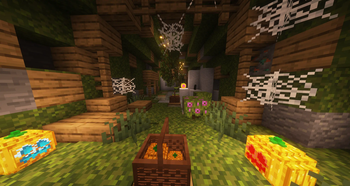
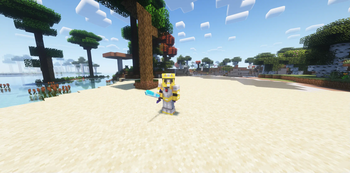
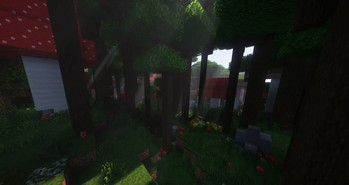
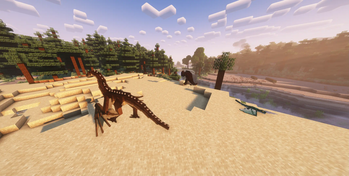

Über dieses Modpack
Overview
This modpack aims to give palyers a magical experience in exploration and combat without overwhelming the player.
There will be many tools, ores, and weapons you'll have to navigate, but extra tool tips should help you get through that!
Old combat mechanics and powerfull weapons will make you feel stronger than ever. However over time the mobs that spawn around you will also slowly increase in strength. Do you have the skill and equipment to keep up?
When you're not fighting repurpose a structure into a new home, use one of the many decoration mods to make this house a home. Collect plushies, backpacks and other trinkets.
There are a few things that will cater towards the engineer side of players. Use copper pipes to make an easy item sorter or to send mail to another player. Dabble with alchemy and spawner changes.
Every playstyle should feel at home in this modpack!
As I expand and change this modpack the change log will provide the information needed to keep up. There are still plenty of magic based mods that I'd love to add but that are simply not up to 1.20.4 quite yet.
Technical Tips:
For any other questions comments or concerns please join the discord!
RAM:
I recommend at least 4GB of allocated RAM
Server:
I have yet to do one myself with this modpack. Eventually I will and I will provide a download to make it easier for others. If you are trying to make a server with this modpack just make sure you remove all client side mods from the mods folder. This is the most common issue people have when running modded servers.
The modpack includes the Essential mod so you'll be able to play with friends easily without servers.
Xaero's Minimap
(Possibly Fixed)
Unfortunatly every update will reset your mini-map settings to that of the defaults I have set. This is due to the settings being stored in config which can be an import folder for me to update. I understand how annoying this is as it affects my game too.
The only thing I can recommend is you change everything to your liking, go to the config folder of the modpack, and copy/save the file "xaerominimap.txt" somewhere else.
This is where your settings are saved. Every update you'll want to bring that saved version into the config folder.
Update Format:
X.Y
X = All players will need to be on this version to play with one another via essential or servers. A gameplay mod has been added or removed.
Y = Missmatched versions should be able to play with one another still. A client side mod was added or removed.
Example: 2.1 and 2.3 can play together but 2.0 and 3.0 cannot.
Verfügbare Versionen
Kults Magic Pack Server einrichten
Server bestellen
Wähle mindestens 6 GB RAM (8 GB empfohlen für Kults Magic Pack). Je nach Spieleranzahl: +1 GB pro 5 Spieler.
Modpack im Dashboard installieren
Öffne den Modpack-Browser im Dashboard, suche nach "Kults Magic Pack" und klicke "Installieren". Der fabric-Loader und Minecraft 1.20.4 werden automatisch konfiguriert.
Server starten & spielen
Starte den Server – alle Mods werden automatisch geladen. Teile die Server-IP mit Freunden und spielt zusammen!
Häufige Fragen
Kults Magic Pack Server crasht oder startet nicht – was tun?
Häufigste Ursachen: zu wenig RAM oder falscher fabric-Loader. Prüfe latest.log auf "OutOfMemoryError" → erhöhe RAM auf mindestens 8 GB. Bei "Mixin" oder "ClassNotFoundException": Modpack-Version und Loader stimmen nicht überein. Bei Mado Hosting werden Loader und Minecraft-Version beim Modpack-Install automatisch konfiguriert – das verhindert die meisten Startprobleme.
Wie viel RAM braucht ein Kults Magic Pack Server wirklich?
Minimum 6 GB, empfohlen 8 GB für stabile Performance. +1 GB pro 5 Spieler. Wichtig: Minecraft-Modpacks brauchen mehr RAM als Vanilla – plane pro zusätzlichem Spieler extra ein. Bei Mado Hosting kannst du den RAM jederzeit live hochskalieren, ohne Datenverlust (ab €7.800000000000001/Monat).
Kann ich eigene Mods zu Kults Magic Pack hinzufügen, ohne Konflikte?
Ja, aber achte auf die Kompatibilität: Nutze nur Mods für den gleichen Loader (fabric) und die gleiche Minecraft-Version (1.20.4). Häufige Probleme: ID-Konflikte bei Rezept-Mods und inkompatible Coremod-Versionen. Im Mado Dashboard zeigt der Mod-Browser nur kompatible Mods an und warnt bei bekannten Konflikten.
Kults Magic Pack Server laggt – Performance-Tipps
1) RAM auf 8 GB+ erhöhen. 2) Server-View-Distance auf 8 reduzieren (server.properties). 3) Pre-Generiere Chunks mit dem "Chunky" Plugin. 4) Prüfe mit /spark profiler welche Mods die meiste Tick-Time verbrauchen. Bei Mado Hosting laufen alle Server auf NVMe-SSDs mit dedizierten CPU-Kernen – das eliminiert Hardware als Engpass.
Ähnliche Modpacks
![Cobblemon Official Modpack [Fabric]](https://cdn.modrinth.com/data/5FFgwNNP/e7f9ee2e9d361623847853fe2ddce42f519ee64f.png)
![COBBLEVERSE - Pokemon Adventure [Cobblemon]](https://cdn.modrinth.com/data/Jkb29YJU/581ecf54530972afb18a04660afd820f2f24f6c7.png)
![Better MC [FABRIC] - BMC2](https://cdn.modrinth.com/data/shFhR8Vx/a19c2bcb51d38f32f138d3607e91cb2b7b8e387f_96.webp)


![Better MC [FORGE] - BMC4](https://cdn.modrinth.com/data/4BV47HRn/7f5ef7cc61b2593609aabef3ed07a866a4f11b73_96.webp)
Kults Magic Pack Server mieten
Starte deinen eigenen Server mit automatischer Modpack-Installation.
Details
- Lizenz
- LicenseRef-All-Rights-Reserved
- Server-seitig
- Erforderlich
- Client-seitig
- Erforderlich
Unterstützte Versionen
Starte deinen Kults Magic Pack Server jetzt
Ab €7.80/Monat; für die beste Performance werden 8 GB RAM empfohlen.
Server konfigurieren →