
Re-Console
A continued Legacy Console Edition experience, expanded upon with modern Java Edition content and QoL! (An Official Legacy4J Project)
Screenshots
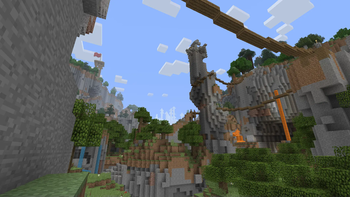
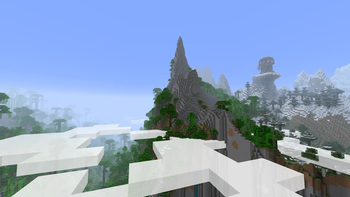
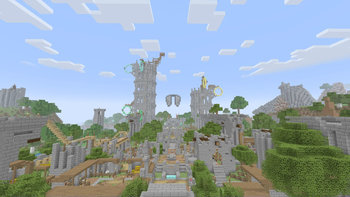

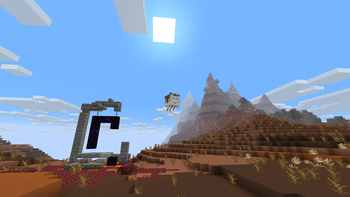

Über dieses Modpack


Watch the Official Modpack Showcase!
Re-Console/Simply Legacy Feature Overview
- ✅ Included
- ❌ Not included
- 📝 Planned
LCE Features
| Re-Console | Simply Legacy | |
|---|---|---|
| User Interface (Crafting/Settings/Menus) |
✅ | ✅ |
| Gamma | ✅ | ✅ |
| Nether Mechanics | ✅ | ✅ |
| Texture Packs | ✅ | ✅ |
| Mash-up Worlds | ✅ | ✅ |
| Mini Games* | ✅ | ✅ |
| Skin Packs** | ✅ | ✅ |
| Manual Saving | ❌ | ✅ |
| All Tutorial World Revisions Included |
✅ | ❌ |
| Limited Worlds | ✅ | ✅ |
| Tutorial System | 📝 | 📝 |
| Global Achievements | 📝 | 📝 |
*Glide only as of writing; Fistfight is also included and is a mini game exclusive to the Minimega mod, which provides console-style mini games.
General Features
| Re-Console+ | Simply Legacy | |
|---|---|---|
| OptiFine Resource Pack features | ✅ | ✅ |
| No Telemetry | ✅ | ✅ |
| Borderless Fullscreen | ✅ | ✅ |
| Custom Options Presets | ✅ | ✅ |
| Online Multiplayer with e4mc | ✅ | ✅ |
| Built-in Shaders | ✅ | ❌ |
| Extra "Java-specific" Texture Packs (like Bare Bones and Faithful) |
✅ | ❌ |
| Alpha and Beta Texture Packs | ✅ | ❌ |
| OptiFine Gameplay features (Dynamic lighting, zoom, BetterGrass, etc.) |
✅ | ❌ |
| Extra Utilities (Ping View, CalcMod, Chat Heads, etc.) |
✅ | ❌ |
| Bedrock-style Bridging | ✅ | ❌ |
| Simple Voice Chat + Voice Chat Interaction |
✅ | ❌ |

Re-Console is a modpack meant to not just re-create Legacy Console Edition entirely from scratch, but expand on top of it with modern Java Edition QoL and features. From OptiFine Parity, to BetterGrass, and a whole lot more!
Check out NicSonic's SteamGridDB assets for Re-Console here!
Need a server?

All the Bells and Whistles...*
Thanks to mods such as Legacy4J and Minimega, everything from the washed-out (if desired) gamma, easy to navigate crafting interface, and controller input, to the Texture Packs, Skin Packs, Mash-Up Worlds and Mini Games, are all accessible right out of the box!
As of Re-Console+ 26.x, Re-Console even now features proper Limited World Generation!
As of writing, features contributing to the "complete experience" (i.e. working tutorial system and console-style global achievements) are already under development for Re-Console+.
Don't worry, the features mentioned above are 100% playable!
...and much more!
On top of these fundamental LCE features, Re-Console also adds plenty of custom Texture Packs, OptiFine features such as Better Grass, dynamic lighting and built-in shader packs, Bedrock-style bridging, and more!
Nice and Speedy!
With the help of some of Minecraft's best optimization mods, we've been able to squeeze out performance that far exceeds what the vanilla game gives you, and maintains the "Always 60FPS" vision of LCE (though with considerably more frames than that)
At times, Re-Console can even match, or exceed dedicated Performance Modpacks, as it utilizes its own unique performance stack!
Updates, people... Updates!
Whenever a major functional part of the modpack is updates, whether it be a resource pack or gameplay mod, we ready ourselves to do the same. Though, not everything will be guaranteed an update within the pack if it breaks functionality, so our update strategy is quick and simple, yet remains methodical.
Built-in SMP!
Re-Console comes built in with the Re-Console SMP, our officially run Survival Multiplayer Server, with an active community and active updates!
Free and Open Source!
Re-Console is comprised of only open-source or source-available mods, which gives you the ability to see the code and contribute to the mods in the pack. The modpack is also available on Codeberg as a packwiz project.
Re-Console LTS!
Modern Re-Console is a significant evolution from the initial Re-Console. However, we still continue to maintain those original versions with bug-fixes, occasional feature backports, and other features from modern Re-Console+ versions.
For more information on LTS, you can read our LTS page on our Documentation!

- DexrnZacAttack for making PackItUp, an automatic modpack update publisher
- bathtubfulloftoast for making the initial wiki for Re-Console
- devin, for maintaining the modpack in 2024 when I could not
- Technocality, for consistent support
- mzov_jen, for porting PACP to Modrinth + making a special compatible version for the modpack
- BrandonItaly, RedRain0o0 and chillyzone, for providing most of the LCE mash-up and texture packs
- S_N00B for making Console-idated, of which this project was inspired from
- WilyIcaro for making the Legacy4J mod, which this pack wouldn't be possible without, along with contributing to the modpack
- Jab125, for making Legacy Skins and Minimega, two flagship mods used in Re-Console
- RedRain0o0, for porting and working on the How To Play menu for greater than 1.14+, along with providing a datapack to re-introduce the disc hunt minigame into the tutorial worlds


Verfügbare Versionen
Re-Console Server einrichten
Server bestellen
Wähle mindestens 4 GB RAM (6 GB empfohlen für Re-Console). Je nach Spieleranzahl: +1 GB pro 5 Spieler.
Modpack im Dashboard installieren
Öffne den Modpack-Browser im Dashboard, suche nach "Re-Console" und klicke "Installieren". Der fabric-Loader und Minecraft 26.3 werden automatisch konfiguriert.
Server starten & spielen
Starte den Server – alle Mods werden automatisch geladen. Teile die Server-IP mit Freunden und spielt zusammen!
Häufige Fragen
Re-Console Server crasht oder startet nicht – was tun?
Häufigste Ursachen: zu wenig RAM oder falscher fabric-Loader. Prüfe latest.log auf "OutOfMemoryError" → erhöhe RAM auf mindestens 6 GB. Bei "Mixin" oder "ClassNotFoundException": Modpack-Version und Loader stimmen nicht überein. Bei Mado Hosting werden Loader und Minecraft-Version beim Modpack-Install automatisch konfiguriert – das verhindert die meisten Startprobleme.
Wie viel RAM braucht ein Re-Console Server wirklich?
Minimum 4 GB, empfohlen 6 GB für stabile Performance. +1 GB pro 5 Spieler. Wichtig: Minecraft-Modpacks brauchen mehr RAM als Vanilla – plane pro zusätzlichem Spieler extra ein. Bei Mado Hosting kannst du den RAM jederzeit live hochskalieren, ohne Datenverlust (ab €5.2/Monat).
Kann ich eigene Mods zu Re-Console hinzufügen, ohne Konflikte?
Ja, aber achte auf die Kompatibilität: Nutze nur Mods für den gleichen Loader (fabric) und die gleiche Minecraft-Version (26.3). Häufige Probleme: ID-Konflikte bei Rezept-Mods und inkompatible Coremod-Versionen. Im Mado Dashboard zeigt der Mod-Browser nur kompatible Mods an und warnt bei bekannten Konflikten.
Re-Console Server laggt – Performance-Tipps
1) RAM auf 6 GB+ erhöhen. 2) Server-View-Distance auf 8 reduzieren (server.properties). 3) Pre-Generiere Chunks mit dem "Chunky" Plugin. 4) Prüfe mit /spark profiler welche Mods die meiste Tick-Time verbrauchen. Bei Mado Hosting laufen alle Server auf NVMe-SSDs mit dedizierten CPU-Kernen – das eliminiert Hardware als Engpass.
Ähnliche Modpacks
![Better MC [FABRIC] - BMC2](https://cdn.modrinth.com/data/shFhR8Vx/a19c2bcb51d38f32f138d3607e91cb2b7b8e387f_96.webp)
![Better MC [FORGE] - BMC4](https://cdn.modrinth.com/data/4BV47HRn/7f5ef7cc61b2593609aabef3ed07a866a4f11b73_96.webp)


![Better MC [FABRIC] - BMC3](https://cdn.modrinth.com/data/NHUidpfR/327e0749bb6d160c41799fd77bf6d3d631569dc8_96.webp)
Re-Console Server mieten
Starte deinen eigenen Server mit automatischer Modpack-Installation.
Details
- Lizenz
- GNU General Public License v3.0 or later
- Server-seitig
- Optional
- Client-seitig
- Optional
Unterstützte Versionen
Starte deinen Re-Console Server jetzt
Ab €5.20/Monat; für die beste Performance werden 6 GB RAM empfohlen.
Server konfigurieren →