
Legends of the Galaxy
Forge your own galactic legacy with an advanced Star Wars action-adventure modpack, and the official modpack for Galaxies: Parzi's Star Wars Mod!
Screenshots
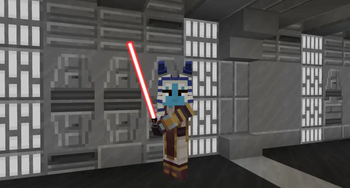
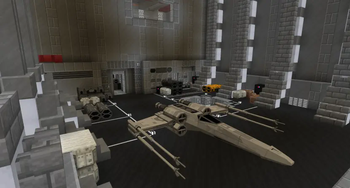
Über dieses Modpack

Galaxies: Parzi's Star Wars Mod (PSWG) is a brand-new take on the Star Wars+Minecraft experience for Fabric and the latest Minecraft versions. Actively in development, new content, features, and changes come each week, and we're working with other authors to further improve the experience. Stick with us as we continue adding content like new planets to explore, lightsabers and blasters to master, and locations to discover! Here are some of the mods the authors recommend to get the most out of your gameplay.
This modpack is a (currently) lightweight collection of various fabric performance improvements, vanilla utility improvement mods, and immersion mods adding more animations or ambience to the game. In the future, the pack will be further curated to better complement the core PSWG gameplay-loop.
PSWG is currently in alpha. Check out the roadmap of content slated for the first full release, and feel free to join our Discord if you have any questions!
Included Mods:
Galaxies family
Performance
- Sodium
- Sodium Extras
- Indium
- Lithium
Graphics
- Iris
- LambDynamicLights
- Not Enough Animations
- Falling Leaves
Utility
- ModMenu
- Reese's Sodium Options
- Appleskin
- Roughly Enough Items
- CameraUtils
- FreeCam
- WorldEdit
- Presence Footsteps
- Ambient Sounds
- Simple Voicechat
- Xaero's World Map
Library
- Fabric API
- Indium
- Cloth Config
- CreativeCore
- Architectury
Shaderpacks
- BSL Shaders
- Rethinking Voxels
- Voyager Shader 2.0
Verfügbare Versionen
Legends of the Galaxy Server einrichten
Server bestellen
Wähle mindestens 6 GB RAM (8 GB empfohlen für Legends of the Galaxy). Je nach Spieleranzahl: +1 GB pro 5 Spieler.
Modpack im Dashboard installieren
Öffne den Modpack-Browser im Dashboard, suche nach "Legends of the Galaxy" und klicke "Installieren". Der fabric-Loader und Minecraft 1.20.2 werden automatisch konfiguriert.
Server starten & spielen
Starte den Server – alle Mods werden automatisch geladen. Teile die Server-IP mit Freunden und spielt zusammen!
Häufige Fragen
Legends of the Galaxy Server crasht oder startet nicht – was tun?
Häufigste Ursachen: zu wenig RAM oder falscher fabric-Loader. Prüfe latest.log auf "OutOfMemoryError" → erhöhe RAM auf mindestens 8 GB. Bei "Mixin" oder "ClassNotFoundException": Modpack-Version und Loader stimmen nicht überein. Bei Mado Hosting werden Loader und Minecraft-Version beim Modpack-Install automatisch konfiguriert – das verhindert die meisten Startprobleme.
Wie viel RAM braucht ein Legends of the Galaxy Server wirklich?
Minimum 6 GB, empfohlen 8 GB für stabile Performance. +1 GB pro 5 Spieler. Wichtig: Minecraft-Modpacks brauchen mehr RAM als Vanilla – plane pro zusätzlichem Spieler extra ein. Bei Mado Hosting kannst du den RAM jederzeit live hochskalieren, ohne Datenverlust (ab €7.800000000000001/Monat).
Kann ich eigene Mods zu Legends of the Galaxy hinzufügen, ohne Konflikte?
Ja, aber achte auf die Kompatibilität: Nutze nur Mods für den gleichen Loader (fabric) und die gleiche Minecraft-Version (1.20.2). Häufige Probleme: ID-Konflikte bei Rezept-Mods und inkompatible Coremod-Versionen. Im Mado Dashboard zeigt der Mod-Browser nur kompatible Mods an und warnt bei bekannten Konflikten.
Legends of the Galaxy Server laggt – Performance-Tipps
1) RAM auf 8 GB+ erhöhen. 2) Server-View-Distance auf 8 reduzieren (server.properties). 3) Pre-Generiere Chunks mit dem "Chunky" Plugin. 4) Prüfe mit /spark profiler welche Mods die meiste Tick-Time verbrauchen. Bei Mado Hosting laufen alle Server auf NVMe-SSDs mit dedizierten CPU-Kernen – das eliminiert Hardware als Engpass.
Ähnliche Modpacks
![Cobblemon Official Modpack [Fabric]](https://cdn.modrinth.com/data/5FFgwNNP/e7f9ee2e9d361623847853fe2ddce42f519ee64f.png)
![COBBLEVERSE - Pokemon Adventure [Cobblemon]](https://cdn.modrinth.com/data/Jkb29YJU/581ecf54530972afb18a04660afd820f2f24f6c7.png)
![Better MC [FABRIC] - BMC2](https://cdn.modrinth.com/data/shFhR8Vx/a19c2bcb51d38f32f138d3607e91cb2b7b8e387f_96.webp)


![Better MC [FORGE] - BMC4](https://cdn.modrinth.com/data/4BV47HRn/7f5ef7cc61b2593609aabef3ed07a866a4f11b73_96.webp)
Legends of the Galaxy Server mieten
Starte deinen eigenen Server mit automatischer Modpack-Installation.
Details
- Lizenz
- GNU Lesser General Public License v3.0 only
- Server-seitig
- Erforderlich
- Client-seitig
- Erforderlich
Unterstützte Versionen
Starte deinen Legends of the Galaxy Server jetzt
Ab €7.80/Monat; für die beste Performance werden 8 GB RAM empfohlen.
Server konfigurieren →