
Men play Skyblock
This modpack, when you enable the SkyBlock datapacks, gives you infinite generation where seed based structures still generate
Screenshots
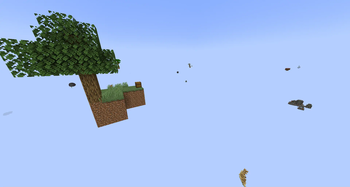
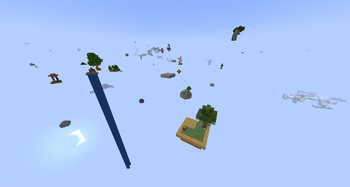
Über dieses Modpack
If your computer isnt as good, a Lite version is available here with lower default settings and some eye candy mods removed.
What is this modpack?
This pack was made for me and my friends to play a skyblock datapack together. We always like to use a bunch of optimization mods and this pack also includes a few mods with extra items and decoration related blocks as well as some visual improvements and many mods that add new structures.
Not all of these mods may be necessary for a skyblock playthough, but it does make it funner in our opinion since some of the game changing mods can provide a different experience from a standard Minecraft experience.
To use the datapacks in a singleplayer world
- in Singleplayer, Create a new world
- Under the More tab, select Data Packs
- In modrinth, select "Folder" from within the Men Play Skyblock instance
- From the datapacks folder, drag and drop the 3 datapacks from the datapacks folder to the Data Packs screen in Minecraft
- Move all 3 datapacks to the selected side of the menu
- Click done and configure the rest of your world settings
When you load into a world for the first time, there will be 3 blocks you can click to set your settings.
I prefer:
* Classic Main island
* Classic Outer Islands
* New World Type
Datapacks
Non-Modrinth mods:
- Simply Houses (as of v0.4)
Warnings and Notes
- If you aren't using an Nvidia GPU, you will need to disable the Nvidium mod
- Do not use the BetterX world type. your game has a high chance of crashing
- Minimum RAM (Memory) setting: 4GB (4096MB)
- Recommended RAM setting: 6GB (6144MB) to 8GB (8192MB)
- Your PC should have at least enough memory to run your OS (like Windows 10/11) plus any other programs you have running plus what you have minecraft set to
Verfügbare Versionen
Men play Skyblock Server einrichten
Server bestellen
Wähle mindestens 6 GB RAM (10 GB empfohlen für Men play Skyblock). Je nach Spieleranzahl: +1 GB pro 4 Spieler.
Modpack im Dashboard installieren
Öffne den Modpack-Browser im Dashboard, suche nach "Men play Skyblock" und klicke "Installieren". Der fabric-Loader und Minecraft 1.20.1 werden automatisch konfiguriert.
Server starten & spielen
Starte den Server – alle Mods werden automatisch geladen. Teile die Server-IP mit Freunden und spielt zusammen!
Häufige Fragen
Men play Skyblock Server crasht oder startet nicht – was tun?
Häufigste Ursachen: zu wenig RAM oder falscher fabric-Loader. Prüfe latest.log auf "OutOfMemoryError" → erhöhe RAM auf mindestens 10 GB. Bei "Mixin" oder "ClassNotFoundException": Modpack-Version und Loader stimmen nicht überein. Bei Mado Hosting werden Loader und Minecraft-Version beim Modpack-Install automatisch konfiguriert – das verhindert die meisten Startprobleme.
Wie viel RAM braucht ein Men play Skyblock Server wirklich?
Minimum 6 GB, empfohlen 10 GB für stabile Performance. +1 GB pro 4 Spieler. Wichtig: Minecraft-Modpacks brauchen mehr RAM als Vanilla – plane pro zusätzlichem Spieler extra ein. Bei Mado Hosting kannst du den RAM jederzeit live hochskalieren, ohne Datenverlust (ab €7.800000000000001/Monat).
Kann ich eigene Mods zu Men play Skyblock hinzufügen, ohne Konflikte?
Ja, aber achte auf die Kompatibilität: Nutze nur Mods für den gleichen Loader (fabric) und die gleiche Minecraft-Version (1.20.1). Häufige Probleme: ID-Konflikte bei Rezept-Mods und inkompatible Coremod-Versionen. Im Mado Dashboard zeigt der Mod-Browser nur kompatible Mods an und warnt bei bekannten Konflikten.
Men play Skyblock Server laggt – Performance-Tipps
1) RAM auf 10 GB+ erhöhen. 2) Server-View-Distance auf 8 reduzieren (server.properties). 3) Pre-Generiere Chunks mit dem "Chunky" Plugin. 4) Prüfe mit /spark profiler welche Mods die meiste Tick-Time verbrauchen. Bei Mado Hosting laufen alle Server auf NVMe-SSDs mit dedizierten CPU-Kernen – das eliminiert Hardware als Engpass.
Ähnliche Modpacks

![Cobblemon Official Modpack [Fabric]](https://cdn.modrinth.com/data/5FFgwNNP/e7f9ee2e9d361623847853fe2ddce42f519ee64f.png)
![COBBLEVERSE - Pokemon Adventure [Cobblemon]](https://cdn.modrinth.com/data/Jkb29YJU/581ecf54530972afb18a04660afd820f2f24f6c7.png)

![Better MC [FABRIC] - BMC2](https://cdn.modrinth.com/data/shFhR8Vx/a19c2bcb51d38f32f138d3607e91cb2b7b8e387f_96.webp)

Men play Skyblock Server mieten
Starte deinen eigenen Server mit automatischer Modpack-Installation.
Details
- Lizenz
- GNU Lesser General Public License v3.0 or later
- Server-seitig
- Erforderlich
- Client-seitig
- Erforderlich
Unterstützte Versionen
Starte deinen Men play Skyblock Server jetzt
Ab €7.80/Monat; für die beste Performance werden 10 GB RAM empfohlen.
Server konfigurieren →