
Minecraft: Java Second Edition
A second edition of Minecraft Java parodying Windows 98 Second Edition that adds new features, compatibility, and fixes.
Screenshots

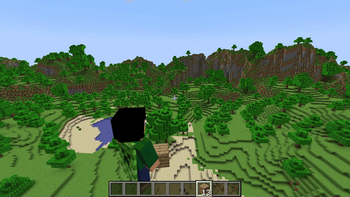
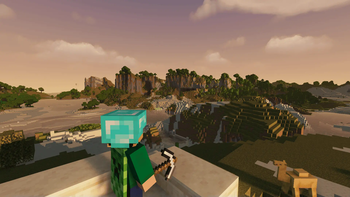
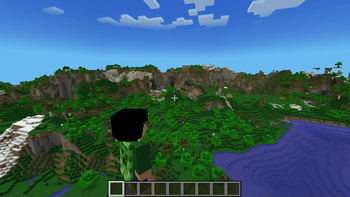
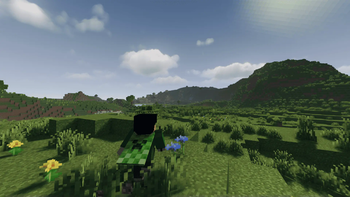
Über dieses Modpack

Is a 'Bare bone' Modpack of Minecraft Java parodying Windows 98 Second Edition that adds new features, compatibility, and fixes.
Minecraft Java SE project is aimed to add and expand gameplay features that mojang overlooked and didnt bother to improve, This is a client-side modpack so switching between vanilla world should be okay, you are also expected to add any mods you want for yourself.
View the Versions page before download/Updating The Modpack!
Require atleast 4gb memory allocation after installation!
🔑 Key Features :
✅ Proper Third Person Gameplay
✅ Optifine Resource pack Compability
✅ Improved Performance
✅ LoD System
✅ Backport World generations
✅ Easy Multiplayer setup
Initial Release of Minecraft Java SE Features (1.20.4JSE1.0):
- Proper Third person Gameplay
- Community Bug fixes
- Supports Optifine resources pack
- Support Shaders
- Added LoD system in Render distance
- Memory Optimization
- Added Ambient sounds
- Added Sound reverberation
- Animated Player movement
- In-game Downloadable Resources
Modpack License
This modpack is licensed under the MIT License, but only as it pertains to the modpack configuration and custom modifications made by the pack creator.
This modpack is a compilation of various third-party mods, each of which is subject to its own respective license. Users must comply with the licensing terms of each included mod.
This modpack is distributed for non-commercial purposes only.
No monetary gain is permitted from its distribution.
Proper attribution must be given to the original mod authors, as required by their respective licenses.
By downloading or using this modpack, you acknowledge and agree to these terms.
Credits
- Tranben: [ETF](https://modrinth.com/mod/entity-model-features), [EMF](https://modrinth.com/mod/entitytexturefeatures)
- creativemd: [Ambientsounds](https://modrinth.com/mod/ambientsounds), [Creativecore](https://modrinth.com/mod/creativecore), [Itemphysic lite](https://modrinth.com/mod/itemphysic-lite)
- FoundationGames: [Animatica](https://modrinth.com/mod/animatica)
- architectury: [Architectury api](https://modrinth.com/mod/architectury-api)
- UltimatChamp: [Bettergrassify](https://modrinth.com/mod/bettergrassify)
- shsupercm: [Cit resewn](https://modrinth.com/mod/cit-resewn)
- shedaniel: [Cloth config](https://modrinth.com/mod/cloth-config)
- PepperCode1: [Continuity](https://modrinth.com/mod/continuity)
- isxander: [Debugify](https://modrinth.com/mod/debugify), [YACL](https://modrinth.com/mod/yacl)
- jeseibel: [Distanthorizons](https://modrinth.com/mod/distanthorizons)
- modmuss50, sfPlayer1: [Fabric api](https://modrinth.com/mod/fabric-api), [Fabric language kotlin](https://modrinth.com/mod/fabric-language-kotlin)
- AMereBagatelle: [Fabricskyboxes](https://modrinth.com/mod/fabricskyboxes)
- FlashyReese: [Fabricskyboxes interop](https://modrinth.com/mod/fabricskyboxes-interop)
- malte0811: [Ferrite core](https://modrinth.com/mod/ferrite-core)
- Fuzs: [Forge config api port](https://modrinth.com/mod/forge-config-api-port)
- comp500: [Indium](https://modrinth.com/mod/indium)
- coderbot: [Iris](https://modrinth.com/mod/iris)
- LambdAurora: [Lambdynamiclights](https://modrinth.com/mod/lambdynamiclights)
- leawind: [Leawind third person](https://modrinth.com/mod/leawind-third-person)
- FX: [Memoryleakfix](https://modrinth.com/mod/memoryleakfix)
- Terraformers: [Modmenu](https://modrinth.com/mod/modmenu)
- MehVahdJukaar: [Modelfix](https://modrinth.com/mod/modelfix)
- tr7zw: [Not enough animations](https://modrinth.com/mod/not-enough-animations)
- opekope2: [Optigui](https://modrinth.com/mod/optigui)
- Motschen: [Puzzle](https://modrinth.com/mod/puzzle)
- DeDiamondPro: [Resourcify](https://modrinth.com/mod/resourcify)
- jellysquid3: [Sodium](https://modrinth.com/mod/sodium)
- henkelmax: [Sound physics remastered](https://modrinth.com/mod/sound-physics-remastered)
- Patbox: [Placeholder api](https://modrinth.com/mod/placeholder-api)
- Pepperoni-Jabroni: [Third person maps](https://modrinth.com/mod/third-person-maps)
- FreshLX: [Fresh animations](https://modrinth.com/resourcepack/fresh-animations), [Fresh animations extensions](https://modrinth.com/resourcepack/fresh-animations-extensions)
- TrasTick, IthanMendoza: [Fresh moves](https://modrinth.com/resourcepack/tras-fresh-player)
- KDXavier: [Makeup ultra fast shaders](https://modrinth.com/shader/makeup-ultra-fast-shaders)
- TheCMK: [Mellow](https://modrinth.com/shader/mellow)
- felixmgoff: [Minimal](https://modrinth.com/shader/minimal-shader)
Verfügbare Versionen
Minecraft: Java Second Edition Server einrichten
Server bestellen
Wähle mindestens 4 GB RAM (6 GB empfohlen für Minecraft: Java Second Edition). Je nach Spieleranzahl: +1 GB pro 5 Spieler.
Modpack im Dashboard installieren
Öffne den Modpack-Browser im Dashboard, suche nach "Minecraft: Java Second Edition" und klicke "Installieren". Der fabric-Loader und Minecraft 1.21.4 werden automatisch konfiguriert.
Server starten & spielen
Starte den Server – alle Mods werden automatisch geladen. Teile die Server-IP mit Freunden und spielt zusammen!
Häufige Fragen
Minecraft: Java Second Edition Server crasht oder startet nicht – was tun?
Häufigste Ursachen: zu wenig RAM oder falscher fabric-Loader. Prüfe latest.log auf "OutOfMemoryError" → erhöhe RAM auf mindestens 6 GB. Bei "Mixin" oder "ClassNotFoundException": Modpack-Version und Loader stimmen nicht überein. Bei Mado Hosting werden Loader und Minecraft-Version beim Modpack-Install automatisch konfiguriert – das verhindert die meisten Startprobleme.
Wie viel RAM braucht ein Minecraft: Java Second Edition Server wirklich?
Minimum 4 GB, empfohlen 6 GB für stabile Performance. +1 GB pro 5 Spieler. Wichtig: Minecraft-Modpacks brauchen mehr RAM als Vanilla – plane pro zusätzlichem Spieler extra ein. Bei Mado Hosting kannst du den RAM jederzeit live hochskalieren, ohne Datenverlust (ab €5.2/Monat).
Kann ich eigene Mods zu Minecraft: Java Second Edition hinzufügen, ohne Konflikte?
Ja, aber achte auf die Kompatibilität: Nutze nur Mods für den gleichen Loader (fabric) und die gleiche Minecraft-Version (1.21.4). Häufige Probleme: ID-Konflikte bei Rezept-Mods und inkompatible Coremod-Versionen. Im Mado Dashboard zeigt der Mod-Browser nur kompatible Mods an und warnt bei bekannten Konflikten.
Minecraft: Java Second Edition Server laggt – Performance-Tipps
1) RAM auf 6 GB+ erhöhen. 2) Server-View-Distance auf 8 reduzieren (server.properties). 3) Pre-Generiere Chunks mit dem "Chunky" Plugin. 4) Prüfe mit /spark profiler welche Mods die meiste Tick-Time verbrauchen. Bei Mado Hosting laufen alle Server auf NVMe-SSDs mit dedizierten CPU-Kernen – das eliminiert Hardware als Engpass.
Ähnliche Modpacks

![Cobblemon Official Modpack [Fabric]](https://cdn.modrinth.com/data/5FFgwNNP/e7f9ee2e9d361623847853fe2ddce42f519ee64f.png)
![COBBLEVERSE - Pokemon Adventure [Cobblemon]](https://cdn.modrinth.com/data/Jkb29YJU/581ecf54530972afb18a04660afd820f2f24f6c7.png)
![Better MC [FABRIC] - BMC2](https://cdn.modrinth.com/data/shFhR8Vx/a19c2bcb51d38f32f138d3607e91cb2b7b8e387f_96.webp)


Minecraft: Java Second Edition Server mieten
Starte deinen eigenen Server mit automatischer Modpack-Installation.
Unterstützte Versionen
Starte deinen Minecraft: Java Second Edition Server jetzt
Ab €5.20/Monat; für die beste Performance werden 6 GB RAM empfohlen.
Server konfigurieren →