
Minecraft Nomad
A vanilla+ modpack that will help you play out your nomadic dreams.
Screenshots
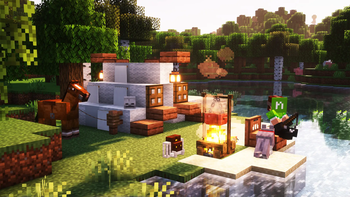
Über dieses Modpack
Minecraft Nomad is a Vanilla+ Modpack that adds quite a few quality of life and adventure mods.
Notable Features
- Explorer's Camp helps create small campsites that pack and unpack themselves to take with you on your journeys.
- Horses and Donkeys won't drown in water and can run through leaves making them infinitely more useful.
- Traveler's Backpack for extra storage and sleeping bags.
- NiftyCarts to bring with you on your journeys
- A bunch of new structures and locations for you to explore.
- A bunch of quality of life mods.
- JourneyMap, a minimap mod for you to keep track of your travels.
- Flashback to get cool clips and shots of your playthrough.
- Removed Herobrine
Some Gameplay Rules to Make It More Challenging
- no punching wood
- no crafting armor above leather (you can wear any armor you find)
- the only utility blocks allowed to be crafted and picked up are crafting tables, campfires, chests and smithing tables (other utility blocks can be used if found)
- no crafting beds (sleeping bags are an exception)
- cannot stay in the same place for longer than 3 days
- no crafting tools above stone
- the only ore you can smelt is copper
- no farming
- no placing chests on the ground
**None of the Mods or shaders in this modpack are my creations. Thanks to all of the amazing mod authors that created these mods
Full Mod List
- Entity Model Features
- Entity Texture Features
- Architectury API
- Audaki Cart Engine (Faster Minecarts)
- BetterF3
- Borderless Fullscreen
- Camera Utils
- Cardinal Components API
- Cherished Worlds
- Cloth Config API
- Cobweb
- Collective
- Continuity
- CreativeCore
- Cristel Lib
- Cubes Without Borders
- Dehydration
- Dungeons and Taverns
- Essential Mod
- Explorer's Camp
- Explorify
- Fabric API
- FallingTree
- Flashback
- Forge Config API Port
- GlitchCore
- Fusion (Connected Textures)
- Horse Buff
- Iceberg
- Indium
- InvMove
- Iris Shaders
- JourneyMap
- Just Enough Items
- Kiwi 🥝
- LambDynamicLights
- Leaf Me Alone
- Lightweight Inventory Sorting
- Lithium
- M.R.U
- Mod Menu
- ModernFix
- NiftyCarts
- Noisium
- Not Enough Animations
- oωo (owo-lib)
- PandaLib
- Prism
- Serene Seasons
- Shulker Box Tooltip
- Snow! Real Magic! ⛄
- Sodium
- Soul Fire'd
- Sound Physics Remastered
- Sparse Structures
- Structory
- Text Placeholder API
- Tidal Towns
- Tough As Nails
- Towns and Towers
- Traveler's Backpack
- UnionLib
- Vanilla Refresh
- Villager Transportation
- YUNG's API
Verfügbare Versionen
Minecraft Nomad Server einrichten
Server bestellen
Wähle mindestens 6 GB RAM (8 GB empfohlen für Minecraft Nomad). Je nach Spieleranzahl: +1 GB pro 5 Spieler.
Modpack im Dashboard installieren
Öffne den Modpack-Browser im Dashboard, suche nach "Minecraft Nomad" und klicke "Installieren". Der fabric-Loader und Minecraft 1.21 werden automatisch konfiguriert.
Server starten & spielen
Starte den Server – alle Mods werden automatisch geladen. Teile die Server-IP mit Freunden und spielt zusammen!
Häufige Fragen
Minecraft Nomad Server crasht oder startet nicht – was tun?
Häufigste Ursachen: zu wenig RAM oder falscher fabric-Loader. Prüfe latest.log auf "OutOfMemoryError" → erhöhe RAM auf mindestens 8 GB. Bei "Mixin" oder "ClassNotFoundException": Modpack-Version und Loader stimmen nicht überein. Bei Mado Hosting werden Loader und Minecraft-Version beim Modpack-Install automatisch konfiguriert – das verhindert die meisten Startprobleme.
Wie viel RAM braucht ein Minecraft Nomad Server wirklich?
Minimum 6 GB, empfohlen 8 GB für stabile Performance. +1 GB pro 5 Spieler. Wichtig: Minecraft-Modpacks brauchen mehr RAM als Vanilla – plane pro zusätzlichem Spieler extra ein. Bei Mado Hosting kannst du den RAM jederzeit live hochskalieren, ohne Datenverlust (ab €7.800000000000001/Monat).
Kann ich eigene Mods zu Minecraft Nomad hinzufügen, ohne Konflikte?
Ja, aber achte auf die Kompatibilität: Nutze nur Mods für den gleichen Loader (fabric) und die gleiche Minecraft-Version (1.21). Häufige Probleme: ID-Konflikte bei Rezept-Mods und inkompatible Coremod-Versionen. Im Mado Dashboard zeigt der Mod-Browser nur kompatible Mods an und warnt bei bekannten Konflikten.
Minecraft Nomad Server laggt – Performance-Tipps
1) RAM auf 8 GB+ erhöhen. 2) Server-View-Distance auf 8 reduzieren (server.properties). 3) Pre-Generiere Chunks mit dem "Chunky" Plugin. 4) Prüfe mit /spark profiler welche Mods die meiste Tick-Time verbrauchen. Bei Mado Hosting laufen alle Server auf NVMe-SSDs mit dedizierten CPU-Kernen – das eliminiert Hardware als Engpass.
Ähnliche Modpacks
![Cobblemon Official Modpack [Fabric]](https://cdn.modrinth.com/data/5FFgwNNP/e7f9ee2e9d361623847853fe2ddce42f519ee64f.png)
![COBBLEVERSE - Pokemon Adventure [Cobblemon]](https://cdn.modrinth.com/data/Jkb29YJU/581ecf54530972afb18a04660afd820f2f24f6c7.png)
![Better MC [FABRIC] - BMC2](https://cdn.modrinth.com/data/shFhR8Vx/a19c2bcb51d38f32f138d3607e91cb2b7b8e387f_96.webp)


![Better MC [FORGE] - BMC4](https://cdn.modrinth.com/data/4BV47HRn/7f5ef7cc61b2593609aabef3ed07a866a4f11b73_96.webp)
Minecraft Nomad Server mieten
Starte deinen eigenen Server mit automatischer Modpack-Installation.
Details
- Lizenz
- LicenseRef-All-Rights-Reserved
- Server-seitig
- Nicht unterstützt
- Client-seitig
- Erforderlich
Unterstützte Versionen
Starte deinen Minecraft Nomad Server jetzt
Ab €7.80/Monat; für die beste Performance werden 8 GB RAM empfohlen.
Server konfigurieren →