MYLP's Create
Create focused Modpack of the MYLP Group. Early state, changes all the time, but it works. A mix of mostly exploration- and techmods
Screenshots
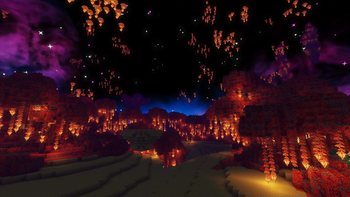
Über dieses Modpack
Magic meets Industry, Adventure meets Expansion
This modpack is primarily intended to contain as much Create mod content as possible, build industries, automate all the item your heart desires, turn mountain ranges into a super flat world and more. However so much of the same might be to bland for some people, this is why it is packed with mods to improve your rpg experience, from a proximity voice chat to dungeons, from a new arsenal of weapons to an onslaught of magic this modpack has it all.
Exploration
Bored of traveling the world on foot or using an elytra? We've got you covered, build your own airships weaponize them with cannons or create your own mobile superbase, the options are endless with the help of Valkyrien skies and extras.
Server Usage
You need to remove following mods on a Server for it to work:
- Embedium
- Itemlocks
- Occulus
Early Build
This modpack is currently in a pretty early stage, mods and all are in a state I'm somewhat happy with however balancing and mods interacting with each other need a lot of work, feel free to state your thoughts on what should be adjusted (currently not set up).
Credits
Aquaculture 2:
[https://www.curseforge.com/minecraft/mc-mods/aquaculture]
Cosmetic Armor Reworked:
[https://www.curseforge.com/minecraft/mc-mods/cosmetic-armor-reworked]
Verfügbare Versionen
MYLP's Create Server einrichten
Server bestellen
Wähle mindestens 6 GB RAM (10 GB empfohlen für MYLP's Create). Je nach Spieleranzahl: +1 GB pro 4 Spieler.
Modpack im Dashboard installieren
Öffne den Modpack-Browser im Dashboard, suche nach "MYLP's Create" und klicke "Installieren". Der forge-Loader und Minecraft 1.21.1 werden automatisch konfiguriert.
Server starten & spielen
Starte den Server – alle Mods werden automatisch geladen. Teile die Server-IP mit Freunden und spielt zusammen!
Häufige Fragen
MYLP's Create Server crasht oder startet nicht – was tun?
Häufigste Ursachen: zu wenig RAM oder falscher forge-Loader. Prüfe latest.log auf "OutOfMemoryError" → erhöhe RAM auf mindestens 10 GB. Bei "Mixin" oder "ClassNotFoundException": Modpack-Version und Loader stimmen nicht überein. Bei Mado Hosting werden Loader und Minecraft-Version beim Modpack-Install automatisch konfiguriert – das verhindert die meisten Startprobleme.
Wie viel RAM braucht ein MYLP's Create Server wirklich?
Minimum 6 GB, empfohlen 10 GB für stabile Performance. +1 GB pro 4 Spieler. Wichtig: Minecraft-Modpacks brauchen mehr RAM als Vanilla – plane pro zusätzlichem Spieler extra ein. Bei Mado Hosting kannst du den RAM jederzeit live hochskalieren, ohne Datenverlust (ab €7.800000000000001/Monat).
Kann ich eigene Mods zu MYLP's Create hinzufügen, ohne Konflikte?
Ja, aber achte auf die Kompatibilität: Nutze nur Mods für den gleichen Loader (forge) und die gleiche Minecraft-Version (1.21.1). Häufige Probleme: ID-Konflikte bei Rezept-Mods und inkompatible Coremod-Versionen. Im Mado Dashboard zeigt der Mod-Browser nur kompatible Mods an und warnt bei bekannten Konflikten.
MYLP's Create Server laggt – Performance-Tipps
1) RAM auf 10 GB+ erhöhen. 2) Server-View-Distance auf 8 reduzieren (server.properties). 3) Pre-Generiere Chunks mit dem "Chunky" Plugin. 4) Prüfe mit /spark profiler welche Mods die meiste Tick-Time verbrauchen. Bei Mado Hosting laufen alle Server auf NVMe-SSDs mit dedizierten CPU-Kernen – das eliminiert Hardware als Engpass.
Ähnliche Modpacks
![Cobblemon Official Modpack [Fabric]](https://cdn.modrinth.com/data/5FFgwNNP/e7f9ee2e9d361623847853fe2ddce42f519ee64f.png)
![COBBLEVERSE - Pokemon Adventure [Cobblemon]](https://cdn.modrinth.com/data/Jkb29YJU/581ecf54530972afb18a04660afd820f2f24f6c7.png)
![Better MC [FABRIC] - BMC2](https://cdn.modrinth.com/data/shFhR8Vx/a19c2bcb51d38f32f138d3607e91cb2b7b8e387f_96.webp)


![Better MC [FORGE] - BMC4](https://cdn.modrinth.com/data/4BV47HRn/7f5ef7cc61b2593609aabef3ed07a866a4f11b73_96.webp)
MYLP's Create Server mieten
Starte deinen eigenen Server mit automatischer Modpack-Installation.
Details
- Lizenz
- LicenseRef-All-Rights-Reserved
- Server-seitig
- Erforderlich
- Client-seitig
- Erforderlich
Unterstützte Versionen
Starte deinen MYLP's Create Server jetzt
Ab €7.80/Monat; für die beste Performance werden 10 GB RAM empfohlen.
Server konfigurieren →