
NanoFabric
A Fabric Optimization modpack for every PC [1.21.5 and up]
Screenshots
Über dieses Modpack
NanoFabric is a optimization only modpack for users who need performance to go.
We include Iris for 1.21.5 to 26.1.2

What's The Benefit Of This Modpack?
ϟ Absolute Performance Only, meaning we try and give the best performance without unnecessary mods.
🪽 Lightweight, self explanatory.
∞ User Support, if you have a crash/problem with NanoFabric we can help you. We also support other modpack issue.
Who does the testing for NanoFabric?
Forlorn does the main testing and what mods enter and leaves the list.
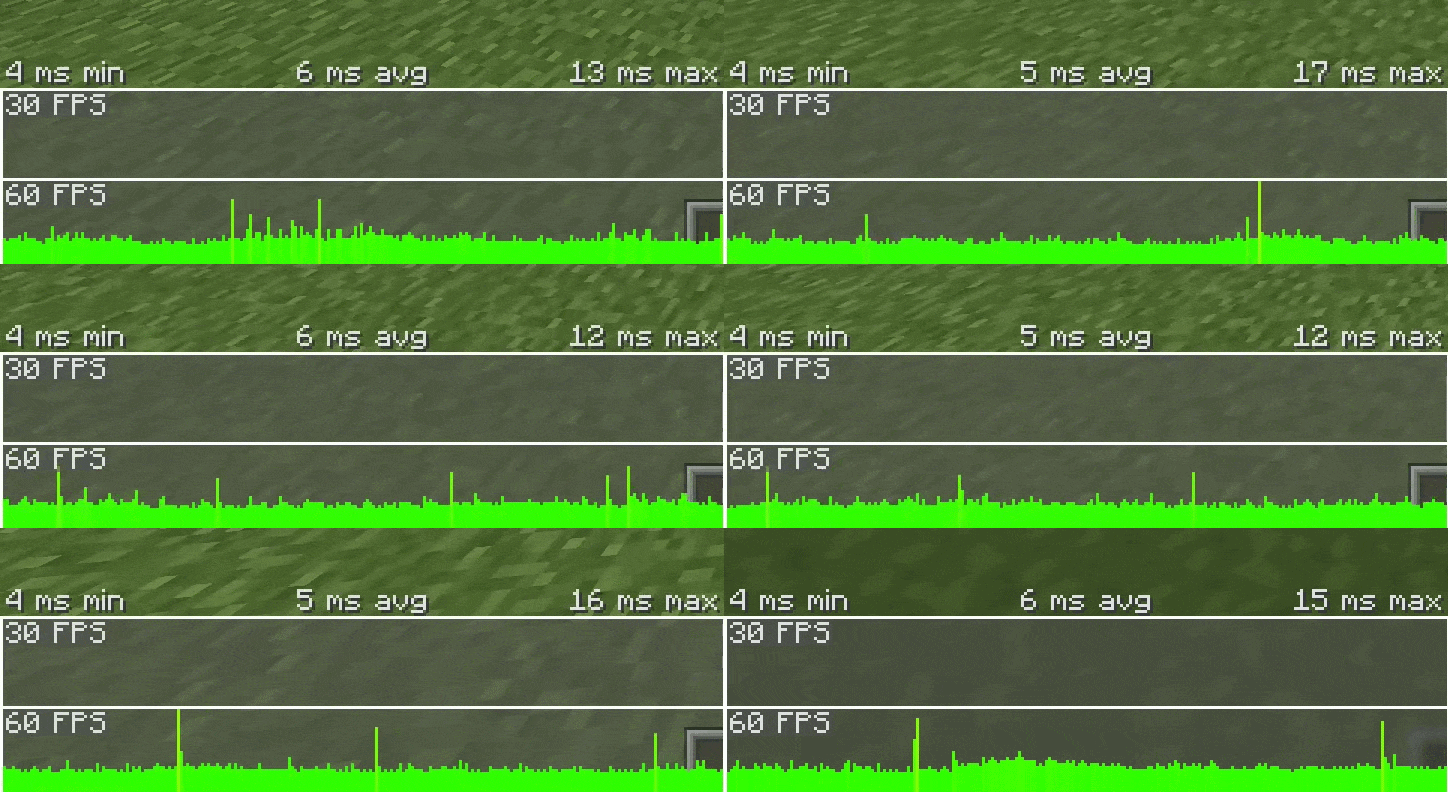
Grassplate, does testing on FPS, stutters, stability, and chunk load speed.
Forlorns Pc's Specs Are
- GeForce RTX 3050 6GB VRAM "Type of GPU: Dedicated GPU",
- Intel Core i5-8500,
- 16 GB of DDR4 RAM, 4 GB is used for Minecraft,
- Type of Pc: Tower PC
Grassplate Pc's Specs Are
- AMD RX 7900 XT "Type of GPU: Dedicated GPU",
- AMD Ryzen 7 7800X3D,
- 32GB of DDR5 RAM, 6 GB is used for Minecraft,
- Type of Pc: Tower PC
Recommended Settings For Users
If a setting has a () around it, it means its recommened for extra performance but is optional.
Low End:
8-12 Render Distance
5-7 Simulation Distance Cloud = Fast
See-Through Leaves = Off
Particles = Minimal
Medium End:
15-22 Render Distance
10-15 Simulation Distance
Cloud = Fancy
(See-Through Leaves) = Off or ON
(Particles) = Minimal or All
High End:
25-30 Render Distance
15 Simulation Distance
Cloud = Fancy
(See-Through Leaves) = Off or ON
Particles = All
WARNING FOR VULKAN API/MOD
Vulkan may be incompatible with some mods and systems, if the the system was released in 2016 or before. If you want great performance but more compatiblilty, use our Sodium version instead of our Vulkan version for 1.21.5 to 26.1.2! Sodium now support Vulkan starting 26.2!
Answers For The Concerns That May Occur
Simple Questions
Will this improve FPS massively?
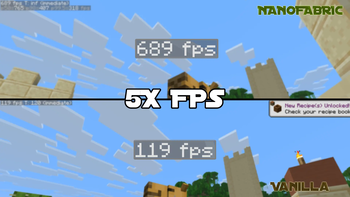
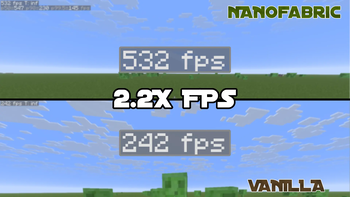
Yes, NanoFabric is focused on massively improving performance, from doing stability increase to FPS increase. For Low to High end PC's users to enjoy. And even for people who can't use Nvidium, the performance will be 2 to 5 times more!Will it update to the newest version?
Yes. I'll try and make NanoFabric update to the newest version of Minecraft for you to play.Will it have Iris?
Depends on Minecraft version, from 1.21.5 to 26.1.2 you will have Iris to use Shaders but because they won't work with Vulkan API for 26.2+, we will no longer add them to the modpack list.Is it like those other Optimization modpacks?
Pretty much... yeah, what am I going to argue? We all do the same purpose by fixing Minecrafts bad performance. We all use the default mods, the only difference we could say is that we focus to be close AS MUCH to vanilla Minecraft while giving best performance.
Safety Questions
Is this safe to use?
Yes, all of these mods was tested and reviewed to see if its safe or not, if they weren't safe, then they would be removed and will never be added to NanoFabric even if they claimed that they stopped, they already broke our trust.Will it work with other mods?
Depends what version you use. Vulkan verions in my Modpack could cause crashes or glitches, as it changes the API from OpenGL to an API not support by Minecraft, while with Sodium was made to give great performance and better compability because it keeps the API Minecraft uses which is OpenGL, by not including Vulkan.Will this break Multiplayer servers?
No, neither Vulkan nor Sodium will break your multiplayer servers.
Vanilla Minecraft Concern Questions
Will it kill the vanilla feeling?
No, NanoFabric was made to make the vanilla Minecraft intact and will NOT remove the vanilla feel but instead, just performance to make it feel smoother.Will this change gameplay or add new features?
No, like before this is just a performance modpack that will NOT ADD any new mechanics nor items in Minecraft, this was only made for you to enjoy the performance and game on vanilla Minecraft.
Other Possible Questions
Do I need to configure anything?
No, it was made to be ready out of the box, but you can change it in your needs for performance.Can I add/remove mods in the Modpack?
Absolutely, you may add/remove any mods you want in NanoFabric, from what you want and need for your Minecraft worlds but if you remove/swap some performance mod it may decrease your FPS or stability.
Warning:
This is those stereotypical modpacks that gives "FPS Boost", this is my fault at that time as I didn't realize it was already a plague at that time. If you are not interested, please look other cool and better projects.
Other Projects I Work On


Verfügbare Versionen
NanoFabric Server einrichten
Server bestellen
Wähle mindestens 4 GB RAM (6 GB empfohlen für NanoFabric). Je nach Spieleranzahl: +1 GB pro 8 Spieler.
Modpack im Dashboard installieren
Öffne den Modpack-Browser im Dashboard, suche nach "NanoFabric" und klicke "Installieren". Der fabric-Loader und Minecraft 26.3 werden automatisch konfiguriert.
Server starten & spielen
Starte den Server – alle Mods werden automatisch geladen. Teile die Server-IP mit Freunden und spielt zusammen!
Häufige Fragen
NanoFabric Server crasht oder startet nicht – was tun?
Häufigste Ursachen: zu wenig RAM oder falscher fabric-Loader. Prüfe latest.log auf "OutOfMemoryError" → erhöhe RAM auf mindestens 6 GB. Bei "Mixin" oder "ClassNotFoundException": Modpack-Version und Loader stimmen nicht überein. Bei Mado Hosting werden Loader und Minecraft-Version beim Modpack-Install automatisch konfiguriert – das verhindert die meisten Startprobleme.
Wie viel RAM braucht ein NanoFabric Server wirklich?
Minimum 4 GB, empfohlen 6 GB für stabile Performance. +1 GB pro 8 Spieler. Wichtig: Minecraft-Modpacks brauchen mehr RAM als Vanilla – plane pro zusätzlichem Spieler extra ein. Bei Mado Hosting kannst du den RAM jederzeit live hochskalieren, ohne Datenverlust (ab €5.2/Monat).
Kann ich eigene Mods zu NanoFabric hinzufügen, ohne Konflikte?
Ja, aber achte auf die Kompatibilität: Nutze nur Mods für den gleichen Loader (fabric) und die gleiche Minecraft-Version (26.3). Häufige Probleme: ID-Konflikte bei Rezept-Mods und inkompatible Coremod-Versionen. Im Mado Dashboard zeigt der Mod-Browser nur kompatible Mods an und warnt bei bekannten Konflikten.
NanoFabric Server laggt – Performance-Tipps
1) RAM auf 6 GB+ erhöhen. 2) Server-View-Distance auf 8 reduzieren (server.properties). 3) Pre-Generiere Chunks mit dem "Chunky" Plugin. 4) Prüfe mit /spark profiler welche Mods die meiste Tick-Time verbrauchen. Bei Mado Hosting laufen alle Server auf NVMe-SSDs mit dedizierten CPU-Kernen – das eliminiert Hardware als Engpass.
Ähnliche Modpacks

![Cobblemon Official Modpack [Fabric]](https://cdn.modrinth.com/data/5FFgwNNP/e7f9ee2e9d361623847853fe2ddce42f519ee64f.png)
![COBBLEVERSE - Pokemon Adventure [Cobblemon]](https://cdn.modrinth.com/data/Jkb29YJU/581ecf54530972afb18a04660afd820f2f24f6c7.png)
![Better MC [FABRIC] - BMC2](https://cdn.modrinth.com/data/shFhR8Vx/a19c2bcb51d38f32f138d3607e91cb2b7b8e387f_96.webp)


NanoFabric Server mieten
Starte deinen eigenen Server mit automatischer Modpack-Installation.
Details
- Lizenz
- Creative Commons Attribution Non Commercial Share Alike 4.0 International
- Server-seitig
- Nicht unterstützt
- Client-seitig
- Erforderlich
Unterstützte Versionen
Starte deinen NanoFabric Server jetzt
Ab €5.20/Monat; für die beste Performance werden 6 GB RAM empfohlen.
Server konfigurieren →