
Nohtis Apohcalyps
Try to survive the most realistic and immersive zombie apocalypse in multiplayer.
Screenshots
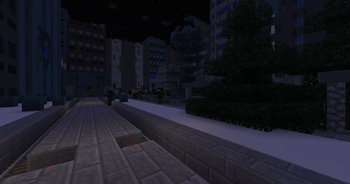
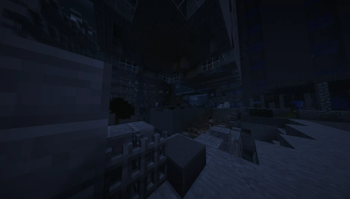
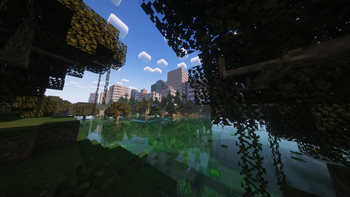
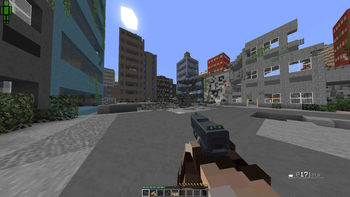
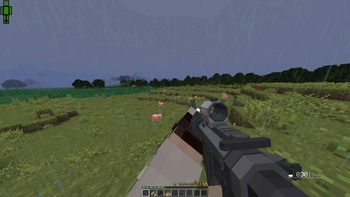
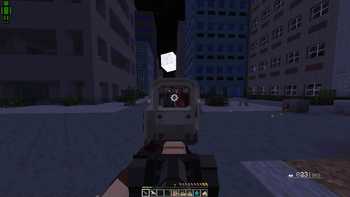
Über dieses Modpack
Nohtis Apohcalyps
An unknown disease infected the entire world. This disease is turning infected humans into zombies.
You are one of humanity's last survivor.
You have to find guns, ammunition, food, and resources to survive in this dangerous world.
Travel across a living abandoned world, fight against hostile players and create a factory to get new weapons.
News about the 0.11.0
The craft will be added in 0.11.0. It will be based on Create.
It is very long to implement it. If someone wants to help me, check the repository of the modpack!
Usage
First start
When you start the modpack for the first time, you may go to the control options and click on "reset" for each keybindings.
Now you can set your own keybindings.
And you can join a server!
Server usage
Check this documentation if the voice chat is not working.
Create a new world
This modpack was designed to be played in multiplayer. The single-player experience does not reflect the multiplayer experience!
You just have to follow the default settings to create a new world.
Wiki
The full list of mods used by the modpack is available here.
Check the wiki of a special mod if you need more informations about a specific feature.
A general wiki is available here.
Modularity
Due to the nature of the modpack, you can easily create tons of new way to play this modpack.
You can easily create these new game modes by creating custom datapacks.
An example is available here: this is a datapack turning Nohtis Apohcalyps into an extraction shooter like Escape From Tarkov.
You can edit this modpack if you respect the AGPL license.
Credits
List of all mods, resourcepacks and musics that are external to Modrinth.
Every mod, resourcepack or music included in this modpack can be used freely if we credit to the author (according to the license or its description).
Mods - Core
- Timeless and Classics Guns [curseforge] -> Guns
- Obfuscate [curseforge] -> lib for Timeless and Classics Guns
- Zombie Awarness [curseforge] -> control zombies
- CoroUtil [curseforge] -> lib for Zombie Awarness
- Apocalyptic Arsenal [curseforge] -> weapons
- KubeJS [curseforge but newest versions are on modrinth] -> customize the game with JS
- Architectury API [curseforge but newest versions are on modrinth] -> lib for KubeJS
- Rhino [curseforge but newest versions are on modrinth] -> lib for KubeJS
Mods - Improvements
- Not Enough Animations [curseforge but newest versions are on modrinth] -> add animations for player
- TRansliterationLib [curseforge] -> lib for Not Enough Animations
- Shutup Experimental Settings! [curseforge] -> remove boring experimental features warning
- Toast Control [curseforge] -> obvious
- Placebo [curseforge but newest versions are on modrinth] -> lib for Toast Control
- Sound Filter [curseforge] -> improve sounds
- Default Options [curseforge but newest versions are on modrinth] -> setup the default options
- ParCool! [curseforge] -> better parkour
- Presence Footsteps [curseforge] -> add footsteps
Optimizations
- LazyDFU [curseforge] -> smooth boot
Resource packs
- Tissou's Zombie Pack [curseforge] -> better zombies textures
Mods - Apocalypse
- Decorative Blocks [curseforge but newest versions are on modrinth] -> obvious
- Mob Sunscreen [curseforge but newest versions are on modrinth] -> make zombies not burning during the day
- Total Darkness [curseforge] -> total darkness during the night
- Sophisticated Backpacks [curseforge] -> add backpacks
Music
The modpack is using the album A season in the dark, a bottomless trench by Feldup.
Verfügbare Versionen
Nohtis Apohcalyps Server einrichten
Server bestellen
Wähle mindestens 6 GB RAM (8 GB empfohlen für Nohtis Apohcalyps). Je nach Spieleranzahl: +1 GB pro 5 Spieler.
Modpack im Dashboard installieren
Öffne den Modpack-Browser im Dashboard, suche nach "Nohtis Apohcalyps" und klicke "Installieren". Der forge-Loader und Minecraft 1.16.5 werden automatisch konfiguriert.
Server starten & spielen
Starte den Server – alle Mods werden automatisch geladen. Teile die Server-IP mit Freunden und spielt zusammen!
Häufige Fragen
Nohtis Apohcalyps Server crasht oder startet nicht – was tun?
Häufigste Ursachen: zu wenig RAM oder falscher forge-Loader. Prüfe latest.log auf "OutOfMemoryError" → erhöhe RAM auf mindestens 8 GB. Bei "Mixin" oder "ClassNotFoundException": Modpack-Version und Loader stimmen nicht überein. Bei Mado Hosting werden Loader und Minecraft-Version beim Modpack-Install automatisch konfiguriert – das verhindert die meisten Startprobleme.
Wie viel RAM braucht ein Nohtis Apohcalyps Server wirklich?
Minimum 6 GB, empfohlen 8 GB für stabile Performance. +1 GB pro 5 Spieler. Wichtig: Minecraft-Modpacks brauchen mehr RAM als Vanilla – plane pro zusätzlichem Spieler extra ein. Bei Mado Hosting kannst du den RAM jederzeit live hochskalieren, ohne Datenverlust (ab €7.800000000000001/Monat).
Kann ich eigene Mods zu Nohtis Apohcalyps hinzufügen, ohne Konflikte?
Ja, aber achte auf die Kompatibilität: Nutze nur Mods für den gleichen Loader (forge) und die gleiche Minecraft-Version (1.16.5). Häufige Probleme: ID-Konflikte bei Rezept-Mods und inkompatible Coremod-Versionen. Im Mado Dashboard zeigt der Mod-Browser nur kompatible Mods an und warnt bei bekannten Konflikten.
Nohtis Apohcalyps Server laggt – Performance-Tipps
1) RAM auf 8 GB+ erhöhen. 2) Server-View-Distance auf 8 reduzieren (server.properties). 3) Pre-Generiere Chunks mit dem "Chunky" Plugin. 4) Prüfe mit /spark profiler welche Mods die meiste Tick-Time verbrauchen. Bei Mado Hosting laufen alle Server auf NVMe-SSDs mit dedizierten CPU-Kernen – das eliminiert Hardware als Engpass.
Ähnliche Modpacks
![Cobblemon Official Modpack [Fabric]](https://cdn.modrinth.com/data/5FFgwNNP/e7f9ee2e9d361623847853fe2ddce42f519ee64f.png)
![COBBLEVERSE - Pokemon Adventure [Cobblemon]](https://cdn.modrinth.com/data/Jkb29YJU/581ecf54530972afb18a04660afd820f2f24f6c7.png)
![Better MC [FABRIC] - BMC2](https://cdn.modrinth.com/data/shFhR8Vx/a19c2bcb51d38f32f138d3607e91cb2b7b8e387f_96.webp)


![Better MC [FORGE] - BMC4](https://cdn.modrinth.com/data/4BV47HRn/7f5ef7cc61b2593609aabef3ed07a866a4f11b73_96.webp)
Nohtis Apohcalyps Server mieten
Starte deinen eigenen Server mit automatischer Modpack-Installation.
Details
- Lizenz
- GNU Affero General Public License v3.0 only
- Server-seitig
- Erforderlich
- Client-seitig
- Erforderlich
Unterstützte Versionen
Starte deinen Nohtis Apohcalyps Server jetzt
Ab €7.80/Monat; für die beste Performance werden 8 GB RAM empfohlen.
Server konfigurieren →