
Plutonium
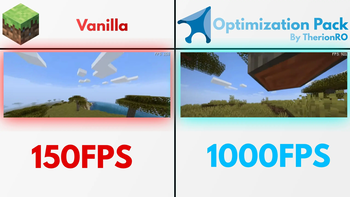
A modpack focused on maximizing performance, fixing bugs, and improving stability to deliver the best possible Minecraft experience. Up to 10X FPS improvement.
Screenshots
Über dieses Modpack
Minecraft Plutonium Pack
Choose your Plutonium flavour! 🍦
By ragedriver

Check out the official repo for Plutonium!
Check the Plutonium Wiki for more tweaks&optimizations!
A minecraft modpack focused on maximizing performance, fixing bugs, and improving stability to deliver the best possible Minecraft experience. Highly modular,customizable and bloat-free philosophy that encourages the users to make minecraft works their way.
Systems compatibility
Plutonium supports Linux,Windows,MacOS and FreeBSD.
All editions are being tested on the following operating systems before officially releasing them:
⚠️ The rolling release edition is only tested under Arch Linux against critical bugs
ℹ️ All releases are being tested on the latest versions of the listed operating systems and on real hardware (We are not using VMs for testing)
ℹ️ Apart from manually testing each edition on all listed operating systems, we also run an automated stress-testing script on each platform to ensure stability. This process includes repeatedly generating worlds with different seeds and terrain layouts, mass-deleting maps, loading each generated world under different rendering settings, and checking for performance regressions or log errors.
| System | Stable Edition | Vulkan Edition | 1.12.2 LTS |
|---|---|---|---|
| Arch Linux | ✅ | ✅ | ✅ |
| CachyOS | ✅ | ✅ | ✅ |
| Gentoo Linux | ✅ | ✅ | ✅ |
| Windows 10 Pro (EOL) | ✅ | ✅ | ✅ |
| Windows 10 LTSC IOT | ✅ | ✅ | ✅ |
| Windows 11 Pro | ✅ | ✅ | ✅ |
| MacOS Tahoe 26.5 | ✅ | ✅ | ✅ |
Hardware used for testing :
- RTX 4090 + AMD Ryzen 9950X + 96GB RAM 6800Mhz DDR5(Arch Linux,CachyOS,Gentoo Linux + Latest NVIDIA driver and packages from each distro repo)
- RTX 3060Ti + i9-9900K + 32GB RAM 3200Mhz DDR4(Windows 10 Pro End-Of-Life, Windows 10 LTSC IOT, Windows 11 Pro)
- Mac Mini M4 (MacOS)
ℹ️ Each operating system is stored on a different drive on each PC (Multiboot) and all apps/packages/security&os features are being updated manually before testing and releasing a new version of Plutonium
📦Explaining the flavours
Stable
Choose Plutonium – Stable for a reliable, well-tested, and highly compatible experience.
This edition prioritizes stability, performance, and broad mod compatibility, making it ideal for long-term gameplay and general use.
Performance may vary depending on your hardware and operating system.
Rolling Release/Unstable
Choose Plutonium – Rolling Release (Unstable) if you want early access to the latest features, updates, and optimization improvements before they are included in the Stable edition.
This edition is tested primarily for critical issues (such as crashes) but may contain bugs or instability.
It is recommended for testing, benchmarking, and advanced users, rather than long-term worlds.
Vulkan Edition
Choose Plutonium – Vulkan Edition for maximum performance and reduced CPU overhead through the use of a Vulkan-based rendering pipeline.
This edition may deliver significantly improved performance on supported hardware, but sacrifices compatibility with many mods, as Vulkan currently has more limited ecosystem support compared to the standard Sodium-based renderer.
Due to its minimal and focused mod stack, this edition is often the most stable in terms of internal consistency.
1.12.2-LTS
Choose Plutonium – 1.12.2 LTS (Long-Term Support) for an optimized and modernized experience on Minecraft 1.12.2.
This edition includes:
- performance improvements and bug fixes tailored for 1.12.2
- support for modern Java versions via Cleanroom
- improved compatibility with newer hardware and systems
Stability and performance may vary depending on your hardware and operating system.
Rankings
| Editions | Performance | Stability | Compatibility |
|---|---|---|---|
| Stable | 7/10 | 10/10 | 10/10 |
| Rolling/Unstable | 8/10 | 7/10 | 9/10 |
| Vulkan Edition | 10/10 | 10/10 | 7/10 |
| 1.12.2-LTS | 10/10 | 8/10 | 9/10 |
| Vanilla | 5/10 | 10/10 | 1/10 |
FAQ
➤What is this?
- This is how minecraft should be in terms of performance,I created this modpack so people can enjoy the best performance possible on Minecraft,without needing to buy a new PC,or lose time downloading the mods and updating them over and over again.This modpack is actively updated.
➤Is this free?
- Yes! All versions of Minecraft Plutonium are 100% free,please do not pay for this modpack as you may get scammed,always download this from the official GitHub page and Modrinth!
Verfügbare Versionen
Plutonium Server einrichten
Server bestellen
Wähle mindestens 4 GB RAM (6 GB empfohlen für Plutonium). Je nach Spieleranzahl: +1 GB pro 5 Spieler.
Modpack im Dashboard installieren
Öffne den Modpack-Browser im Dashboard, suche nach "Plutonium" und klicke "Installieren". Der fabric-Loader und Minecraft 26.2 werden automatisch konfiguriert.
Server starten & spielen
Starte den Server – alle Mods werden automatisch geladen. Teile die Server-IP mit Freunden und spielt zusammen!
Häufige Fragen
Plutonium Server crasht oder startet nicht – was tun?
Häufigste Ursachen: zu wenig RAM oder falscher fabric-Loader. Prüfe latest.log auf "OutOfMemoryError" → erhöhe RAM auf mindestens 6 GB. Bei "Mixin" oder "ClassNotFoundException": Modpack-Version und Loader stimmen nicht überein. Bei Mado Hosting werden Loader und Minecraft-Version beim Modpack-Install automatisch konfiguriert – das verhindert die meisten Startprobleme.
Wie viel RAM braucht ein Plutonium Server wirklich?
Minimum 4 GB, empfohlen 6 GB für stabile Performance. +1 GB pro 5 Spieler. Wichtig: Minecraft-Modpacks brauchen mehr RAM als Vanilla – plane pro zusätzlichem Spieler extra ein. Bei Mado Hosting kannst du den RAM jederzeit live hochskalieren, ohne Datenverlust (ab €5.2/Monat).
Kann ich eigene Mods zu Plutonium hinzufügen, ohne Konflikte?
Ja, aber achte auf die Kompatibilität: Nutze nur Mods für den gleichen Loader (fabric) und die gleiche Minecraft-Version (26.2). Häufige Probleme: ID-Konflikte bei Rezept-Mods und inkompatible Coremod-Versionen. Im Mado Dashboard zeigt der Mod-Browser nur kompatible Mods an und warnt bei bekannten Konflikten.
Plutonium Server laggt – Performance-Tipps
1) RAM auf 6 GB+ erhöhen. 2) Server-View-Distance auf 8 reduzieren (server.properties). 3) Pre-Generiere Chunks mit dem "Chunky" Plugin. 4) Prüfe mit /spark profiler welche Mods die meiste Tick-Time verbrauchen. Bei Mado Hosting laufen alle Server auf NVMe-SSDs mit dedizierten CPU-Kernen – das eliminiert Hardware als Engpass.
Ähnliche Modpacks

![Cobblemon Official Modpack [Fabric]](https://cdn.modrinth.com/data/5FFgwNNP/e7f9ee2e9d361623847853fe2ddce42f519ee64f.png)
![COBBLEVERSE - Pokemon Adventure [Cobblemon]](https://cdn.modrinth.com/data/Jkb29YJU/581ecf54530972afb18a04660afd820f2f24f6c7.png)
![Better MC [FABRIC] - BMC2](https://cdn.modrinth.com/data/shFhR8Vx/a19c2bcb51d38f32f138d3607e91cb2b7b8e387f_96.webp)


Plutonium Server mieten
Starte deinen eigenen Server mit automatischer Modpack-Installation.
Details
- Lizenz
- GNU Affero General Public License v3.0 or later
- Server-seitig
- Optional
- Client-seitig
- Optional
Unterstützte Versionen
Starte deinen Plutonium Server jetzt
Ab €5.20/Monat; für die beste Performance werden 6 GB RAM empfohlen.
Server konfigurieren →