
Opti Boost Craft
Elevate your Minecraft experience with this mod pack. Enjoy improved FPS, reduced stutters, and lag-free gameplay, striking the perfect balance between performance and visuals.
Über dieses Modpack

What is Opti-Boost-Craft?
Dive into a superior Minecraft experience with OptiBoostCraft, a thoughtfully curated mod pack designed to elevate your gameplay. This collection seamlessly integrates performance-enhancing mods, expertly crafted by various talented creators, to improve FPS, reduce stutters, and eliminate lag. Enjoy smoother, more responsive gameplay as OptiBoostCraft optimizes resource allocation and employs advanced algorithms to enhance your Minecraft world without compromising visual quality.
Essential Notes
It's essential to note that OptiBoostCraft includes mods created by other talented individuals, and credit is duly given to their respective creators. This mod pack strikes the perfect balance between aesthetics and performance, ensuring an immersive adventure through blocky landscapes. Whether you're exploring vast terrains, battling formidable foes, or constructing intricate structures, OptiBoostCraft guarantees a lag-free and visually stunning experience. Transform your Minecraft journey today with OptiBoostCraft, and discover the impressive synergy of carefully selected mods that redefine how you perceive and enjoy the world of Minecraft.
Version 1.0.0
Introducing "OptiBoostCraft," a revolutionary mod pack designed to enhance your Minecraft gaming experience by significantly improving in-game FPS, minimizing stutters, and eliminating lag. Carefully curated and meticulously optimized, OptiBoostCraft combines a variety of performance-enhancing mods to ensure smoother and more enjoyable gameplay.
This mod pack addresses common performance issues that players encounter, utilizing advanced optimization techniques and resource management. With streamlined code and efficient algorithms, OptiBoostCraft prioritizes the allocation of system resources, resulting in a noticeable boost in frame rates. Say goodbye to frustrating lag spikes and choppy gameplay as OptiBoostCraft works seamlessly to provide a fluid and immersive Minecraft adventure.
OptiBoostCraft doesn't compromise on visual quality either. The mod pack fine-tunes graphical settings to strike the perfect balance between performance and aesthetics. You'll experience improved graphics without sacrificing the smoothness of your gameplay, making it an ideal choice for both casual players and dedicated enthusiasts.
Whether you're exploring vast landscapes, engaging in epic battles, or constructing intricate structures, OptiBoostCraft ensures that your Minecraft world runs effortlessly. Elevate your gaming experience and unlock the true potential of your hardware with the OptiBoostCraft mod pack – because every adventurer deserves a lag-free journey in the blocky realms of Minecraft.
Version 1.0.1
This Update includes a lot of new optimisations and massive improvements in Frames per second, Yet alone having any impact on visual fidelity, lists of mods included are: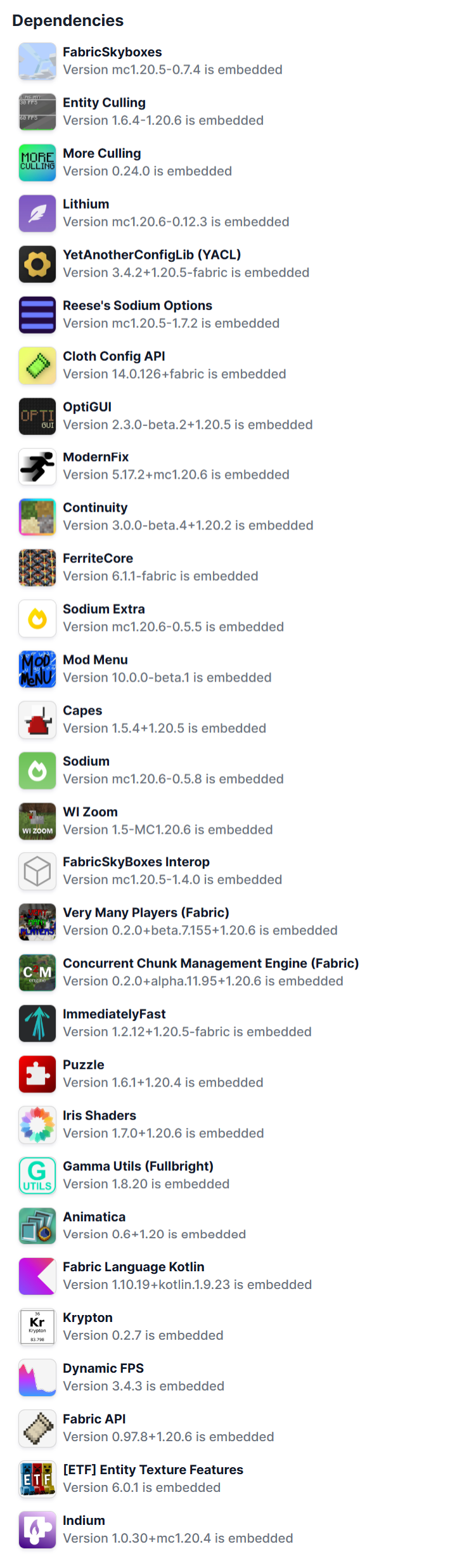
Verfügbare Versionen
Opti Boost Craft Server einrichten
Server bestellen
Wähle mindestens 4 GB RAM (6 GB empfohlen für Opti Boost Craft). Je nach Spieleranzahl: +1 GB pro 8 Spieler.
Modpack im Dashboard installieren
Öffne den Modpack-Browser im Dashboard, suche nach "Opti Boost Craft" und klicke "Installieren". Der fabric-Loader und Minecraft 26.1.2 werden automatisch konfiguriert.
Server starten & spielen
Starte den Server – alle Mods werden automatisch geladen. Teile die Server-IP mit Freunden und spielt zusammen!
Häufige Fragen
Opti Boost Craft Server crasht oder startet nicht – was tun?
Häufigste Ursachen: zu wenig RAM oder falscher fabric-Loader. Prüfe latest.log auf "OutOfMemoryError" → erhöhe RAM auf mindestens 6 GB. Bei "Mixin" oder "ClassNotFoundException": Modpack-Version und Loader stimmen nicht überein. Bei Mado Hosting werden Loader und Minecraft-Version beim Modpack-Install automatisch konfiguriert – das verhindert die meisten Startprobleme.
Wie viel RAM braucht ein Opti Boost Craft Server wirklich?
Minimum 4 GB, empfohlen 6 GB für stabile Performance. +1 GB pro 8 Spieler. Wichtig: Minecraft-Modpacks brauchen mehr RAM als Vanilla – plane pro zusätzlichem Spieler extra ein. Bei Mado Hosting kannst du den RAM jederzeit live hochskalieren, ohne Datenverlust (ab €5.2/Monat).
Kann ich eigene Mods zu Opti Boost Craft hinzufügen, ohne Konflikte?
Ja, aber achte auf die Kompatibilität: Nutze nur Mods für den gleichen Loader (fabric) und die gleiche Minecraft-Version (26.1.2). Häufige Probleme: ID-Konflikte bei Rezept-Mods und inkompatible Coremod-Versionen. Im Mado Dashboard zeigt der Mod-Browser nur kompatible Mods an und warnt bei bekannten Konflikten.
Opti Boost Craft Server laggt – Performance-Tipps
1) RAM auf 6 GB+ erhöhen. 2) Server-View-Distance auf 8 reduzieren (server.properties). 3) Pre-Generiere Chunks mit dem "Chunky" Plugin. 4) Prüfe mit /spark profiler welche Mods die meiste Tick-Time verbrauchen. Bei Mado Hosting laufen alle Server auf NVMe-SSDs mit dedizierten CPU-Kernen – das eliminiert Hardware als Engpass.
Ähnliche Modpacks

![Cobblemon Official Modpack [Fabric]](https://cdn.modrinth.com/data/5FFgwNNP/e7f9ee2e9d361623847853fe2ddce42f519ee64f.png)
![COBBLEVERSE - Pokemon Adventure [Cobblemon]](https://cdn.modrinth.com/data/Jkb29YJU/581ecf54530972afb18a04660afd820f2f24f6c7.png)
![Better MC [FABRIC] - BMC2](https://cdn.modrinth.com/data/shFhR8Vx/a19c2bcb51d38f32f138d3607e91cb2b7b8e387f_96.webp)


Opti Boost Craft Server mieten
Starte deinen eigenen Server mit automatischer Modpack-Installation.
Details
- Lizenz
- LicenseRef-All-Rights-Reserved
- Server-seitig
- Optional
- Client-seitig
- Optional
Unterstützte Versionen
Starte deinen Opti Boost Craft Server jetzt
Ab €5.20/Monat; für die beste Performance werden 6 GB RAM empfohlen.
Server konfigurieren →