
Optimized For NVIDIA
A modpack for any Nvidia PC. Customizable to your liking
Screenshots

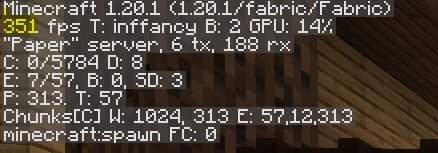
Über dieses Modpack
Optimized For NVIDIA PCs
Welcome to my first project! This is a modpack that originally was made for my PC only but i saw that many people needed a good modpack that works well on NVIDIA GPU Computers. I also needed that but all the modpacks that I found either had a bunch of mods that weren't needed, or they didn't work good on NVIDIA GPU Computers, so I decided to do something about it.
Mods and Description
There are 13 mods in this modpacks, all chosen by their performance and optimization. You may customize it to your liking (and PC performance). Everything is in default settings. please keep in mind that Nvidium only works on computers with a Nvidia Graphics card. If using on a Non-Nvidia Computer, the mod will automatically disable itself not effecting gameplay
- Collective by Serilum
- Dynamic FPS by juliand665
- Memory Leak Fix by FX
- Sodium by jellysquid3
- Entity Culling by tr7zw
- Nvidium by cortex
- FerriteCore by malte0811
- BadOptimizations by thosea
- Sodium Extra By FlashyReese
These are just the main plugins used for optimization. There are more and I will always be adding to the list of mods this modpack has, chosen for optimization on nvidia computers of course.
Please enjoy this modpack. And if you have any issues, please DM me on discord m0neygreen_
Verfügbare Versionen
Optimized For NVIDIA Server einrichten
Server bestellen
Wähle mindestens 4 GB RAM (6 GB empfohlen für Optimized For NVIDIA). Je nach Spieleranzahl: +1 GB pro 8 Spieler.
Modpack im Dashboard installieren
Öffne den Modpack-Browser im Dashboard, suche nach "Optimized For NVIDIA" und klicke "Installieren". Der fabric-Loader und Minecraft 1.21 werden automatisch konfiguriert.
Server starten & spielen
Starte den Server – alle Mods werden automatisch geladen. Teile die Server-IP mit Freunden und spielt zusammen!
Häufige Fragen
Optimized For NVIDIA Server crasht oder startet nicht – was tun?
Häufigste Ursachen: zu wenig RAM oder falscher fabric-Loader. Prüfe latest.log auf "OutOfMemoryError" → erhöhe RAM auf mindestens 6 GB. Bei "Mixin" oder "ClassNotFoundException": Modpack-Version und Loader stimmen nicht überein. Bei Mado Hosting werden Loader und Minecraft-Version beim Modpack-Install automatisch konfiguriert – das verhindert die meisten Startprobleme.
Wie viel RAM braucht ein Optimized For NVIDIA Server wirklich?
Minimum 4 GB, empfohlen 6 GB für stabile Performance. +1 GB pro 8 Spieler. Wichtig: Minecraft-Modpacks brauchen mehr RAM als Vanilla – plane pro zusätzlichem Spieler extra ein. Bei Mado Hosting kannst du den RAM jederzeit live hochskalieren, ohne Datenverlust (ab €5.2/Monat).
Kann ich eigene Mods zu Optimized For NVIDIA hinzufügen, ohne Konflikte?
Ja, aber achte auf die Kompatibilität: Nutze nur Mods für den gleichen Loader (fabric) und die gleiche Minecraft-Version (1.21). Häufige Probleme: ID-Konflikte bei Rezept-Mods und inkompatible Coremod-Versionen. Im Mado Dashboard zeigt der Mod-Browser nur kompatible Mods an und warnt bei bekannten Konflikten.
Optimized For NVIDIA Server laggt – Performance-Tipps
1) RAM auf 6 GB+ erhöhen. 2) Server-View-Distance auf 8 reduzieren (server.properties). 3) Pre-Generiere Chunks mit dem "Chunky" Plugin. 4) Prüfe mit /spark profiler welche Mods die meiste Tick-Time verbrauchen. Bei Mado Hosting laufen alle Server auf NVMe-SSDs mit dedizierten CPU-Kernen – das eliminiert Hardware als Engpass.
Ähnliche Modpacks

![Cobblemon Official Modpack [Fabric]](https://cdn.modrinth.com/data/5FFgwNNP/e7f9ee2e9d361623847853fe2ddce42f519ee64f.png)
![COBBLEVERSE - Pokemon Adventure [Cobblemon]](https://cdn.modrinth.com/data/Jkb29YJU/581ecf54530972afb18a04660afd820f2f24f6c7.png)

![Better MC [FABRIC] - BMC2](https://cdn.modrinth.com/data/shFhR8Vx/a19c2bcb51d38f32f138d3607e91cb2b7b8e387f_96.webp)

Optimized For NVIDIA Server mieten
Starte deinen eigenen Server mit automatischer Modpack-Installation.
Details
- Lizenz
- LicenseRef-All-Rights-Reserved
- Server-seitig
- Nicht unterstützt
- Client-seitig
- Erforderlich
Unterstützte Versionen
Starte deinen Optimized For NVIDIA Server jetzt
Ab €5.20/Monat; für die beste Performance werden 6 GB RAM empfohlen.
Server konfigurieren →