
OptiShade
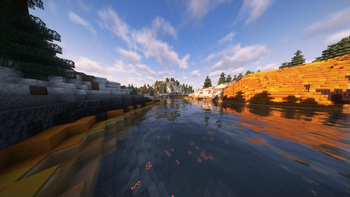
OptiShade enhances Minecraft with improved performance and shader support for better lighting and visuals. Enjoy a smoother, more beautiful vanilla experience.
Screenshots
Über dieses Modpack
Optishade Modpack!
Join Us In The Discord!
Discord
Description
Optishade is a meticulously crafted Minecraft modpack designed to enhance your vanilla gameplay experience with optimal performance, stunning visuals, and extensive shader support. This modpack is perfect for players who seek to maintain the core essence of Minecraft while enjoying smoother gameplay and breathtaking scenery.
Why Download Optishade?
Optishade is the ideal modpack for players who want to keep the vanilla Minecraft experience intact while benefiting from modern enhancements. Whether you're a seasoned player or new to the game, Optishade provides a seamless blend of performance, aesthetics, and functionality. Enhance your Minecraft world without compromising its original spirit.
Discover the beauty of Minecraft with Optishade and transform your gameplay into a visually captivating adventure.
Key Features
Optimized Performance:
Experience significant improvements in game performance with enhanced frame rates and reduced lag. Optishade utilizes various optimization mods to ensure your game runs smoothly, even on lower-end systems.Vanilla Enhancements:
Maintain the pure Minecraft experience with slight enhancements that preserve the game’s original charm. Enjoy improved textures, refined lighting, and subtle tweaks that make the world more immersive.Shader Pack Support:
Optishade comes with built-in support for popular shader packs, allowing you to easily integrate stunning visual effects such as dynamic shadows, realistic water reflections, and beautiful skyboxes. Customize your visuals to your liking and take your Minecraft world to the next level.Terralith Integration:
Transform your world with the Terralith mod, which overhauls terrain generation and introduces a plethora of new biomes, above-ground structures, and even underground structures. Explore breathtaking landscapes and discover unique environments that breathe new life into your Minecraft experience.User-Friendly Configuration:
Easy-to-use configuration options ensure that you can tailor the modpack to suit your preferences and system capabilities. Adjust settings for performance or visual quality with simple, intuitive controls.
Shaders and Resource Packs included:
Verfügbare Versionen
OptiShade Server einrichten
Server bestellen
Wähle mindestens 6 GB RAM (8 GB empfohlen für OptiShade). Je nach Spieleranzahl: +1 GB pro 5 Spieler.
Modpack im Dashboard installieren
Öffne den Modpack-Browser im Dashboard, suche nach "OptiShade" und klicke "Installieren". Der fabric-Loader und Minecraft 1.21.8 werden automatisch konfiguriert.
Server starten & spielen
Starte den Server – alle Mods werden automatisch geladen. Teile die Server-IP mit Freunden und spielt zusammen!
Häufige Fragen
OptiShade Server crasht oder startet nicht – was tun?
Häufigste Ursachen: zu wenig RAM oder falscher fabric-Loader. Prüfe latest.log auf "OutOfMemoryError" → erhöhe RAM auf mindestens 8 GB. Bei "Mixin" oder "ClassNotFoundException": Modpack-Version und Loader stimmen nicht überein. Bei Mado Hosting werden Loader und Minecraft-Version beim Modpack-Install automatisch konfiguriert – das verhindert die meisten Startprobleme.
Wie viel RAM braucht ein OptiShade Server wirklich?
Minimum 6 GB, empfohlen 8 GB für stabile Performance. +1 GB pro 5 Spieler. Wichtig: Minecraft-Modpacks brauchen mehr RAM als Vanilla – plane pro zusätzlichem Spieler extra ein. Bei Mado Hosting kannst du den RAM jederzeit live hochskalieren, ohne Datenverlust (ab €7.800000000000001/Monat).
Kann ich eigene Mods zu OptiShade hinzufügen, ohne Konflikte?
Ja, aber achte auf die Kompatibilität: Nutze nur Mods für den gleichen Loader (fabric) und die gleiche Minecraft-Version (1.21.8). Häufige Probleme: ID-Konflikte bei Rezept-Mods und inkompatible Coremod-Versionen. Im Mado Dashboard zeigt der Mod-Browser nur kompatible Mods an und warnt bei bekannten Konflikten.
OptiShade Server laggt – Performance-Tipps
1) RAM auf 8 GB+ erhöhen. 2) Server-View-Distance auf 8 reduzieren (server.properties). 3) Pre-Generiere Chunks mit dem "Chunky" Plugin. 4) Prüfe mit /spark profiler welche Mods die meiste Tick-Time verbrauchen. Bei Mado Hosting laufen alle Server auf NVMe-SSDs mit dedizierten CPU-Kernen – das eliminiert Hardware als Engpass.
Ähnliche Modpacks


![Cobblemon Official Modpack [Fabric]](https://cdn.modrinth.com/data/5FFgwNNP/e7f9ee2e9d361623847853fe2ddce42f519ee64f.png)
![COBBLEVERSE - Pokemon Adventure [Cobblemon]](https://cdn.modrinth.com/data/Jkb29YJU/581ecf54530972afb18a04660afd820f2f24f6c7.png)

![Better MC [FABRIC] - BMC2](https://cdn.modrinth.com/data/shFhR8Vx/a19c2bcb51d38f32f138d3607e91cb2b7b8e387f_96.webp)
OptiShade Server mieten
Starte deinen eigenen Server mit automatischer Modpack-Installation.
Unterstützte Versionen
Starte deinen OptiShade Server jetzt
Ab €7.80/Monat; für die beste Performance werden 8 GB RAM empfohlen.
Server konfigurieren →