
Packed
Vanilla-styled visual, auditory, and gameplay improvements packed into the client.
Screenshots
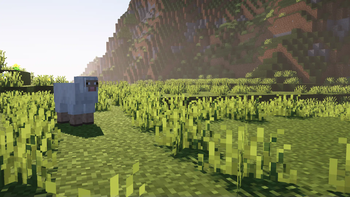

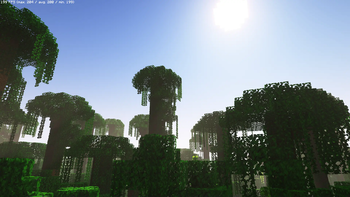
Über dieses Modpack
Packed
Vanilla-styled visual, auditory, and gameplay improvements packed into the client.
This modpack focuses on improving the client-side experience, while maintaining a vanilla feel. All mods within this modpack work independently of servers!
Built upon Packed Yellow.
⚙️ Features
Visual improvements
- Dark mode by default
- Shader pack preset to match vanilla styles
- Armor bar reflects what's being worn
- Player models are significantly improved
- Environments are more interactive and immersive
Auditory improvements
- Realistic player and entity footsteps
- Additional sounds when interacting with your environment
- Improvements to the in-game music
QOL improvements
- Improved recipe book, replaces JEI-like mods
- Simple editing of NBT data, command blocks, and books
- Additional safety features (fixes for chat reporting)
- Chat overhaul with spellcheck, emojis, and better suggestions
- Various improvements to lacking UI elements
- LAN worlds can access features typically locked to dedicated servers
Performance improvements
- Utilizes the CaffeineMC suite of optimization mods
- Utilizes Iris for fast shaders
- Improvements regarding game and world load times
- Focuses on improving performance without noticeable compromises
- Includes safe and lesser-known performance tweaks
...and more!
I did not make any of the projects that make this modpack possible.
Make sure to give some love to the authors of the projects listed in /mods, /resourcepacks, and /shaderpacks!
❔ FAQ
What makes this different from other modpacks?
Packed aims to keep to the vanilla style, while still providing improvements.
For example, the provided shaderpack options don't make your game look like the latest AAA game release.
Instead, the shadows are pixelated, and effects aren't blown out of proportion. The visuals are still amazing, while sticking to "Minecraft".
This also strives to achieve consistency between every element of the game. Information about enchanted books aren't included in the book's lore, rather contained within the book itself! Rather than using a mod such as JEI to list recipes, the recipe book is improved with many of the features from said mods.
There are many more tweaks and improvements in this modpack that follow this design style. Consistency is the primary goal of this project!
Does this work with OptiFine?
No. Nor is this fully* compatible with OptiFine resource packs. Packed modpack uses Sodium, Iris, etc.
- Packed includes a few mods that add resource pack features from OptiFine, such as Continuity and CIT-resewn, but Packed itself doesn't aim to be fully OptiFine-compatible.
Is this modpack laggy?
Packed isn't laggy. However, it won't be as performant as other modpacks such as Simply Optimized or Fabulously Optimized. This is due to the amount of visual, auditory, and gameplay-enhancing mods in this pack.
The aforementioned modpacks focus purely on squeezing as much performance out of Minecraft as possible, while Packed aims to enhance the client's experience. If your computer struggles running this modpack, give the modpacks listed above a try!
©️ Credits
This pack uses a few resources located outside of Modrinth's ecosystem. As such, they are credited here.
Mods
Resource Packs
- VanillaTweaks
- Pre-configured with general tweaks.
- Little Improvments: Custom
Verfügbare Versionen
Packed Server einrichten
Server bestellen
Wähle mindestens 4 GB RAM (6 GB empfohlen für Packed). Je nach Spieleranzahl: +1 GB pro 8 Spieler.
Modpack im Dashboard installieren
Öffne den Modpack-Browser im Dashboard, suche nach "Packed" und klicke "Installieren". Der quilt-Loader und Minecraft 1.19.2 werden automatisch konfiguriert.
Server starten & spielen
Starte den Server – alle Mods werden automatisch geladen. Teile die Server-IP mit Freunden und spielt zusammen!
Häufige Fragen
Packed Server crasht oder startet nicht – was tun?
Häufigste Ursachen: zu wenig RAM oder falscher quilt-Loader. Prüfe latest.log auf "OutOfMemoryError" → erhöhe RAM auf mindestens 6 GB. Bei "Mixin" oder "ClassNotFoundException": Modpack-Version und Loader stimmen nicht überein. Bei Mado Hosting werden Loader und Minecraft-Version beim Modpack-Install automatisch konfiguriert – das verhindert die meisten Startprobleme.
Wie viel RAM braucht ein Packed Server wirklich?
Minimum 4 GB, empfohlen 6 GB für stabile Performance. +1 GB pro 8 Spieler. Wichtig: Minecraft-Modpacks brauchen mehr RAM als Vanilla – plane pro zusätzlichem Spieler extra ein. Bei Mado Hosting kannst du den RAM jederzeit live hochskalieren, ohne Datenverlust (ab €5.2/Monat).
Kann ich eigene Mods zu Packed hinzufügen, ohne Konflikte?
Ja, aber achte auf die Kompatibilität: Nutze nur Mods für den gleichen Loader (quilt) und die gleiche Minecraft-Version (1.19.2). Häufige Probleme: ID-Konflikte bei Rezept-Mods und inkompatible Coremod-Versionen. Im Mado Dashboard zeigt der Mod-Browser nur kompatible Mods an und warnt bei bekannten Konflikten.
Packed Server laggt – Performance-Tipps
1) RAM auf 6 GB+ erhöhen. 2) Server-View-Distance auf 8 reduzieren (server.properties). 3) Pre-Generiere Chunks mit dem "Chunky" Plugin. 4) Prüfe mit /spark profiler welche Mods die meiste Tick-Time verbrauchen. Bei Mado Hosting laufen alle Server auf NVMe-SSDs mit dedizierten CPU-Kernen – das eliminiert Hardware als Engpass.
Ähnliche Modpacks
![Better MC [FABRIC] - BMC2](https://cdn.modrinth.com/data/shFhR8Vx/a19c2bcb51d38f32f138d3607e91cb2b7b8e387f_96.webp)
![Better MC [FORGE] - BMC4](https://cdn.modrinth.com/data/4BV47HRn/7f5ef7cc61b2593609aabef3ed07a866a4f11b73_96.webp)


Packed Server mieten
Starte deinen eigenen Server mit automatischer Modpack-Installation.
Unterstützte Versionen
Starte deinen Packed Server jetzt
Ab €5.20/Monat; für die beste Performance werden 6 GB RAM empfohlen.
Server konfigurieren →