
Performa
This modpack optimizes Minecraft to boost FPS and improve world loading speeds. It generates chunks only when needed, enhancing overall performance. It has been tested on various devices. For more information read the description
Screenshots
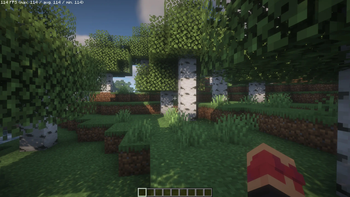



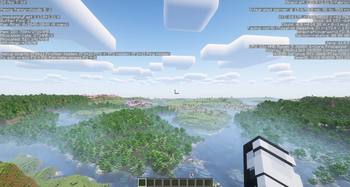

Über dieses Modpack
Minecraft Performance Modpack
This modpack is designed to optimize Minecraft for maximum performance, providing a significant FPS boost, faster world loading, and overall smoother gameplay. Thanks to advanced optimizations, chunks are only generated when necessary, reducing resource consumption and improving stability.
⚠️Important!:⚠️
If you experience low framerate consider to deactivate async because as the mod description states following part "Async is a Fabric mod designed to improve entity performance by processing them in parallel using multiple CPU cores and threads. In newer versions Async isnt used anymore.
Setup:
🛠 Installing with Prism Launcher, MultiMC, Modrinth APP or GDLauncher
Download the .mrpack file.
Open Prism Launcher, MultiMC or Modrinth APP.
Click "Add Instance" → "Import from MRPack/File".
Select the downloaded .mrpack file and start the modpack.
Features:
✅ Higher FPS for a smoother experience
✅ Faster world loading and reduced lag
✅ Optimized chunk rendering for better performance
✅ Improved memory management to prevent crashes
Tested on:
Gaming PC (Ryzen 5 3600X, RTX 3060, 64GB RAM)
Gaming Notebook (i7-10750H, GTX 1660 Ti Max-Q, 16GB RAM)
Notebook (Ryzen 7 4000U, Radeon Vega, 16GB RAM)
ASUS ROG ALLY Z1 Extreme
Notebook: i5-4210u with an gtx 850m (used UbuntuOS)
Experience Minecraft like never before — optimized for speed and stability!
Wiki
If you are a mod developer and do not want your mod to be included in my modpack, please contact me and I will remove it as soon as possible. You can find my contact details in my Profile
Verfügbare Versionen
Performa Server einrichten
Server bestellen
Wähle mindestens 4 GB RAM (6 GB empfohlen für Performa). Je nach Spieleranzahl: +1 GB pro 5 Spieler.
Modpack im Dashboard installieren
Öffne den Modpack-Browser im Dashboard, suche nach "Performa" und klicke "Installieren". Der neoforge-Loader und Minecraft 26.2 werden automatisch konfiguriert.
Server starten & spielen
Starte den Server – alle Mods werden automatisch geladen. Teile die Server-IP mit Freunden und spielt zusammen!
Häufige Fragen
Performa Server crasht oder startet nicht – was tun?
Häufigste Ursachen: zu wenig RAM oder falscher neoforge-Loader. Prüfe latest.log auf "OutOfMemoryError" → erhöhe RAM auf mindestens 6 GB. Bei "Mixin" oder "ClassNotFoundException": Modpack-Version und Loader stimmen nicht überein. Bei Mado Hosting werden Loader und Minecraft-Version beim Modpack-Install automatisch konfiguriert – das verhindert die meisten Startprobleme.
Wie viel RAM braucht ein Performa Server wirklich?
Minimum 4 GB, empfohlen 6 GB für stabile Performance. +1 GB pro 5 Spieler. Wichtig: Minecraft-Modpacks brauchen mehr RAM als Vanilla – plane pro zusätzlichem Spieler extra ein. Bei Mado Hosting kannst du den RAM jederzeit live hochskalieren, ohne Datenverlust (ab €5.2/Monat).
Kann ich eigene Mods zu Performa hinzufügen, ohne Konflikte?
Ja, aber achte auf die Kompatibilität: Nutze nur Mods für den gleichen Loader (neoforge) und die gleiche Minecraft-Version (26.2). Häufige Probleme: ID-Konflikte bei Rezept-Mods und inkompatible Coremod-Versionen. Im Mado Dashboard zeigt der Mod-Browser nur kompatible Mods an und warnt bei bekannten Konflikten.
Performa Server laggt – Performance-Tipps
1) RAM auf 6 GB+ erhöhen. 2) Server-View-Distance auf 8 reduzieren (server.properties). 3) Pre-Generiere Chunks mit dem "Chunky" Plugin. 4) Prüfe mit /spark profiler welche Mods die meiste Tick-Time verbrauchen. Bei Mado Hosting laufen alle Server auf NVMe-SSDs mit dedizierten CPU-Kernen – das eliminiert Hardware als Engpass.
Ähnliche Modpacks

![Cobblemon Official Modpack [Fabric]](https://cdn.modrinth.com/data/5FFgwNNP/e7f9ee2e9d361623847853fe2ddce42f519ee64f.png)
![COBBLEVERSE - Pokemon Adventure [Cobblemon]](https://cdn.modrinth.com/data/Jkb29YJU/581ecf54530972afb18a04660afd820f2f24f6c7.png)
![Better MC [FABRIC] - BMC2](https://cdn.modrinth.com/data/shFhR8Vx/a19c2bcb51d38f32f138d3607e91cb2b7b8e387f_96.webp)


Performa Server mieten
Starte deinen eigenen Server mit automatischer Modpack-Installation.
Unterstützte Versionen
Starte deinen Performa Server jetzt
Ab €5.20/Monat; für die beste Performance werden 6 GB RAM empfohlen.
Server konfigurieren →