
PVP Optimizations
An Optimization modpack, that also aims to add QOL features regarding PVP while not adding mods that would result in you getting banned.
Screenshots
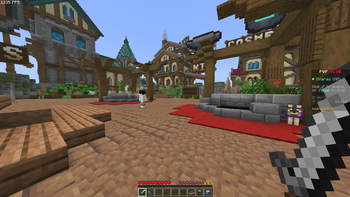
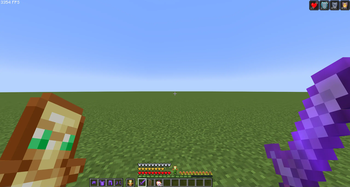
Über dieses Modpack
What is this?
PVP Optimizations is a modpack that aims to improve performance by as much as possible, while adding various QOL features to aid in PVP scenarios.
What does it add?
An armour display next to your hotbar so you can always see if you armour durability is running low
Allows you to see your saturation on your hunger bar which can significantly aid in PVP
Makes you see when the shield cooldown runs out and attacks will be blocked
Adds potion effect timers on the hud so you can see what effects are running low
Mod list
Spoiler
Mods listed here are for the latest version of the modpack!
- AppleSkin
- BadOptimizations
- BetterHurtCam
- Chat Heads
- Cloth Config v26.1
- Clumps
- Concurrent Chunk Management Engine
- Controlling
- Dynamic FPS
- EffectTimerPlus
- Entity Texture Features
- EntityCulling
- Fabric API
- Fabric Language Kotlin
- Fast IP Ping
- FerriteCore
- Gamma Utils
- ImmediatelyFast
- Krypton
- Lithium
- Mod Menu
- More Chat History
- More Culling
- No Chat Reports
- Numeral Ping
- Placeholder API
- Reese's Sodium Options
- Searchables
- Shield Fixes
- Shield Status
- Shulker Box Tooltip
- Sodium
- Sodium Extra
- TierTagger
- TotemCounter
- Very Many Players
- Walksy Lib
- YOSBR
- YetAnotherConfigLib
- Zoomify
- kennytv's epic force close loading screen mod for Fabric
- uku's Armor HUD
- ukulib
Verfügbare Versionen
PVP Optimizations Server einrichten
Server bestellen
Wähle mindestens 4 GB RAM (6 GB empfohlen für PVP Optimizations). Je nach Spieleranzahl: +1 GB pro 8 Spieler.
Modpack im Dashboard installieren
Öffne den Modpack-Browser im Dashboard, suche nach "PVP Optimizations" und klicke "Installieren". Der fabric-Loader und Minecraft 26.1.1 werden automatisch konfiguriert.
Server starten & spielen
Starte den Server – alle Mods werden automatisch geladen. Teile die Server-IP mit Freunden und spielt zusammen!
Häufige Fragen
PVP Optimizations Server crasht oder startet nicht – was tun?
Häufigste Ursachen: zu wenig RAM oder falscher fabric-Loader. Prüfe latest.log auf "OutOfMemoryError" → erhöhe RAM auf mindestens 6 GB. Bei "Mixin" oder "ClassNotFoundException": Modpack-Version und Loader stimmen nicht überein. Bei Mado Hosting werden Loader und Minecraft-Version beim Modpack-Install automatisch konfiguriert – das verhindert die meisten Startprobleme.
Wie viel RAM braucht ein PVP Optimizations Server wirklich?
Minimum 4 GB, empfohlen 6 GB für stabile Performance. +1 GB pro 8 Spieler. Wichtig: Minecraft-Modpacks brauchen mehr RAM als Vanilla – plane pro zusätzlichem Spieler extra ein. Bei Mado Hosting kannst du den RAM jederzeit live hochskalieren, ohne Datenverlust (ab €5.2/Monat).
Kann ich eigene Mods zu PVP Optimizations hinzufügen, ohne Konflikte?
Ja, aber achte auf die Kompatibilität: Nutze nur Mods für den gleichen Loader (fabric) und die gleiche Minecraft-Version (26.1.1). Häufige Probleme: ID-Konflikte bei Rezept-Mods und inkompatible Coremod-Versionen. Im Mado Dashboard zeigt der Mod-Browser nur kompatible Mods an und warnt bei bekannten Konflikten.
PVP Optimizations Server laggt – Performance-Tipps
1) RAM auf 6 GB+ erhöhen. 2) Server-View-Distance auf 8 reduzieren (server.properties). 3) Pre-Generiere Chunks mit dem "Chunky" Plugin. 4) Prüfe mit /spark profiler welche Mods die meiste Tick-Time verbrauchen. Bei Mado Hosting laufen alle Server auf NVMe-SSDs mit dedizierten CPU-Kernen – das eliminiert Hardware als Engpass.
Ähnliche Modpacks


![Better MC [FABRIC] - BMC2](https://cdn.modrinth.com/data/shFhR8Vx/a19c2bcb51d38f32f138d3607e91cb2b7b8e387f_96.webp)
![Better MC [FORGE] - BMC4](https://cdn.modrinth.com/data/4BV47HRn/7f5ef7cc61b2593609aabef3ed07a866a4f11b73_96.webp)


PVP Optimizations Server mieten
Starte deinen eigenen Server mit automatischer Modpack-Installation.
Details
- Lizenz
- LicenseRef-All-Rights-Reserved
- Server-seitig
- Nicht unterstützt
- Client-seitig
- Erforderlich
Unterstützte Versionen
Starte deinen PVP Optimizations Server jetzt
Ab €5.20/Monat; für die beste Performance werden 6 GB RAM empfohlen.
Server konfigurieren →