
PvPBoosted
Modpack containing a HUGE amount of optimizations for Minecraft, PvP and more.
Screenshots
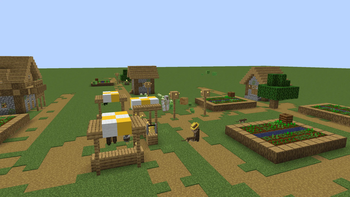
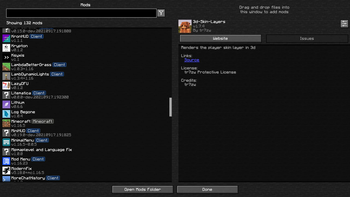
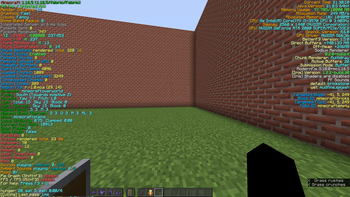
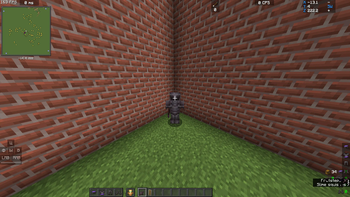
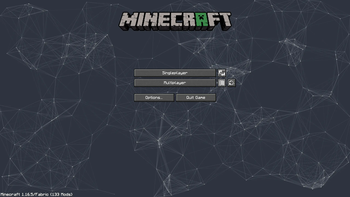
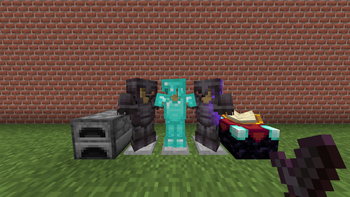
Über dieses Modpack
PvPBoosted Modpack
Unleash the ultimate PvP experience in Minecraft 1.16.5 with PvPBoosted, a modpack designed to maximize performance, enhance combat, and bring modern functionality to your gameplay. Whether you're a competitive player or just love fine-tuned mechanics, this modpack is your one-stop solution.
If you want to support me donation alerts or buy me a coffee.
Installing
Install modpack through a Modrinth App or import a .mrpack file.
Customizable Configurations
By default, PvPBoosted comes preconfigured with carefully tuned settings for the best performance and gameplay. However, all configs can be adjusted to suit your preferences, giving you full control over your experience.
Known Issues
Broken Horse Textures: If you encounter distorted or broken horse textures, activate the Horse Tex Fix resource pack to resolve the issue.

Invalid java: If you have invalid java error, just use not java 8, but java 17. Some launchers (idk why) by default downloading java 8 for 1.16.5 (Like Modrinth for me), for more read official wiki - https://support.modrinth.com/en/articles/8797659-java-installations.
Resource Packs/mods Recommendations
For the best visual experience, we recommend enabling your favorite resource packs alongside the modpack. This will further enhance the game's aesthetics and immersion.
Recommended Mods and Resource Packs
These are optional but highly recommended mods and resource packs to enhance your PvP experience. Due to licensing restrictions, these are not included in the pack. You can download and install them separately.
Tiny PvP Swords and Tools
Description: A simple yet effective resource pack that reduces the size of swords and tools, giving you better visibility during combat. Perfect for PvP players!
Preview:

Link: Download here
Low On Fire
Description: This pack minimizes the height of fire textures, making it easier to see during intense PvP battles. A must-have for anyone who values clarity.
Preview:

Link: Download here
Awesome Skies
Description: Enhance your Minecraft world with stunning, high-quality sky textures. Includes beautiful sunsets, detailed stars, and vibrant colors for an immersive experience.
Preview:
(Not available)
Link: Download here
Some Fish
Description: Adds a variety of beautifully detailed fish textures to Minecraft. Featuring vibrant colors, realistic designs, and unique patterns to enhance your underwater world.
Preview:

Link: Download here
Custom Crosshair Mod
Description: This mod allows you to customize your crosshair to fit your playstyle. Change the shape, size, color, and more for optimal precision in PvP.
Preview:

Link: Download here
Hidden Totem
Description: A resource pack that makes your Totem of Undying less distracting. Includes both 50% transparent and fully invisible versions.
Preview:
 (Example preview not linked)
Links:
Visible Ores
Description: A resource pack that highlights ores, making them easier to spot while mining. Essential for PvP or UHC scenarios.
Link: Download here
Cloud’s Unobtrusive Shields
Description: A small-shield resource pack designed for better visibility during combat. Ideal for PvP or casual play.
Preview:
 (Example preview not linked)
Link: Download here
Horse Textures Fix
Description: Fixes inconsistencies in horse textures for a cleaner, more polished look.
Link: Download here
Vanilla Tweaks
Description: Customize your Minecraft experience with a variety of tweaks for visuals, sounds, and gameplay. You can use my custom version or create your own.
Links:
Walli Fault (YouTubers RP)
Description: A popular PvP resource pack used by YouTubers, featuring clean, minimal textures designed for competitive gameplay (Used by Wallibear).
Link: Download here
Agera PvP v2 Red (YouTubers RP)
Description: A vibrant PvP resource pack with red accents, perfect for competitive gameplay (Used by Agera Park).
Link: Download here
How to Install
Download the resource packs or mods using the provided links.
Place resource packs in the resourcepacks folder located in your .minecraft directory.
Place mods in the mods folder in the same directory.
Activate resource packs in Minecraft settings.
Enjoy the enhanced experience!
These additions will make PvPBoosted even better!
Why PvPBoosted Stands Out
Exclusive to Minecraft 1.16.5
PvPBoosted is crafted specifically for Minecraft 1.16.5, which is widely regarded as the most stable and optimized version for PvP gameplay. By focusing solely on this version, we’ve created the most streamlined, optimized, and balanced modpack available. While other versions may seem appealing, 1.16.5 delivers the best combination of performance, compatibility, and PvP mechanics. There are no plans to release PvPBoosted for other versions, as this ensures we can provide the highest-quality experience here.
Performance Focused
PvPBoosted integrates the most advanced optimization mods, including Sodium, Lithium, and Phosphor, to deliver unparalleled speed and smoothness. With better FPS, reduced input delay, and zero lag spikes, you’ll never miss a crucial moment in combat.
Feels Like Home
Experience Minecraft the way you love it. Whether you're used to vanilla gameplay or modded mechanics, PvPBoosted maintains the classic feel while enhancing core systems. Play locally, compete on servers, and enjoy advanced tools like Inventory Profiles Next and Xaero’s Minimap without losing the nostalgic vibe.
Built for Compatibility
This modpack is carefully constructed to work seamlessly across vanilla and modded servers. No content mods are included, so you can join any PvP arena without worrying about compatibility issues.
Features You’ll Love
Combat Precision
Take advantage of mods like BetterThirdPerson, Perspective Mod Redux and more to sharpen your tactics and awareness in battle.
Enhanced Graphics and Visuals
Bring a touch of beauty to your PvP world with Iris Shaders, LambDynamicLights, and Blur. These mods elevate the game’s visuals without compromising performance, ensuring smooth gameplay on any system.
Utility Upgrades
Navigate and organize with ease using tools like Xaero’s World Map, Mouse Tweaks, and Durability Viewer, Death Log etc. Manage your inventory faster and with less effort during high-stakes moments.
Modern QoL Additions
Stay connected with Voice Chat, get clean and detailed performance stats with BetterF3, and track gear durability with no hassle. PvPBoosted ensures that every detail of your experience is efficient and intuitive.
Built on Fabric
PvPBoosted is powered by the Fabric mod loader, renowned for its lightweight design and compatibility with an extensive range of mods. It’s a perfect foundation for adding your favorite customizations.
Open Development
PvPBoosted thrives on user feedback. Have an idea or a bug to report? Visit our GitHub page to collaborate.
FAQ
Q: Can I use PvPBoosted with my existing launcher (Not Modrinth)?
A: Absolutely! The modpack works with most launchers, though we recommend using MultiMC for the best experience.
Q: Why is this modpack only for 1.16.5?
A: Minecraft 1.16.5 offers the best balance of performance, mod compatibility, and PvP mechanics. By focusing exclusively on this version, we’ve created the most optimized PvP experience available.
Q: Do I need this modpack on my server?
A: Not at all! PvPBoosted is fully compatible with any vanilla server that allows client-side mods.
Q: I found a bug or want to request a feature. What should I do?
A: Report bugs and suggest features on our GitHub issues page. We love hearing from our players!
Q: Is this modpack safe for my worlds?
A: Yes, every mod is tested to ensure compatibility and safety in both single-player and multiplayer environments.
Take your Minecraft 1.16.5 PvP to new heights with PvPBoosted — the most optimized and finely tuned modpack for competitive gameplay. Download now and experience precision, performance, and peak PvP action!
GitHub: PvPBoosted
Verfügbare Versionen
PvPBoosted Server einrichten
Server bestellen
Wähle mindestens 4 GB RAM (6 GB empfohlen für PvPBoosted). Je nach Spieleranzahl: +1 GB pro 8 Spieler.
Modpack im Dashboard installieren
Öffne den Modpack-Browser im Dashboard, suche nach "PvPBoosted" und klicke "Installieren". Der fabric-Loader und Minecraft 1.16.5 werden automatisch konfiguriert.
Server starten & spielen
Starte den Server – alle Mods werden automatisch geladen. Teile die Server-IP mit Freunden und spielt zusammen!
Häufige Fragen
PvPBoosted Server crasht oder startet nicht – was tun?
Häufigste Ursachen: zu wenig RAM oder falscher fabric-Loader. Prüfe latest.log auf "OutOfMemoryError" → erhöhe RAM auf mindestens 6 GB. Bei "Mixin" oder "ClassNotFoundException": Modpack-Version und Loader stimmen nicht überein. Bei Mado Hosting werden Loader und Minecraft-Version beim Modpack-Install automatisch konfiguriert – das verhindert die meisten Startprobleme.
Wie viel RAM braucht ein PvPBoosted Server wirklich?
Minimum 4 GB, empfohlen 6 GB für stabile Performance. +1 GB pro 8 Spieler. Wichtig: Minecraft-Modpacks brauchen mehr RAM als Vanilla – plane pro zusätzlichem Spieler extra ein. Bei Mado Hosting kannst du den RAM jederzeit live hochskalieren, ohne Datenverlust (ab €5.2/Monat).
Kann ich eigene Mods zu PvPBoosted hinzufügen, ohne Konflikte?
Ja, aber achte auf die Kompatibilität: Nutze nur Mods für den gleichen Loader (fabric) und die gleiche Minecraft-Version (1.16.5). Häufige Probleme: ID-Konflikte bei Rezept-Mods und inkompatible Coremod-Versionen. Im Mado Dashboard zeigt der Mod-Browser nur kompatible Mods an und warnt bei bekannten Konflikten.
PvPBoosted Server laggt – Performance-Tipps
1) RAM auf 6 GB+ erhöhen. 2) Server-View-Distance auf 8 reduzieren (server.properties). 3) Pre-Generiere Chunks mit dem "Chunky" Plugin. 4) Prüfe mit /spark profiler welche Mods die meiste Tick-Time verbrauchen. Bei Mado Hosting laufen alle Server auf NVMe-SSDs mit dedizierten CPU-Kernen – das eliminiert Hardware als Engpass.
Ähnliche Modpacks


![Better MC [FABRIC] - BMC2](https://cdn.modrinth.com/data/shFhR8Vx/a19c2bcb51d38f32f138d3607e91cb2b7b8e387f_96.webp)
![Better MC [FORGE] - BMC4](https://cdn.modrinth.com/data/4BV47HRn/7f5ef7cc61b2593609aabef3ed07a866a4f11b73_96.webp)


PvPBoosted Server mieten
Starte deinen eigenen Server mit automatischer Modpack-Installation.
Unterstützte Versionen
Starte deinen PvPBoosted Server jetzt
Ab €5.20/Monat; für die beste Performance werden 6 GB RAM empfohlen.
Server konfigurieren →