
vanilla PvP
mods that make your game feel 10x smoother with 1k+ fps & optimize it for pvp!
Screenshots
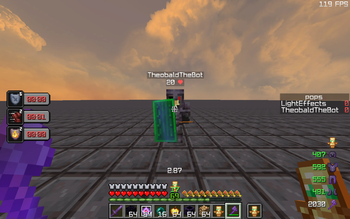
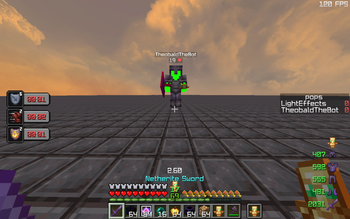

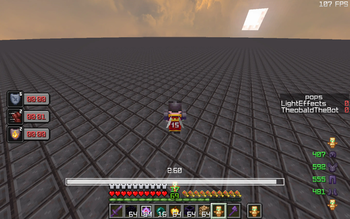


Über dieses Modpack
NOTE: for full functionality you would need to download marlow's cpvp optimizer with this pack, it could not be attached due to copyright reasons!
tired for being stuck with your game looking like a slideshow? this mod fixes that and gives you a frick ton of pvp mods to provide you THE ULTIMATE pvp experience!
MAKE SURE to configure sodium settings e.g. fog and fast render & inventory hud for full experience!
FEATURES
- get more FPS!
- multiple mods that make your game look SICK such as 3D skins
- apple skin makes you actually see your saturation bar, insanely useful for almost any pvp gamemodes or just survival vanilla gameplay!
- ever tired for your sprint getting reset upon death, worry no more
- better mount hud to stay locked in even when on a horse!
- better ping display to give your friends the excuse of high ping :)
- carpet pvp doesn't affect anything in multiplayer but is useful in pvp practice maps, especially theobald's! you can find theobald's practice map from theo's discord server which is linked in the bio of his yt channel
- clumps to byebye the lag caused from xp orbs
- crosshair indicator to lock your aim, this gets 10x easier with a vibrant hit color with the hit color mod
- dynamic fps to keep your pc happy :D
- emoji type, pretty self-explanatory!
- multiple shield optimizations!
- the mod of all mods ESSENTIAL
- fabric skyboxes to achieve the most of my texture pack
- fullbright :O
- remove reloading screen to not get farmed whilst loading the server resource pack!
- better sodium options and s24 ultra zoom
- inventory hud to lock in even more #lockin
- count those totems and flex your lt3 crystal!
- shulker box tooltips to SEE DA SHULKAHS
Verfügbare Versionen
vanilla PvP Server einrichten
Server bestellen
Wähle mindestens 4 GB RAM (6 GB empfohlen für vanilla PvP). Je nach Spieleranzahl: +1 GB pro 8 Spieler.
Modpack im Dashboard installieren
Öffne den Modpack-Browser im Dashboard, suche nach "vanilla PvP" und klicke "Installieren". Der fabric-Loader und Minecraft 1.21 werden automatisch konfiguriert.
Server starten & spielen
Starte den Server – alle Mods werden automatisch geladen. Teile die Server-IP mit Freunden und spielt zusammen!
Häufige Fragen
vanilla PvP Server crasht oder startet nicht – was tun?
Häufigste Ursachen: zu wenig RAM oder falscher fabric-Loader. Prüfe latest.log auf "OutOfMemoryError" → erhöhe RAM auf mindestens 6 GB. Bei "Mixin" oder "ClassNotFoundException": Modpack-Version und Loader stimmen nicht überein. Bei Mado Hosting werden Loader und Minecraft-Version beim Modpack-Install automatisch konfiguriert – das verhindert die meisten Startprobleme.
Wie viel RAM braucht ein vanilla PvP Server wirklich?
Minimum 4 GB, empfohlen 6 GB für stabile Performance. +1 GB pro 8 Spieler. Wichtig: Minecraft-Modpacks brauchen mehr RAM als Vanilla – plane pro zusätzlichem Spieler extra ein. Bei Mado Hosting kannst du den RAM jederzeit live hochskalieren, ohne Datenverlust (ab €5.2/Monat).
Kann ich eigene Mods zu vanilla PvP hinzufügen, ohne Konflikte?
Ja, aber achte auf die Kompatibilität: Nutze nur Mods für den gleichen Loader (fabric) und die gleiche Minecraft-Version (1.21). Häufige Probleme: ID-Konflikte bei Rezept-Mods und inkompatible Coremod-Versionen. Im Mado Dashboard zeigt der Mod-Browser nur kompatible Mods an und warnt bei bekannten Konflikten.
vanilla PvP Server laggt – Performance-Tipps
1) RAM auf 6 GB+ erhöhen. 2) Server-View-Distance auf 8 reduzieren (server.properties). 3) Pre-Generiere Chunks mit dem "Chunky" Plugin. 4) Prüfe mit /spark profiler welche Mods die meiste Tick-Time verbrauchen. Bei Mado Hosting laufen alle Server auf NVMe-SSDs mit dedizierten CPU-Kernen – das eliminiert Hardware als Engpass.
Ähnliche Modpacks


![Better MC [FABRIC] - BMC2](https://cdn.modrinth.com/data/shFhR8Vx/a19c2bcb51d38f32f138d3607e91cb2b7b8e387f_96.webp)
![Better MC [FORGE] - BMC4](https://cdn.modrinth.com/data/4BV47HRn/7f5ef7cc61b2593609aabef3ed07a866a4f11b73_96.webp)


vanilla PvP Server mieten
Starte deinen eigenen Server mit automatischer Modpack-Installation.
Unterstützte Versionen
Starte deinen vanilla PvP Server jetzt
Ab €5.20/Monat; für die beste Performance werden 6 GB RAM empfohlen.
Server konfigurieren →