
Qearioz's Optimized PvP & SMP
Qearioz's Modpack specifically made for PvP and SMP
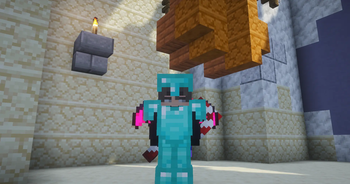
Screenshots


Über dieses Modpack
QEARIOZ MODPACK
INFO: This pack focuses on delivering a lightweight, SMP-friendly experience that bridges the gap between classic gameplay and high-tier performance. It’s a carefully balanced collection of Vanilla+ enhancements and optimizations designed to improve exploration, day-to-day survival, and the competitive PvP experience. all while keeping that authentic Minecraft feel.
I built this pack for players who want a clean, polished foundation for long-term servers. It smooths out the rough edges of the game and boosts your frames without ever crossing the line of feeling over-modded.
HOW TO INSTALL
HOW TO INSTALL:
Download the Modrinth App.
Search for Qearioz Modpack and click Install.
Run the instance, check your keybinds, and jump in!
- RAM ALLOCATION: Because this pack includes heavy optimizations and competitive PvP tweaks, it is recommended to use 4GB to 6GB of RAM. This ensures your game stays buttery smooth even during intense combat or while exploring new chunks.
WHAT’S INSIDE
WHAT’S INSIDE:
Performance First: A deep suite of optimization mods to maximize your FPS and minimize stutter.
PvP Ready: Enhanced responsiveness and UI tweaks for a competitive edge in combat.
Vanilla+ Feel: Subtle quality-of-life improvements that make survival more intuitive without changing the core game.
SMP Optimized: Lightweight enough for any server, ensuring stability for long-term play.
Verfügbare Versionen
Qearioz's Optimized PvP & SMP Server einrichten
Server bestellen
Wähle mindestens 4 GB RAM (6 GB empfohlen für Qearioz's Optimized PvP & SMP). Je nach Spieleranzahl: +1 GB pro 8 Spieler.
Modpack im Dashboard installieren
Öffne den Modpack-Browser im Dashboard, suche nach "Qearioz's Optimized PvP & SMP" und klicke "Installieren". Der fabric-Loader und Minecraft 26.3 werden automatisch konfiguriert.
Server starten & spielen
Starte den Server – alle Mods werden automatisch geladen. Teile die Server-IP mit Freunden und spielt zusammen!
Häufige Fragen
Qearioz's Optimized PvP & SMP Server crasht oder startet nicht – was tun?
Häufigste Ursachen: zu wenig RAM oder falscher fabric-Loader. Prüfe latest.log auf "OutOfMemoryError" → erhöhe RAM auf mindestens 6 GB. Bei "Mixin" oder "ClassNotFoundException": Modpack-Version und Loader stimmen nicht überein. Bei Mado Hosting werden Loader und Minecraft-Version beim Modpack-Install automatisch konfiguriert – das verhindert die meisten Startprobleme.
Wie viel RAM braucht ein Qearioz's Optimized PvP & SMP Server wirklich?
Minimum 4 GB, empfohlen 6 GB für stabile Performance. +1 GB pro 8 Spieler. Wichtig: Minecraft-Modpacks brauchen mehr RAM als Vanilla – plane pro zusätzlichem Spieler extra ein. Bei Mado Hosting kannst du den RAM jederzeit live hochskalieren, ohne Datenverlust (ab €5.2/Monat).
Kann ich eigene Mods zu Qearioz's Optimized PvP & SMP hinzufügen, ohne Konflikte?
Ja, aber achte auf die Kompatibilität: Nutze nur Mods für den gleichen Loader (fabric) und die gleiche Minecraft-Version (26.3). Häufige Probleme: ID-Konflikte bei Rezept-Mods und inkompatible Coremod-Versionen. Im Mado Dashboard zeigt der Mod-Browser nur kompatible Mods an und warnt bei bekannten Konflikten.
Qearioz's Optimized PvP & SMP Server laggt – Performance-Tipps
1) RAM auf 6 GB+ erhöhen. 2) Server-View-Distance auf 8 reduzieren (server.properties). 3) Pre-Generiere Chunks mit dem "Chunky" Plugin. 4) Prüfe mit /spark profiler welche Mods die meiste Tick-Time verbrauchen. Bei Mado Hosting laufen alle Server auf NVMe-SSDs mit dedizierten CPU-Kernen – das eliminiert Hardware als Engpass.
Ähnliche Modpacks


![Better MC [FABRIC] - BMC2](https://cdn.modrinth.com/data/shFhR8Vx/a19c2bcb51d38f32f138d3607e91cb2b7b8e387f_96.webp)
![Better MC [FORGE] - BMC4](https://cdn.modrinth.com/data/4BV47HRn/7f5ef7cc61b2593609aabef3ed07a866a4f11b73_96.webp)


Qearioz's Optimized PvP & SMP Server mieten
Starte deinen eigenen Server mit automatischer Modpack-Installation.
Details
- Lizenz
- LicenseRef-All-Rights-Reserved
- Server-seitig
- Optional
- Client-seitig
- Erforderlich
Unterstützte Versionen
Starte deinen Qearioz's Optimized PvP & SMP Server jetzt
Ab €5.20/Monat; für die beste Performance werden 6 GB RAM empfohlen.
Server konfigurieren →