
QoL Client
Lighting fast performance and Quality of Life, all in a convenient and completely client-side package.
Screenshots

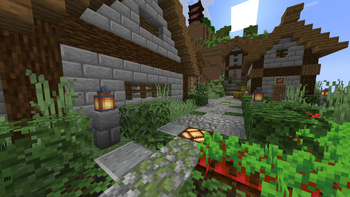
Über dieses Modpack


The QoL Client is a fabric modpack which contains the fastest performance boosting mods and features a ton quality of life features.

Enhanced Clouds and Weather

A revamped options menu

An in-game Resource Pack, Datapack and Shader Pack browser

And much more!
- Play with your friends without a server using e4cm.
- Mods like REI and Jade can be optionally turned on by the player through configs or keybinds.
- Lighting fast performance!
- Many other QoL mods and visual improvements.
- Extra translations for mods bundled in.

The latest stable Minecraft verion (Currently 26.2) with the Fabric Modloader is the main supported version.
Alternatively, there is a NeoForge version, which is less mantained and is missing some mods which are not available on NeoForge.

Show
Full breakdown of the 60 mods and 2 resource packs inside of QoL Client.
Performance (13)
For chunk rendering:
- C2ME
- Fast Noise
Client Side:
Sodium
Sodium Extra
Sodium Shadowy Path Blocks
Sodium Core Shaders*
BadOptimizations
EntityCulling
ImmediatelyFast
Language Reload
Server & General:
- Lithium
- FerriteCore
- Very Many Players
Optifine Features Parity (4)
- Iris Shaders
- BetterGrassify
- LambDynamicLights
- Ok Zoomer
Optifine Resource Packs Parity (9)
Entity Model Features
Entity Sound Features
Entity Texture Features
Nuit
Nuit Interop
Continuity
OptiGUI
Polytone
Puzzle
Quality Of Life (17)
Essential QoL:
- Appleskin
- Borderless Fullscreen
- Mouse Tweaks
- No Chat reports
Chat Tweaks:
- Chat Heads
- Chat Animation
- Chat Patches
Optional added info:
REI
Jade
Durability Tooltip
Shulker Box Tooltip
Better Advancements
Nice to haves:
- Controlify
- Simple Voice Chat
- Resourcify
- MacOS Input Fix
Aesthetics / Ambience (6)
Better Clouds
Particle Rain
Not Enough Animations
Visuality
Inventory Blur
Raised
Modpack Utilities (3)
- FancyMenu
- Mod Menu
- YOSBR
Libraries (9)
Architectury API
Fabric API
Fabric Language Kotlin
Cloth Config
ZConfig
Supermartijn642's Library
Konkrete
Melody
YetAnotherConfigLib
Resource Packs (2)
- Translations for Sodium
- Parity Title
*not yet updated to 26.2, just minor mods anyway
NeoForge Differences
NeoForge Ports
- Neo Language Reload (Language Reload)
- Better Modlist (Mod Menu)
- Your Options Shall Be NeoForged (YOSBR)
Missing Mods
Bettergrassify
Particle Rain
Continuity
OptiGUI
EntityCulling
VMP
Chat Patches
MacOS Input Fixes
Fabric API (Not Needed)
ZConfig (Not Needed)
Mods Exclusive To NeoForge
- Midnight Lib (Needed by Puzzle)
Reporting bugs or making suggestions on the discord server is greatly appreciated!
Verfügbare Versionen
QoL Client Server einrichten
Server bestellen
Wähle mindestens 4 GB RAM (6 GB empfohlen für QoL Client). Je nach Spieleranzahl: +1 GB pro 5 Spieler.
Modpack im Dashboard installieren
Öffne den Modpack-Browser im Dashboard, suche nach "QoL Client" und klicke "Installieren". Der fabric-Loader und Minecraft 26.3 werden automatisch konfiguriert.
Server starten & spielen
Starte den Server – alle Mods werden automatisch geladen. Teile die Server-IP mit Freunden und spielt zusammen!
Häufige Fragen
QoL Client Server crasht oder startet nicht – was tun?
Häufigste Ursachen: zu wenig RAM oder falscher fabric-Loader. Prüfe latest.log auf "OutOfMemoryError" → erhöhe RAM auf mindestens 6 GB. Bei "Mixin" oder "ClassNotFoundException": Modpack-Version und Loader stimmen nicht überein. Bei Mado Hosting werden Loader und Minecraft-Version beim Modpack-Install automatisch konfiguriert – das verhindert die meisten Startprobleme.
Wie viel RAM braucht ein QoL Client Server wirklich?
Minimum 4 GB, empfohlen 6 GB für stabile Performance. +1 GB pro 5 Spieler. Wichtig: Minecraft-Modpacks brauchen mehr RAM als Vanilla – plane pro zusätzlichem Spieler extra ein. Bei Mado Hosting kannst du den RAM jederzeit live hochskalieren, ohne Datenverlust (ab €5.2/Monat).
Kann ich eigene Mods zu QoL Client hinzufügen, ohne Konflikte?
Ja, aber achte auf die Kompatibilität: Nutze nur Mods für den gleichen Loader (fabric) und die gleiche Minecraft-Version (26.3). Häufige Probleme: ID-Konflikte bei Rezept-Mods und inkompatible Coremod-Versionen. Im Mado Dashboard zeigt der Mod-Browser nur kompatible Mods an und warnt bei bekannten Konflikten.
QoL Client Server laggt – Performance-Tipps
1) RAM auf 6 GB+ erhöhen. 2) Server-View-Distance auf 8 reduzieren (server.properties). 3) Pre-Generiere Chunks mit dem "Chunky" Plugin. 4) Prüfe mit /spark profiler welche Mods die meiste Tick-Time verbrauchen. Bei Mado Hosting laufen alle Server auf NVMe-SSDs mit dedizierten CPU-Kernen – das eliminiert Hardware als Engpass.
Ähnliche Modpacks

![Cobblemon Official Modpack [Fabric]](https://cdn.modrinth.com/data/5FFgwNNP/e7f9ee2e9d361623847853fe2ddce42f519ee64f.png)
![COBBLEVERSE - Pokemon Adventure [Cobblemon]](https://cdn.modrinth.com/data/Jkb29YJU/581ecf54530972afb18a04660afd820f2f24f6c7.png)
![Better MC [FABRIC] - BMC2](https://cdn.modrinth.com/data/shFhR8Vx/a19c2bcb51d38f32f138d3607e91cb2b7b8e387f_96.webp)


QoL Client Server mieten
Starte deinen eigenen Server mit automatischer Modpack-Installation.
Unterstützte Versionen
Starte deinen QoL Client Server jetzt
Ab €5.20/Monat; für die beste Performance werden 6 GB RAM empfohlen.
Server konfigurieren →