
Ryan Cliffords VR Experience 3
After 3 Years Ive finally made my next full VR modpack and I dare say its my best one yet!
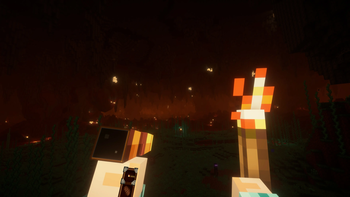
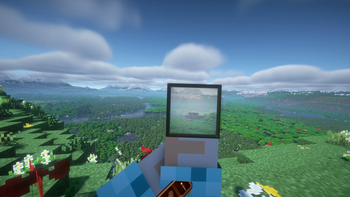
Screenshots
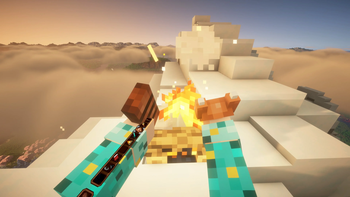
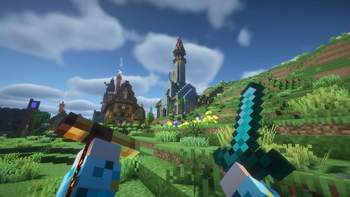
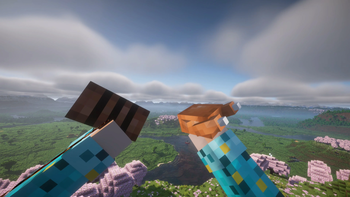
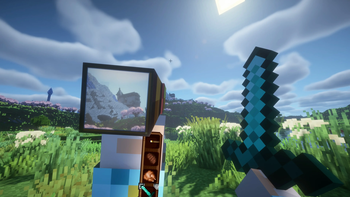
Über dieses Modpack
Thank you for checking out Ryans VR Experience 3!
Its been 3 years since I made my last VR Experience modpack and part of the reason why its taken me so long is I was waiting for something to come out to make the next modpack worthwhile.
And for me that moment came when I discovered Voxy. It completley changes the way you play Minecraft in VR and therefore I wanted to design it around Voxy. I basiclaly wanted to make minecraft almost feel like Zelda BOTW where if you see something cool in the distance you can go to it.
So for this pack I wanted to do 4 things:
1 - As with the last 2 Experience modpacks I wanted it to be Vanilla plus.
2 - Add more mods to make MC even better in Virtual Reality.
3 - Make you as players want to explore and make use of the massive render distances.
4 - Make the modpack as Sastisfying as possible.
And what I came up with is this pack. There are well over 100 mods and resource packs in this and I think they all complement each other really well.
- There are new VR mechanics/mods to hopefully improve the VR Experience
- Tectonic makes the overworld feel grand and because I've added New large structures and dungeons it makes the world feel lived and hopefully makes you want to explore!
- Many particle mods working together to make the world feel more alive some of which you can interact with!
- Changes to sleep, menus, sound effects and more!
If you would like the full rundown on all the mods and things in this pack you can checkout my youtube video here:
There are some important things to note:
1 - DO NOT UPDATE THE MODS IN THIS PACK! If you do it will cause the modpack to break (mainly voxy to break)
2 - When you are done loading the chunks with Voxy WorldGen make sure to turn it off in mod menu or it will cause your game to stutter.
But yeah if you would like help with preformance I am also going to make a tutorial video for this pack which I will link here:
And if anyone has any other questions please feel free to message on my communities discord and Im sure either myself or one of our members will be able to help:
Thank you all for watching and downloading and I hope you have a fantastic time with this modpack! :)
Verfügbare Versionen
Ryan Cliffords VR Experience 3 Server einrichten
Server bestellen
Wähle mindestens 6 GB RAM (8 GB empfohlen für Ryan Cliffords VR Experience 3). Je nach Spieleranzahl: +1 GB pro 5 Spieler.
Modpack im Dashboard installieren
Öffne den Modpack-Browser im Dashboard, suche nach "Ryan Cliffords VR Experience 3" und klicke "Installieren". Der fabric-Loader und Minecraft 1.21.11 werden automatisch konfiguriert.
Server starten & spielen
Starte den Server – alle Mods werden automatisch geladen. Teile die Server-IP mit Freunden und spielt zusammen!
Häufige Fragen
Ryan Cliffords VR Experience 3 Server crasht oder startet nicht – was tun?
Häufigste Ursachen: zu wenig RAM oder falscher fabric-Loader. Prüfe latest.log auf "OutOfMemoryError" → erhöhe RAM auf mindestens 8 GB. Bei "Mixin" oder "ClassNotFoundException": Modpack-Version und Loader stimmen nicht überein. Bei Mado Hosting werden Loader und Minecraft-Version beim Modpack-Install automatisch konfiguriert – das verhindert die meisten Startprobleme.
Wie viel RAM braucht ein Ryan Cliffords VR Experience 3 Server wirklich?
Minimum 6 GB, empfohlen 8 GB für stabile Performance. +1 GB pro 5 Spieler. Wichtig: Minecraft-Modpacks brauchen mehr RAM als Vanilla – plane pro zusätzlichem Spieler extra ein. Bei Mado Hosting kannst du den RAM jederzeit live hochskalieren, ohne Datenverlust (ab €7.800000000000001/Monat).
Kann ich eigene Mods zu Ryan Cliffords VR Experience 3 hinzufügen, ohne Konflikte?
Ja, aber achte auf die Kompatibilität: Nutze nur Mods für den gleichen Loader (fabric) und die gleiche Minecraft-Version (1.21.11). Häufige Probleme: ID-Konflikte bei Rezept-Mods und inkompatible Coremod-Versionen. Im Mado Dashboard zeigt der Mod-Browser nur kompatible Mods an und warnt bei bekannten Konflikten.
Ryan Cliffords VR Experience 3 Server laggt – Performance-Tipps
1) RAM auf 8 GB+ erhöhen. 2) Server-View-Distance auf 8 reduzieren (server.properties). 3) Pre-Generiere Chunks mit dem "Chunky" Plugin. 4) Prüfe mit /spark profiler welche Mods die meiste Tick-Time verbrauchen. Bei Mado Hosting laufen alle Server auf NVMe-SSDs mit dedizierten CPU-Kernen – das eliminiert Hardware als Engpass.
Ähnliche Modpacks
![Cobblemon Official Modpack [Fabric]](https://cdn.modrinth.com/data/5FFgwNNP/e7f9ee2e9d361623847853fe2ddce42f519ee64f.png)
![COBBLEVERSE - Pokemon Adventure [Cobblemon]](https://cdn.modrinth.com/data/Jkb29YJU/581ecf54530972afb18a04660afd820f2f24f6c7.png)
![Better MC [FABRIC] - BMC2](https://cdn.modrinth.com/data/shFhR8Vx/a19c2bcb51d38f32f138d3607e91cb2b7b8e387f_96.webp)


![Better MC [FORGE] - BMC4](https://cdn.modrinth.com/data/4BV47HRn/7f5ef7cc61b2593609aabef3ed07a866a4f11b73_96.webp)
Ryan Cliffords VR Experience 3 Server mieten
Starte deinen eigenen Server mit automatischer Modpack-Installation.
Details
- Lizenz
- LicenseRef-All-Rights-Reserved
- Server-seitig
- Nicht unterstützt
- Client-seitig
- Erforderlich
Unterstützte Versionen
Starte deinen Ryan Cliffords VR Experience 3 Server jetzt
Ab €7.80/Monat; für die beste Performance werden 8 GB RAM empfohlen.
Server konfigurieren →