
SimplyFine
Fast OptiFine-alternative that focuses on simplicity.
Screenshots
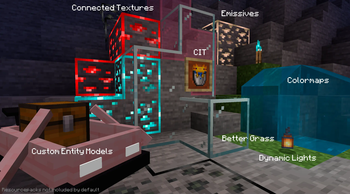
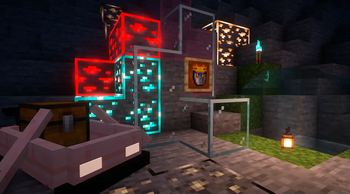
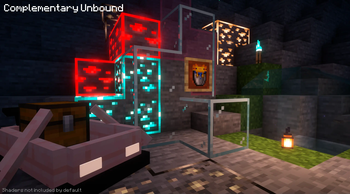
Über dieses Modpack
Modpack is archived. Use Additive instead.
⚙️SimplyFine
SimplyFine (SIF for short) is a lightweight Fabric modpack, that brings All OptiFine Features. It contains only optimization and OptiFine-Features, while not adding anything extra™.
❓ Difference between Additive
Smaller number of bundled mods. That's it. Not adding anything™ besides optimization + OptiFine parity mods.
Mod list
Optimization
- BBE
- C2ME
- EntityCulling
- Fast Noise
- FastQuit
- FerriteCore
- ImmediatelyFast
- Lithium
- ModernFix
- ScalableLux
- Sodium
OptiFine Features
- Animatica
- Capes (1.21.6+ - Cape Provider)
- CIT Resewn (1.16.5-1.21.1)
- Colormatic (1.18.2, 1.19.2), 1.20+ - Polytone
- Continuity
- [EMF] Entity Model Features
- [ETF] Entity Texture Features
- Nuit
- Nuit Interop (1.16.5-1.21.4), 1.21.6+ - Optiboxes
- Iris Shaders
- LambdaBetterGrass (1.16.5 - 1.19.2), 1.20+* - BetterGrassify
- LambDynamicLights (1.20.6 - RyoamicLights)
- OptiGUI
- Puzzle
- Sodium Extra
- Zoomify (1.18.2 - 1.20.4), 1.16.5, 1.20.6+ - Ok Zoomer
Some other mods...
- Mod Menu
- No Chat Reports
- Reese's Sodium Options (1.16.5-1.21.10)
- YOSBR - Saves your settings after modpack updates
* 1.19.4 replaces Better Grass with Fast Better Grass resource pack.
🔥 Performance
SIF provides similar performance as Additive.
The overall performance may vary depending on the scenario.
❓ How to increase performance even more?
You can look at SIF wiki that contains Post-Install information. Make sure to check FAQ too!
Other...
Version Support Policy
I aim to support primarily LTS versions (e.g. 1.20.1, 1.21.1). Some older versions may be dropped (1.16.5), as there's not much mod/config updates that affect them in major way. I may update them someday, but that's highly unlikely.
You can always see what versions I aim to support by viewing if it's Featured or not. Modrinth removed Featured versions, so from now on you can't view that.
Release channels
If special version is tagged as "Alpha" or "Beta", that doesn't always mean it's unstable - most of the time it means if there's all mods available.
Current channel is decided by this simple algorithm:
Release - All mods are available, version is stable. Might also be when there's one/two mods missing cause they'll not be updated on this version (for example, CIT Resewn on 1.21.4).
Beta - Modpack is missing 5 or less not that critical* mods.
Alpha - Modpack is missing 5-6 and more critical/not critical mods. Also has 0.x version format.
* - By critical mods I mean OptiFine most essential mods alternatives, for example, Continuity.
Verfügbare Versionen
SimplyFine Server einrichten
Server bestellen
Wähle mindestens 4 GB RAM (6 GB empfohlen für SimplyFine). Je nach Spieleranzahl: +1 GB pro 8 Spieler.
Modpack im Dashboard installieren
Öffne den Modpack-Browser im Dashboard, suche nach "SimplyFine" und klicke "Installieren". Der fabric-Loader und Minecraft 1.21.11 werden automatisch konfiguriert.
Server starten & spielen
Starte den Server – alle Mods werden automatisch geladen. Teile die Server-IP mit Freunden und spielt zusammen!
Häufige Fragen
SimplyFine Server crasht oder startet nicht – was tun?
Häufigste Ursachen: zu wenig RAM oder falscher fabric-Loader. Prüfe latest.log auf "OutOfMemoryError" → erhöhe RAM auf mindestens 6 GB. Bei "Mixin" oder "ClassNotFoundException": Modpack-Version und Loader stimmen nicht überein. Bei Mado Hosting werden Loader und Minecraft-Version beim Modpack-Install automatisch konfiguriert – das verhindert die meisten Startprobleme.
Wie viel RAM braucht ein SimplyFine Server wirklich?
Minimum 4 GB, empfohlen 6 GB für stabile Performance. +1 GB pro 8 Spieler. Wichtig: Minecraft-Modpacks brauchen mehr RAM als Vanilla – plane pro zusätzlichem Spieler extra ein. Bei Mado Hosting kannst du den RAM jederzeit live hochskalieren, ohne Datenverlust (ab €5.2/Monat).
Kann ich eigene Mods zu SimplyFine hinzufügen, ohne Konflikte?
Ja, aber achte auf die Kompatibilität: Nutze nur Mods für den gleichen Loader (fabric) und die gleiche Minecraft-Version (1.21.11). Häufige Probleme: ID-Konflikte bei Rezept-Mods und inkompatible Coremod-Versionen. Im Mado Dashboard zeigt der Mod-Browser nur kompatible Mods an und warnt bei bekannten Konflikten.
SimplyFine Server laggt – Performance-Tipps
1) RAM auf 6 GB+ erhöhen. 2) Server-View-Distance auf 8 reduzieren (server.properties). 3) Pre-Generiere Chunks mit dem "Chunky" Plugin. 4) Prüfe mit /spark profiler welche Mods die meiste Tick-Time verbrauchen. Bei Mado Hosting laufen alle Server auf NVMe-SSDs mit dedizierten CPU-Kernen – das eliminiert Hardware als Engpass.
Ähnliche Modpacks

![Cobblemon Official Modpack [Fabric]](https://cdn.modrinth.com/data/5FFgwNNP/e7f9ee2e9d361623847853fe2ddce42f519ee64f.png)
![COBBLEVERSE - Pokemon Adventure [Cobblemon]](https://cdn.modrinth.com/data/Jkb29YJU/581ecf54530972afb18a04660afd820f2f24f6c7.png)
![Better MC [FABRIC] - BMC2](https://cdn.modrinth.com/data/shFhR8Vx/a19c2bcb51d38f32f138d3607e91cb2b7b8e387f_96.webp)


SimplyFine Server mieten
Starte deinen eigenen Server mit automatischer Modpack-Installation.
Details
- Lizenz
- GNU Lesser General Public License v3.0 only
- Server-seitig
- Nicht unterstützt
- Client-seitig
- Erforderlich
Unterstützte Versionen
Starte deinen SimplyFine Server jetzt
Ab €5.20/Monat; für die beste Performance werden 6 GB RAM empfohlen.
Server konfigurieren →