
All Simple Voice Chat Connections!
🎤|See all All Simple Voice Chat Connections!
Screenshots

Über dieses Modpack
all simple voice chat connections!
everything you could want for simple voice chat.



voice chat · discord · tts · soundboards · recording · qol
a complete collection of addons, integrations, and quality-of-life mods built around simple voice chat.
no hunting for addons.
no figuring out what works together.
just install the pack and start talking.

what is this?
simple voice chat connections is a modpack built around simple voice chat and everything that can be connected to it.
it brings together voice communication, discord integration, audio tools, text-to-speech, recording, and a collection of smaller quality-of-life addons into one ready-to-use package.
one modpack. one voice stack.
what's included?





voice & communication
everything you need to make minecraft's voice system more useful:
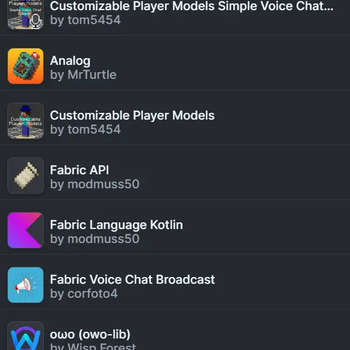
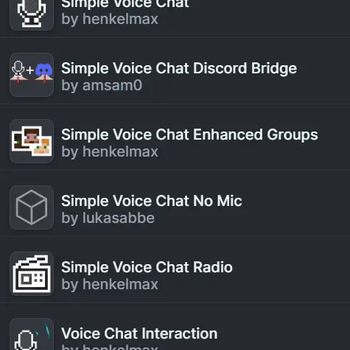
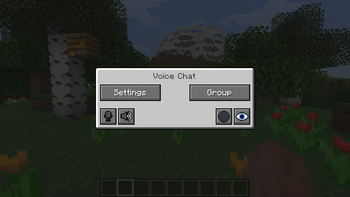
- simple voice chat — proximity voice chat
- replay voice chat — records voice chat alongside replay mod
- voice chat discord — bridges in-game voice to discord
- voice messages — send recorded voice messages through chat
- talkingheads — makes player heads react while speaking
- svc player names — displays player names while they talk
- voicechat names — alternative player name display
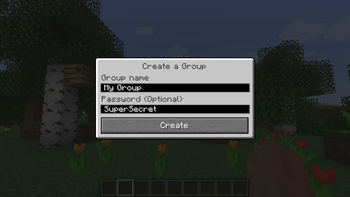
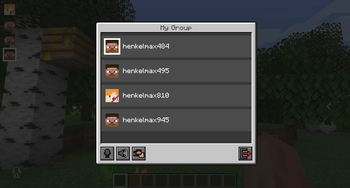
- enhanced groups — improved voice chat group management
- global spectator vc — voice chat support while spectating
- wiretap — record and monitor voice chat sessions
audio & soundboards
turn voice chat into an actual audio system:
- audio player — play custom audio files in-game
- open soundboard — open-source soundboard integration
- simple soundboard — lightweight soundboard addon
- soundboard — additional soundboard functionality
tts & voice effects
because normal voices are apparently not enough:
- ttvoice — twitch chat tts integration
- svc tts — text-to-speech for simple voice chat
- pitch shifter — change your voice pitch in real time
recording
- replay mod — record and replay entire sessions
- replay voice chat — keep voice chat alongside your recordings
performance
the voice stack doesn't need to come at the cost of your fps.
- sodium — optimized rendering
- lithium — optimized game logic
- ferritecore — reduced memory usage
- entity culling — skips rendering things you can't see
- iris — shader support
the whole stack
| category | mods |
|---|---|
| voice chat | simple voice chat, replay voice chat, voice chat discord |
| communication | voice messages, enhanced groups, global spectator vc |
| player presence | talkingheads, svc player names, voicechat names |
| audio | audio player, open soundboard, simple soundboard, soundboard |
| tts | ttvoice, svc tts |
| voice effects | pitch shifter |
| recording | replay mod, replay voice chat |
| performance | sodium, lithium, ferritecore, entity culling, iris |
| interface | mod menu |
| libraries | fabric api, fabric language kotlin, cloth config, owo lib, cristel lib, placeholder api |
compatibility
| minecraft | 1.21.11 |
| loader | fabric 0.18.6 |
| java | java 21 |
| ram | 3 gb allocated recommended |
download
we're currently available on modrinth.

made by edonme studios
lead dev: slibjpg
this modpack exists to make the entire simple voice chat ecosystem easier to use.
instead of searching for every addon individually, everything important is collected here.
Verfügbare Versionen
All Simple Voice Chat Connections! Server einrichten
Server bestellen
Wähle mindestens 6 GB RAM (8 GB empfohlen für All Simple Voice Chat Connections!). Je nach Spieleranzahl: +1 GB pro 5 Spieler.
Modpack im Dashboard installieren
Öffne den Modpack-Browser im Dashboard, suche nach "All Simple Voice Chat Connections!" und klicke "Installieren". Der fabric-Loader und Minecraft 1.21.11 werden automatisch konfiguriert.
Server starten & spielen
Starte den Server – alle Mods werden automatisch geladen. Teile die Server-IP mit Freunden und spielt zusammen!
Häufige Fragen
All Simple Voice Chat Connections! Server crasht oder startet nicht – was tun?
Häufigste Ursachen: zu wenig RAM oder falscher fabric-Loader. Prüfe latest.log auf "OutOfMemoryError" → erhöhe RAM auf mindestens 8 GB. Bei "Mixin" oder "ClassNotFoundException": Modpack-Version und Loader stimmen nicht überein. Bei Mado Hosting werden Loader und Minecraft-Version beim Modpack-Install automatisch konfiguriert – das verhindert die meisten Startprobleme.
Wie viel RAM braucht ein All Simple Voice Chat Connections! Server wirklich?
Minimum 6 GB, empfohlen 8 GB für stabile Performance. +1 GB pro 5 Spieler. Wichtig: Minecraft-Modpacks brauchen mehr RAM als Vanilla – plane pro zusätzlichem Spieler extra ein. Bei Mado Hosting kannst du den RAM jederzeit live hochskalieren, ohne Datenverlust (ab €7.800000000000001/Monat).
Kann ich eigene Mods zu All Simple Voice Chat Connections! hinzufügen, ohne Konflikte?
Ja, aber achte auf die Kompatibilität: Nutze nur Mods für den gleichen Loader (fabric) und die gleiche Minecraft-Version (1.21.11). Häufige Probleme: ID-Konflikte bei Rezept-Mods und inkompatible Coremod-Versionen. Im Mado Dashboard zeigt der Mod-Browser nur kompatible Mods an und warnt bei bekannten Konflikten.
All Simple Voice Chat Connections! Server laggt – Performance-Tipps
1) RAM auf 8 GB+ erhöhen. 2) Server-View-Distance auf 8 reduzieren (server.properties). 3) Pre-Generiere Chunks mit dem "Chunky" Plugin. 4) Prüfe mit /spark profiler welche Mods die meiste Tick-Time verbrauchen. Bei Mado Hosting laufen alle Server auf NVMe-SSDs mit dedizierten CPU-Kernen – das eliminiert Hardware als Engpass.
Ähnliche Modpacks


![Cobblemon Official Modpack [Fabric]](https://cdn.modrinth.com/data/5FFgwNNP/e7f9ee2e9d361623847853fe2ddce42f519ee64f.png)
![COBBLEVERSE - Pokemon Adventure [Cobblemon]](https://cdn.modrinth.com/data/Jkb29YJU/581ecf54530972afb18a04660afd820f2f24f6c7.png)

![Better MC [FABRIC] - BMC2](https://cdn.modrinth.com/data/shFhR8Vx/a19c2bcb51d38f32f138d3607e91cb2b7b8e387f_96.webp)
All Simple Voice Chat Connections! Server mieten
Starte deinen eigenen Server mit automatischer Modpack-Installation.
Details
- Lizenz
- LicenseRef-All-Rights-Reserved
- Server-seitig
- Erforderlich
- Client-seitig
- Erforderlich
Unterstützte Versionen
Starte deinen All Simple Voice Chat Connections! Server jetzt
Ab €7.80/Monat; für die beste Performance werden 8 GB RAM empfohlen.
Server konfigurieren →