
Slimecrew Frontier
Encounter new mobs, embark on thrilling quests, and craft custom recipes that deepen your adventure. Unleash the power of innovative storage and automation tools like Framed Blocks and Refined Storage, redefining your gameplay.
Screenshots

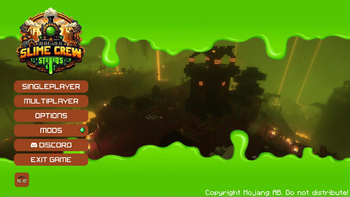
Über dieses Modpack
Description
This modpack, powered by the NeoForged mod loader, delivers an unparalleled gaming experience, featuring 🌄 sprawling landscapes and intricate structures courtesy of top-tier mods from YUNG and other notable creators. Encounter a rich array of 🐾 new mobs, delve into numerous quests 📜, and explore custom recipes 🍲. With cutting-edge additions like Framed Blocks 🧱, Sophisticated Backpacks 🎒, and Refined Storage 🗄️, this modpack redefines storage and automation. Experience revamped world generation 🌍 across all dimensions, immersing you in a world that honors the essence of Vanilla Minecraft, all while centering around the innovative Create mod 🛠️ and its many addons. Prepare for an adventure that captivates and elevates your Minecraft journey.
Included Content
Mods
Curseforge
- AllTheCompressed
- Apotheosis
- Apothic Attributes (AttributesLib)
- Aquaculture 2
- Chimes
- Chisels and Bits
- Crash Utilities
- Create Compressed
- Create Confectionery
- Create Design n' Decor
- Create WooderWheels
- GroovyModLoader (GML)
- Krypton Reforged
- KubeJS Delight
- Ore Excavation
- Placebo
- Sophisticated Backpacks
- Sophisticated Core
- Sophisticated Storage
- Time In A Bottle
- Time In A Bottle Curio Support
- When Dungeons Arise
Datapacks
- [Better End Cities (Vanilla)](https://modrinth.com/datapack/better-end-cities-(vanilla)) - [Create Renewable Ores](https://modrinth.com/datapack/create-renewable-ores) - [Ender Dragon Fight Remastered](https://modrinth.com/datapack/edf-remastered) - [End Remastered Yungs](https://discord.com/invite/D9cxayDNSP) - [Remove Terralith Intro Message](https://modrinth.com/datapack/remove-terralith-intro-message) - [Remove Oil Well](https://modrinth.com/datapack/disable-ad-astra-oil-wells) - [Repurposed Structures - Better Desert Temples Compat](https://modrinth.com/datapack/repurposed-structures-better-desert-temples-compat) - [Repurposed Structures - Better Dungeons Compat](https://modrinth.com/datapack/repurposed-structures-better-dungeons-compat) - [Repurposed Structures - Better Jungle Temples Compat](https://modrinth.com/datapack/repurposed-structures-better-jungle-temples) - [Repurposed Structures - Better Ocean Monuments Compat](https://modrinth.com/datapack/repurposed-structures-better-ocean-monuments-compat) - [Repurposed Structures - Better Strongholds Compat](https://modrinth.com/datapack/rsbtsc) - [Repurposed Structures - Better Villages Compat](https://modrinth.com/datapack/repurposed-structures-better-villages-compat) - [Terralith v2](https://modrinth.com/datapack/terralith-v2) - [Terrains](https://modrinth.com/datapack/terrains)Shaders
- [Sildurs Vibrant Shaders](https://www.curseforge.com/minecraft/customization/sildurs-vibrant-shaders)Resource Packs
- [Faithful 32x](https://www.curseforge.com/minecraft/texture-packs/faithful-32x)Requirements
- Forge: 47.1.61
- Minecraft: 1.20.1
Recommendations
Ensure you allocate at least 8GB of RAM
Verfügbare Versionen
Slimecrew Frontier Server einrichten
Server bestellen
Wähle mindestens 6 GB RAM (8 GB empfohlen für Slimecrew Frontier). Je nach Spieleranzahl: +1 GB pro 5 Spieler.
Modpack im Dashboard installieren
Öffne den Modpack-Browser im Dashboard, suche nach "Slimecrew Frontier" und klicke "Installieren". Der neoforge-Loader und Minecraft 1.20.1 werden automatisch konfiguriert.
Server starten & spielen
Starte den Server – alle Mods werden automatisch geladen. Teile die Server-IP mit Freunden und spielt zusammen!
Häufige Fragen
Slimecrew Frontier Server crasht oder startet nicht – was tun?
Häufigste Ursachen: zu wenig RAM oder falscher neoforge-Loader. Prüfe latest.log auf "OutOfMemoryError" → erhöhe RAM auf mindestens 8 GB. Bei "Mixin" oder "ClassNotFoundException": Modpack-Version und Loader stimmen nicht überein. Bei Mado Hosting werden Loader und Minecraft-Version beim Modpack-Install automatisch konfiguriert – das verhindert die meisten Startprobleme.
Wie viel RAM braucht ein Slimecrew Frontier Server wirklich?
Minimum 6 GB, empfohlen 8 GB für stabile Performance. +1 GB pro 5 Spieler. Wichtig: Minecraft-Modpacks brauchen mehr RAM als Vanilla – plane pro zusätzlichem Spieler extra ein. Bei Mado Hosting kannst du den RAM jederzeit live hochskalieren, ohne Datenverlust (ab €7.800000000000001/Monat).
Kann ich eigene Mods zu Slimecrew Frontier hinzufügen, ohne Konflikte?
Ja, aber achte auf die Kompatibilität: Nutze nur Mods für den gleichen Loader (neoforge) und die gleiche Minecraft-Version (1.20.1). Häufige Probleme: ID-Konflikte bei Rezept-Mods und inkompatible Coremod-Versionen. Im Mado Dashboard zeigt der Mod-Browser nur kompatible Mods an und warnt bei bekannten Konflikten.
Slimecrew Frontier Server laggt – Performance-Tipps
1) RAM auf 8 GB+ erhöhen. 2) Server-View-Distance auf 8 reduzieren (server.properties). 3) Pre-Generiere Chunks mit dem "Chunky" Plugin. 4) Prüfe mit /spark profiler welche Mods die meiste Tick-Time verbrauchen. Bei Mado Hosting laufen alle Server auf NVMe-SSDs mit dedizierten CPU-Kernen – das eliminiert Hardware als Engpass.
Ähnliche Modpacks
![Cobblemon Official Modpack [Fabric]](https://cdn.modrinth.com/data/5FFgwNNP/e7f9ee2e9d361623847853fe2ddce42f519ee64f.png)
![COBBLEVERSE - Pokemon Adventure [Cobblemon]](https://cdn.modrinth.com/data/Jkb29YJU/581ecf54530972afb18a04660afd820f2f24f6c7.png)
![Better MC [FABRIC] - BMC2](https://cdn.modrinth.com/data/shFhR8Vx/a19c2bcb51d38f32f138d3607e91cb2b7b8e387f_96.webp)


![Better MC [FORGE] - BMC4](https://cdn.modrinth.com/data/4BV47HRn/7f5ef7cc61b2593609aabef3ed07a866a4f11b73_96.webp)
Slimecrew Frontier Server mieten
Starte deinen eigenen Server mit automatischer Modpack-Installation.
Details
- Lizenz
- LicenseRef-All-Rights-Reserved
- Server-seitig
- Erforderlich
- Client-seitig
- Erforderlich
Unterstützte Versionen
Starte deinen Slimecrew Frontier Server jetzt
Ab €7.80/Monat; für die beste Performance werden 8 GB RAM empfohlen.
Server konfigurieren →