
SmoothCraft
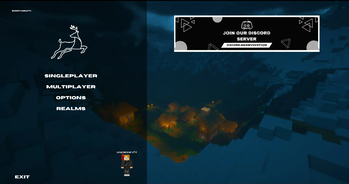
The Best Fabric FPS mod pack for adding more performence, adding the prettiest menu and many other!
Screenshots

Über dieses Modpack
🦌 SmoothCraft — The Ultimate Performance & Visual Enhancement Modpack

SmoothCraft is a meticulously crafted Fabric-based modpack designed to maximize FPS while delivering breathtaking visuals. Built on industry-leading optimizations like Sodium, Lithium, and Iris Shaders, it transforms Minecraft into a smoother, prettier, and more immersive experience—without sacrificing performance.
✨ Why Choose SmoothCraft?
✅ Unrivaled Performance
- Powered by Sodium, Lithium, and Starlight for buttery-smooth gameplay, even on mid-range PCs.
- Reduced lag spikes and optimized chunk loading for seamless exploration.
✅ Stunning Visuals, Zero Compromises
- Full shader support (Iris) with presets tailored for balance between beauty and FPS.
- Enhanced lighting, shadows, and textures without the typical performance hit.
✅ Lightweight & Stable
- No bloat—only essential optimizations and carefully selected visual mods.
- Fewer crashes thanks to rigorous compatibility testing.
✅ Community-Approved
- Trusted by thousands of players and continuously updated for the best experience.
🖼️ Performance Showcase
Tested on:
- CPU: AMD Ryzen 5 3400G
- GPU: Vega 11 Integrated (4GB VRAM)
- RAM: 16GB DDR4 @ 2666MHz
- Resolution: 1080p
Benchmark Results
| Settings | Render Distance | Avg FPS | Shaders |
|---|---|---|---|
| Ultra | 8 chunks | 250-290 | ❌ Disabled |
| Balanced | 12 chunks | 120-180 | ❌ Disabled |
| Shader | 8 chunks | 45-70 | ✅ Bliss |
📌 Results with Bliss shaders and 4GB RAM allocation
Visual Comparison
 |
 |
|---|---|
| 270+ FPS - Default settings | 45-70 FPS - Shaders enabled |
⚙️ System Requirements
Minimum (720p/30fps)
- CPU: AMD Ryzen 3 2200G / Intel i3-8100
- GPU: Vega 8 / Intel UHD 630 (2GB VRAM)
- RAM: 8GB DDR4 (4GB allocated)
Recommended (1080p/60fps)
- CPU: AMD Ryzen 5 3400G / Intel i5-9400
- GPU: Vega 11 / GTX 1050 (4GB VRAM)
- RAM: 16GB DDR4 (6GB allocated)
Shader-Ready
- Dedicated GPU: GTX 1650 / RX 5500 XT
- RAM: 16GB+ (8GB allocated)
⚙️ Installation Guide
- Download from:
- Allocate 6GB RAM or 4GB MIN in your launcher
🚀 Optimization Tips
- For APUs: Set mipmap levels to 0 in video settings
- For Better FPS: Lower your render distance to 4-6 chunks to avoid overloading your system.
- Disable Clouds: Turn off clouds in video settings to reduce unnecessary graphical load.
- Use Lower FOV: Set your FOV to 70-90 for better FPS.
- For Lower-End Systems: Use Fast Graphics and turn off smooth lighting for a smoother experience.
Want more tips? Join our server for additional optimization suggestions and great gameplay experience!
📢 Join Our Community
🔹 Discord | CurseForge
Experience Minecraft like never before - optimized for every setup! 🚀
Verfügbare Versionen
SmoothCraft Server einrichten
Server bestellen
Wähle mindestens 4 GB RAM (6 GB empfohlen für SmoothCraft). Je nach Spieleranzahl: +1 GB pro 8 Spieler.
Modpack im Dashboard installieren
Öffne den Modpack-Browser im Dashboard, suche nach "SmoothCraft" und klicke "Installieren". Der fabric-Loader und Minecraft 1.21 werden automatisch konfiguriert.
Server starten & spielen
Starte den Server – alle Mods werden automatisch geladen. Teile die Server-IP mit Freunden und spielt zusammen!
Häufige Fragen
SmoothCraft Server crasht oder startet nicht – was tun?
Häufigste Ursachen: zu wenig RAM oder falscher fabric-Loader. Prüfe latest.log auf "OutOfMemoryError" → erhöhe RAM auf mindestens 6 GB. Bei "Mixin" oder "ClassNotFoundException": Modpack-Version und Loader stimmen nicht überein. Bei Mado Hosting werden Loader und Minecraft-Version beim Modpack-Install automatisch konfiguriert – das verhindert die meisten Startprobleme.
Wie viel RAM braucht ein SmoothCraft Server wirklich?
Minimum 4 GB, empfohlen 6 GB für stabile Performance. +1 GB pro 8 Spieler. Wichtig: Minecraft-Modpacks brauchen mehr RAM als Vanilla – plane pro zusätzlichem Spieler extra ein. Bei Mado Hosting kannst du den RAM jederzeit live hochskalieren, ohne Datenverlust (ab €5.2/Monat).
Kann ich eigene Mods zu SmoothCraft hinzufügen, ohne Konflikte?
Ja, aber achte auf die Kompatibilität: Nutze nur Mods für den gleichen Loader (fabric) und die gleiche Minecraft-Version (1.21). Häufige Probleme: ID-Konflikte bei Rezept-Mods und inkompatible Coremod-Versionen. Im Mado Dashboard zeigt der Mod-Browser nur kompatible Mods an und warnt bei bekannten Konflikten.
SmoothCraft Server laggt – Performance-Tipps
1) RAM auf 6 GB+ erhöhen. 2) Server-View-Distance auf 8 reduzieren (server.properties). 3) Pre-Generiere Chunks mit dem "Chunky" Plugin. 4) Prüfe mit /spark profiler welche Mods die meiste Tick-Time verbrauchen. Bei Mado Hosting laufen alle Server auf NVMe-SSDs mit dedizierten CPU-Kernen – das eliminiert Hardware als Engpass.
Ähnliche Modpacks

![Cobblemon Official Modpack [Fabric]](https://cdn.modrinth.com/data/5FFgwNNP/e7f9ee2e9d361623847853fe2ddce42f519ee64f.png)
![COBBLEVERSE - Pokemon Adventure [Cobblemon]](https://cdn.modrinth.com/data/Jkb29YJU/581ecf54530972afb18a04660afd820f2f24f6c7.png)
![Better MC [FABRIC] - BMC2](https://cdn.modrinth.com/data/shFhR8Vx/a19c2bcb51d38f32f138d3607e91cb2b7b8e387f_96.webp)


SmoothCraft Server mieten
Starte deinen eigenen Server mit automatischer Modpack-Installation.
Details
- Lizenz
- LicenseRef-All-Rights-Reserved
- Server-seitig
- Nicht unterstützt
- Client-seitig
- Erforderlich
Unterstützte Versionen
Starte deinen SmoothCraft Server jetzt
Ab €5.20/Monat; für die beste Performance werden 6 GB RAM empfohlen.
Server konfigurieren →