
Sodium Plus
A client-side optimization modpack with a few extra tweaks.
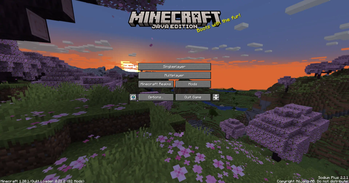
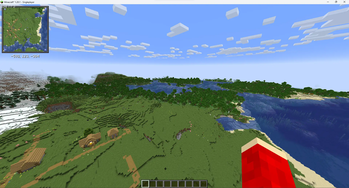
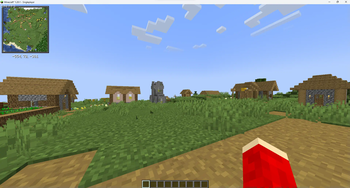
Screenshots
Über dieses Modpack
Sodium Plus
If you have any issues and you have used your launcher to update the modpack, try instead to make a new instance and see if that works.
If this works I am more than happy to help you transfer your data over on discord. If it still has some problem, create a github issue.
About
Sodium Plus aims to re-create the experience of the OptiFine mod, while still having the most resource-efficient Minecraft client you can have. It also comes with some visual tweaks, quality-of-life changes, and a couple of bug patches. A couple of these mods you may not like, as it changes gameplay, even if it is only client-side. Because of this, I might make a fair play edition later on.
Please submit any bugs or feature requests on out GitHub issues page: https://github.com/happyredstone/sodiumplus/issues
You shouldn't get banned or kicked for joining a current version of the game, but might have issues with older versions due to use of viaFabricPlus. I am not responsible for any bans you might get!
Server
Sodium Plus supports being installed on a server as of version 2.4.7.
Install the SERVER release on the server, and the same number version on any clients.
SERVER releases should work on clients, but there is no reason not to use the normal releases.
List of mods:
Expand
- AmbientSounds
- Animatica Refabricated
- AppleSkin
- AudioThrottle
- Auto Clicker
- Axiom
- Better Statistics Screen
- Better Tab
- Blur+
- CICADA
- CalcMod
- Chat Heads
- ClickThrough Plus
- Cloth Config v26.2
- Collective
- Continuity
- Craft Config Library
- Crash Assistant
- CreativeCore
- Cull Leaves
- Distant Horizons
- Dynamic FPS
- Emojis
- Entity Model Features
- Entity Texture Features
- Entity View Distance
- EntityCulling
- FPS-Display
- Fabric API
- Fabric Language Kotlin
- Fadeless
- Falling Leaves
- Fast Noise
- Fast Surface
- Faster Iris Shadow Mapper
- FerriteCore
- Flashback
- Full Brightness Toggle
- Held Item Info
- Hold That Chunk V2
- ImmediatelyFast
- Iris
- Jade
- Language Reload
- LibJF
- Litematica
- Lithium
- MaLiLib
- MidnightLib
- MiniHUD
- Mod Menu
- More Chat History
- No Chat Reports
- NotEnoughAnimations
- Nuit
- Nuit Interop
- Optimized block entities
- Presence Footsteps
- Puzzle
- Reese's Sodium Options
- Shulker Box Tooltip
- Simple Voice Chat
- Sodium
- Sodium Extra
- Sound Physics Remastered
- TCDCommons API
- ViaFabricPlus
- Visuality
- Xaero's Minimap
- Xaero's World Map
- YetAnotherConfigLib
- ZConfig
- Zoomify
- lazy-language-loader
Resource packs:
- Fresh Animations
- Redstone Tweaks
Note: If you're looking for OutPerform, it is no longer maintained. My friend is now helping me work on Sodium Plus, since he no longer works on OutPerform, and Sodium Plus is much better.
Old OutPerform versions can be found here:
https://modrinth.com/modpack/outperform
If you would like to suggest anything, use out GitHub issues for now: https://github.com/NoSadBeHappy/sodiumplus/issues
Verfügbare Versionen
Sodium Plus Server einrichten
Server bestellen
Wähle mindestens 4 GB RAM (6 GB empfohlen für Sodium Plus). Je nach Spieleranzahl: +1 GB pro 8 Spieler.
Modpack im Dashboard installieren
Öffne den Modpack-Browser im Dashboard, suche nach "Sodium Plus" und klicke "Installieren". Der fabric-Loader und Minecraft 26.2 werden automatisch konfiguriert.
Server starten & spielen
Starte den Server – alle Mods werden automatisch geladen. Teile die Server-IP mit Freunden und spielt zusammen!
Häufige Fragen
Sodium Plus Server crasht oder startet nicht – was tun?
Häufigste Ursachen: zu wenig RAM oder falscher fabric-Loader. Prüfe latest.log auf "OutOfMemoryError" → erhöhe RAM auf mindestens 6 GB. Bei "Mixin" oder "ClassNotFoundException": Modpack-Version und Loader stimmen nicht überein. Bei Mado Hosting werden Loader und Minecraft-Version beim Modpack-Install automatisch konfiguriert – das verhindert die meisten Startprobleme.
Wie viel RAM braucht ein Sodium Plus Server wirklich?
Minimum 4 GB, empfohlen 6 GB für stabile Performance. +1 GB pro 8 Spieler. Wichtig: Minecraft-Modpacks brauchen mehr RAM als Vanilla – plane pro zusätzlichem Spieler extra ein. Bei Mado Hosting kannst du den RAM jederzeit live hochskalieren, ohne Datenverlust (ab €5.2/Monat).
Kann ich eigene Mods zu Sodium Plus hinzufügen, ohne Konflikte?
Ja, aber achte auf die Kompatibilität: Nutze nur Mods für den gleichen Loader (fabric) und die gleiche Minecraft-Version (26.2). Häufige Probleme: ID-Konflikte bei Rezept-Mods und inkompatible Coremod-Versionen. Im Mado Dashboard zeigt der Mod-Browser nur kompatible Mods an und warnt bei bekannten Konflikten.
Sodium Plus Server laggt – Performance-Tipps
1) RAM auf 6 GB+ erhöhen. 2) Server-View-Distance auf 8 reduzieren (server.properties). 3) Pre-Generiere Chunks mit dem "Chunky" Plugin. 4) Prüfe mit /spark profiler welche Mods die meiste Tick-Time verbrauchen. Bei Mado Hosting laufen alle Server auf NVMe-SSDs mit dedizierten CPU-Kernen – das eliminiert Hardware als Engpass.
Ähnliche Modpacks

![Cobblemon Official Modpack [Fabric]](https://cdn.modrinth.com/data/5FFgwNNP/e7f9ee2e9d361623847853fe2ddce42f519ee64f.png)
![COBBLEVERSE - Pokemon Adventure [Cobblemon]](https://cdn.modrinth.com/data/Jkb29YJU/581ecf54530972afb18a04660afd820f2f24f6c7.png)
![Better MC [FABRIC] - BMC2](https://cdn.modrinth.com/data/shFhR8Vx/a19c2bcb51d38f32f138d3607e91cb2b7b8e387f_96.webp)

![Better MC [FORGE] - BMC4](https://cdn.modrinth.com/data/4BV47HRn/7f5ef7cc61b2593609aabef3ed07a866a4f11b73_96.webp)
Sodium Plus Server mieten
Starte deinen eigenen Server mit automatischer Modpack-Installation.
Unterstützte Versionen
Starte deinen Sodium Plus Server jetzt
Ab €5.20/Monat; für die beste Performance werden 6 GB RAM empfohlen.
Server konfigurieren →