
Something is knocking...
A modpack focused mainly about Verity™
Screenshots
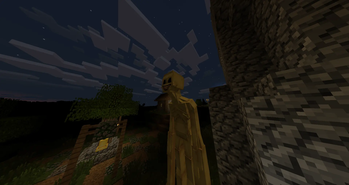
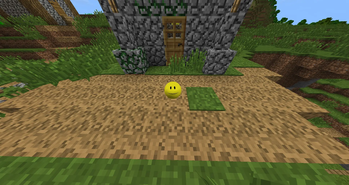
Über dieses Modpack
Verity
A friendly face. Until it isn't.
Verity is a curated horror-survival modpack built around the Verity mod — the AI-driven companion inspired by ThatMob's viral Minecraft horror series. What starts as a helpful yellow companion who offers tips, conversation, and reassurance slowly reveals something far more unsettling the longer you stay in its world.
This pack brings together 10-20 handpicked mods to expand and reinforce that experience: atmosphere, tension, and performance, all tuned to work seamlessly alongside Verity's evolving behavior.
Features
A companion that changes. Verity starts as an eager helper and shifts over in-game days into something you can no longer trust.
Enhanced atmosphere. Lighting, sound, and shader mods deepen the dread as your world darkens.
Optimized performance. Carefully selected FPS and QoL mods keep the experience smooth so nothing distracts from immersion.
Progressive horror. Events, sounds, and anomalies escalate naturally as your survival continues.
Survival core intact. Built on a solid vanilla-plus survival base, so the horror layers onto real gameplay rather than replacing it.
Notes
This pack includes the Verity mod, created and maintained by its original developers. Full credit for the Verity concept goes to ThatMob and Varmite; please direct any Verity-specific bug reports to the official mod page. This modpack is a curated compilation and configuration built around that mod, not a claim of ownership over it.
Verfügbare Versionen
Something is knocking... Server einrichten
Server bestellen
Wähle mindestens 6 GB RAM (8 GB empfohlen für Something is knocking...). Je nach Spieleranzahl: +1 GB pro 5 Spieler.
Modpack im Dashboard installieren
Öffne den Modpack-Browser im Dashboard, suche nach "Something is knocking..." und klicke "Installieren". Der forge-Loader und Minecraft 1.20.1 werden automatisch konfiguriert.
Server starten & spielen
Starte den Server – alle Mods werden automatisch geladen. Teile die Server-IP mit Freunden und spielt zusammen!
Häufige Fragen
Something is knocking... Server crasht oder startet nicht – was tun?
Häufigste Ursachen: zu wenig RAM oder falscher forge-Loader. Prüfe latest.log auf "OutOfMemoryError" → erhöhe RAM auf mindestens 8 GB. Bei "Mixin" oder "ClassNotFoundException": Modpack-Version und Loader stimmen nicht überein. Bei Mado Hosting werden Loader und Minecraft-Version beim Modpack-Install automatisch konfiguriert – das verhindert die meisten Startprobleme.
Wie viel RAM braucht ein Something is knocking... Server wirklich?
Minimum 6 GB, empfohlen 8 GB für stabile Performance. +1 GB pro 5 Spieler. Wichtig: Minecraft-Modpacks brauchen mehr RAM als Vanilla – plane pro zusätzlichem Spieler extra ein. Bei Mado Hosting kannst du den RAM jederzeit live hochskalieren, ohne Datenverlust (ab €7.800000000000001/Monat).
Kann ich eigene Mods zu Something is knocking... hinzufügen, ohne Konflikte?
Ja, aber achte auf die Kompatibilität: Nutze nur Mods für den gleichen Loader (forge) und die gleiche Minecraft-Version (1.20.1). Häufige Probleme: ID-Konflikte bei Rezept-Mods und inkompatible Coremod-Versionen. Im Mado Dashboard zeigt der Mod-Browser nur kompatible Mods an und warnt bei bekannten Konflikten.
Something is knocking... Server laggt – Performance-Tipps
1) RAM auf 8 GB+ erhöhen. 2) Server-View-Distance auf 8 reduzieren (server.properties). 3) Pre-Generiere Chunks mit dem "Chunky" Plugin. 4) Prüfe mit /spark profiler welche Mods die meiste Tick-Time verbrauchen. Bei Mado Hosting laufen alle Server auf NVMe-SSDs mit dedizierten CPU-Kernen – das eliminiert Hardware als Engpass.
Ähnliche Modpacks
![Cobblemon Official Modpack [Fabric]](https://cdn.modrinth.com/data/5FFgwNNP/e7f9ee2e9d361623847853fe2ddce42f519ee64f.png)
![COBBLEVERSE - Pokemon Adventure [Cobblemon]](https://cdn.modrinth.com/data/Jkb29YJU/581ecf54530972afb18a04660afd820f2f24f6c7.png)
![Better MC [FABRIC] - BMC2](https://cdn.modrinth.com/data/shFhR8Vx/a19c2bcb51d38f32f138d3607e91cb2b7b8e387f_96.webp)


![Better MC [FORGE] - BMC4](https://cdn.modrinth.com/data/4BV47HRn/7f5ef7cc61b2593609aabef3ed07a866a4f11b73_96.webp)
Something is knocking... Server mieten
Starte deinen eigenen Server mit automatischer Modpack-Installation.
Details
- Lizenz
- LicenseRef-All-Rights-Reserved
- Server-seitig
- Erforderlich
- Client-seitig
- Erforderlich
Unterstützte Versionen
Starte deinen Something is knocking... Server jetzt
Ab €7.80/Monat; für die beste Performance werden 8 GB RAM empfohlen.
Server konfigurieren →