Spectralarity
A Spectrum-focused progression modpack, placing focus on creativity, discovery, and ingenuity.
Screenshots
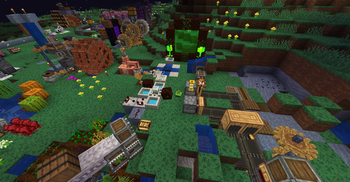
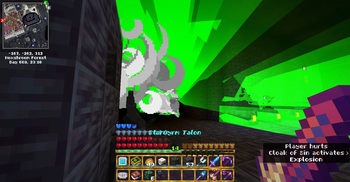
Über dieses Modpack
Description
Spectralarity is a 1.19.2 progression modpack built on the Quilt Loader that focuses on Spectrum as its core mod, featuring interwoven progression done in a novel way. Alongside Spectrum itself, you may find Botania, Yttr, Create, Hex Casting, and Malum as the supporting cast of content mods, all requiring Spectrum to unlock and progress in, and themselves the key to progressing further into Spectrum.
Several recipes have been tweaked for theming, balance, and to ensure a sense of continuous progression - focusing on just one mod will have you hit a wall, eventually, and not all mods are accessible from the start. But there is more than just recipe changes: ore and worldgen hiding with Revelationary, alterations to mods' behavior, and more. For full details, every version of the pack ships with the Spectralarity Changelog file, listing every change ordered by category.
In Spectralarity, you can...
- tinker with magical gemstones of unknown origin
- open holes in bedrock and explore what awaits beneath... or merely setup Void-based fast travel
- decipher the patterns etched on magenta gems to cast spells, and go mad in the knowing
- work with devices both mechanical and floral to create elaborate (or not-so-elaborate) contraptions
- commit magical atrocities for your own sake
- see familiar dimensions in a whole new light, finding secrets that were not there before
- explore far and wide, using your artifices to aid you
- encounter and defeat several bosses, and use their once-fabled power to further your own
- discover and savor a wide variety of magical cuisine, from foods and drinks to other consumables
- explore the true potential of enchants and potions, empowered by your gemstones
- and more - what can you make, fellow chromamancer?
Design Points
Spectralarity has a few guidelines on how it is designed, which may be interesting to know:
- Put Spectrum at the forefront, requiring it throughout the progression tree.
- Encourage exploration of lesser-known and interesting blocks and items from Spectrum and other mods such as Botania and Yttr, which often go ignored in typical packs.
- Entice the player with minor puzzles throughout, similarly to Spectrum itself. Reward creativity and discovery.
- Change standard progression in a way that makes things feel new again, and is overall longer, weaving mods together.
Notes
- This modpack is intended to contain FTB Chunks, which depends on FTB Library and FTB Teams, for land claiming. These mods cannot be distributed here, and thus if you want them, they must be downloaded separately through these links.
- Sodium and Indium are marked Optional because of minor visual issues that they may cause. Further, they have not been extensively tested.
Credits and Acknowledgements
- The modpack logo incorporates Spectrum's dike rune textures; full credit for these to Azzyypaaras, of course!
- Menu music "Gazing Through a Window" is (c) Radiarc, licensed CC BY-NA 3.0.
- See the Spectralarity Credits file in the pack download for a listing of acknowledgements.
Feedback, Questions, Etc?
Note well that because of the amount of changes this pack makes to the mods within it, it is recommended you first contact me about issues or questions as opposed to the mods' dedicated spaces, to avoid unintended confusion.
You can find me on Spectrum's discord as EsetKalenko, feel free to ping me about this modpack anytime. Or, you can join the Spectralarity discord and discuss with other players, and see upcoming content for the pack.
Full Modlist
Key:
[E] = Externally sourced mod, must be manually added
[O] = Optional
[S] = Safe to remove
- Adaptive Tooltips by isXander
- Another Furniture by Starfish Studios
- AppleSkin by squeek502
- Architect's Palette Fabric by Jsburg & Slomaxonical
- Architectury by shedaniel
- Astronomical by doctor4t
- Blåhaj by hibi, infoplayerstart
- Boat with Everything by quaternary
- Bookshelf by Darkhax
- Bosses of Mass Destruction (Beta) by Barribob
- Botania by Vazkii, wiiv, williewillus, dylan4ever, Hubry, Alwinfy, artemisSystem, Falkory220
- Bundle Scroll by Zachary Barbanell
- Cardinal Components API by UpcraftLP, Pyrofab
- Cloth Config v8 by shedaniel
- Comforts by Illusive Soulworks
- Conjuring by glisco
- Continuity by Pepper_Bell
- Cosmetic Armor by Apace
- Create by Fabricators of Create, Creators of Create
- Custom Stars by b3spectacled
- Data Driven Composter by KJP12
- Display Case Mod by ChappiePie
- Double Hotbar by sidezbros [S]
- Drip Sounds by PieKing1215
- EMI Loot by fzzyhmstrs, lxly9 (art)
- EMI Trades by pkstDev
- EMI by Emi
- EMIffect by pkstDev
- Ears by unascribed [S]
- Estrogen by Mayaqq
- Excorrelation by unascribed
- FTB Chunks by FTB Team [E][O]
- FTB Library by FTB, LatvianModder [E][O]
- FTB Teams by LatvianModder [E][O]
- Fabrication by unascribed, SFort
- FancyMenu by Keksuccino
- FerriteCore by malte0811
- Figura by skyrina [S]
- Forge Config API Port by Fuzs
- Frame by Daniel Orr (Andante)
- Geckolib by Gecko, Eliot, AzureDoom, Hydos, DerToaster
- Hex Casting by petrak@ (aka gamma-delta)
- HexGloop by samsthenerd
- Hexal by Talia
- Hexbound by Cypher121
- Indium by comp500 [O]
- Idwtialsimmoedm by glisco
- Iron Chests: Restocked by ThatGravyBoat, Kekie
- Jade by Snownee
- Kettle by Cypher121
- Konkrete by Keksuccino
- Lithium by JellySquid, 2No2Name
- Malum (Quilt) by Arathain, RTTV, SammySemicolon
- MarderLib by Talsumi
- Mod Menu by Prospector, jackassmc, haykam821, TerraformersMC
- ModernFix by embeddedt
- Moonlight by MehVahdJukaar
- Mouse Wheelie by Siphalor [S]
- Nature's Compass by ChaosTheDude
- No Chat Reports by Aizistral
- No Telemetry by kb1000
- NotEnoughAnimations by tr7zw
- Ok Zoomer by Ennui Langeweile [S]
- Open Loader by Darkhax
- Overflowing Bars by Fuzs
- PAUCAL by petrak@ (aka gamma-delta)
- Packages by quaternary
- Paginated Advancements by DaFuqs
- Patchouli by Vazkii, williewillus
- Pehkui by Virtuoel
- Phantom Redux by CyborgCabbage
- Presence Footsteps by Hurricaaane (Ha3), Sollace [S]
- Puzzles Lib by Fuzs
- Quilt Kotlin Libraries by QuiltMC: Quilt Kotlin Team
- Quilted Fabric API by FabricMC, QuiltMC: QSL Team
- Reacharound by spAnser
- Redirector by TeamPotato
- Regions Unexplored by UHQ_Games (Owner), JoostMsoftware (Contributer), Loxi (Contributer)
- Revelationary by DaFuqs
- Scarves by Falkreon
- Scout by Cynosphere
- Simple Voice Chat by Max Henkel [S]
- Sodium by JellySquid [O]
- Sound Physics Remastered by Sonic Ether, vlad2305m, Max Henkel
- Spectrum Jetpacks by Mayaqq
- Spectrum by DaFuqs, Azzyypaaras
- Starlight by Spottedleaf
- Starry Skies by DaFuqs
- StepUp by NotTooManyItems, Giselbaer [S]
- Supplementaries by MehVahdJukaar, Plantkillable
- TerraBlender by Adubbz
- Terrestria by coderbot16, NeusFear, TerraformersMC
- Time in a Bottle by alkyaLy
- Toast Manager by Banzetta
- Traverse by Prospector, NeusFear, TerraformersMC
- Trinkets by Emi, C4
- Twigs by Ninni
- Vein Mining by Illusive Soulworks
- Void Cubes by ageuxo, oude_henky
- What's That Slot? by Gegy [S]
- Why Not Be One Item by samsthenerd
- Xaero's Minimap by Xaero96
- Xaero's World Map by Xaero96
- YetAnotherConfigLib by isXander
- You're in Grave Danger by b1n_ry
- Yttr by unascribed
- oωo by glisco, Noaaan, BasiqueEvangelist
- spark by Luck [S]
- zzz... rrr... Rawr? by unilock [S]
Verfügbare Versionen
Spectralarity Server einrichten
Server bestellen
Wähle mindestens 6 GB RAM (10 GB empfohlen für Spectralarity). Je nach Spieleranzahl: +1 GB pro 4 Spieler.
Modpack im Dashboard installieren
Öffne den Modpack-Browser im Dashboard, suche nach "Spectralarity" und klicke "Installieren". Der quilt-Loader und Minecraft 1.19.2 werden automatisch konfiguriert.
Server starten & spielen
Starte den Server – alle Mods werden automatisch geladen. Teile die Server-IP mit Freunden und spielt zusammen!
Häufige Fragen
Spectralarity Server crasht oder startet nicht – was tun?
Häufigste Ursachen: zu wenig RAM oder falscher quilt-Loader. Prüfe latest.log auf "OutOfMemoryError" → erhöhe RAM auf mindestens 10 GB. Bei "Mixin" oder "ClassNotFoundException": Modpack-Version und Loader stimmen nicht überein. Bei Mado Hosting werden Loader und Minecraft-Version beim Modpack-Install automatisch konfiguriert – das verhindert die meisten Startprobleme.
Wie viel RAM braucht ein Spectralarity Server wirklich?
Minimum 6 GB, empfohlen 10 GB für stabile Performance. +1 GB pro 4 Spieler. Wichtig: Minecraft-Modpacks brauchen mehr RAM als Vanilla – plane pro zusätzlichem Spieler extra ein. Bei Mado Hosting kannst du den RAM jederzeit live hochskalieren, ohne Datenverlust (ab €7.800000000000001/Monat).
Kann ich eigene Mods zu Spectralarity hinzufügen, ohne Konflikte?
Ja, aber achte auf die Kompatibilität: Nutze nur Mods für den gleichen Loader (quilt) und die gleiche Minecraft-Version (1.19.2). Häufige Probleme: ID-Konflikte bei Rezept-Mods und inkompatible Coremod-Versionen. Im Mado Dashboard zeigt der Mod-Browser nur kompatible Mods an und warnt bei bekannten Konflikten.
Spectralarity Server laggt – Performance-Tipps
1) RAM auf 10 GB+ erhöhen. 2) Server-View-Distance auf 8 reduzieren (server.properties). 3) Pre-Generiere Chunks mit dem "Chunky" Plugin. 4) Prüfe mit /spark profiler welche Mods die meiste Tick-Time verbrauchen. Bei Mado Hosting laufen alle Server auf NVMe-SSDs mit dedizierten CPU-Kernen – das eliminiert Hardware als Engpass.
Ähnliche Modpacks
![Cobblemon Official Modpack [Fabric]](https://cdn.modrinth.com/data/5FFgwNNP/e7f9ee2e9d361623847853fe2ddce42f519ee64f.png)
![COBBLEVERSE - Pokemon Adventure [Cobblemon]](https://cdn.modrinth.com/data/Jkb29YJU/581ecf54530972afb18a04660afd820f2f24f6c7.png)
![Better MC [FABRIC] - BMC2](https://cdn.modrinth.com/data/shFhR8Vx/a19c2bcb51d38f32f138d3607e91cb2b7b8e387f_96.webp)


![Better MC [FORGE] - BMC4](https://cdn.modrinth.com/data/4BV47HRn/7f5ef7cc61b2593609aabef3ed07a866a4f11b73_96.webp)
Spectralarity Server mieten
Starte deinen eigenen Server mit automatischer Modpack-Installation.
Details
- Lizenz
- LicenseRef-All-Rights-Reserved
- Server-seitig
- Erforderlich
- Client-seitig
- Erforderlich
Unterstützte Versionen
Starte deinen Spectralarity Server jetzt
Ab €7.80/Monat; für die beste Performance werden 10 GB RAM empfohlen.
Server konfigurieren →