
Spunky PVP Plus (Mobile)
The best PvP modpack for PojavLauncher with all the essential mods & resource packs that improve your PVP gameplay experience.
Screenshots
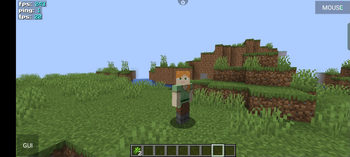
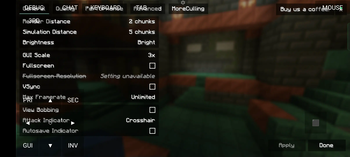
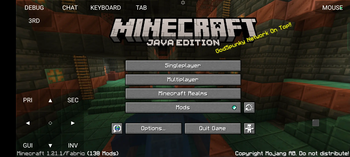
Über dieses Modpack
Spunky PvP Plus (Mobile Edition) is a trimmed-down, mobile-friendly version of the original Spunky PvP Plus modpack. Built for Minecraft 1.20.1 with Fabric, it's made to run smoothly on low-end systems or devices using emulators like PojavLauncher. This pack keeps PvP sharp, fast, and responsive without heavy mods slowing you down.
What's Different in the Mobile Edition?
This version focuses on ultra-low-lag performance and essential PvP features, perfect for mobile or low-end PC users. We've removed shader-heavy mods and replaced them with lighter alternatives to ensure smooth combat even during intense fights also added custom settings for stable gameplay.
Performance & Optimization Mods
- Sodium / Lithium / FerriteCore / ModernFix / Bad Optimizations / C2ME / ImmediatelyFast – Boost FPS, reduce lag, and improve chunk loading.
- Entity Culling / MoreCulling / Noisium / ThreadTweak – Optimized rendering and background performance.
PvP mods
- Custom Crosshair Mod – Fully customizable crosshair for better aim.
- Totem Counter / Potion Counter / Tier Tagger – Track PvP essentials like totems, potions, and armor.
- Gamma Utils – Full brightness always on, no need for night vision.
- Shulker Box Tooltip / AppleSkin – Quick access to food values and item previews.
- ReplayMod – Record your PvP fights to review and improve later.
UI & Quality of Life Mods
- Mod Menu / Cloth Config / Fabric API / Placeholder API / Ukulib – Core utility mods to support config and compatibility.
- Custom HUD / Ukus Armor HUD – Customize your HUD to show armor, status, and more.
- No Chat Reports – Keeps your multiplayer experience safe and private.
- ViaFabricPlus – Adds server compatibility for various versions.
Click Here - Mrpack to Zip Converter
Verfügbare Versionen
Spunky PVP Plus (Mobile) Server einrichten
Server bestellen
Wähle mindestens 4 GB RAM (6 GB empfohlen für Spunky PVP Plus (Mobile)). Je nach Spieleranzahl: +1 GB pro 8 Spieler.
Modpack im Dashboard installieren
Öffne den Modpack-Browser im Dashboard, suche nach "Spunky PVP Plus (Mobile)" und klicke "Installieren". Der fabric-Loader und Minecraft 26.2 werden automatisch konfiguriert.
Server starten & spielen
Starte den Server – alle Mods werden automatisch geladen. Teile die Server-IP mit Freunden und spielt zusammen!
Häufige Fragen
Spunky PVP Plus (Mobile) Server crasht oder startet nicht – was tun?
Häufigste Ursachen: zu wenig RAM oder falscher fabric-Loader. Prüfe latest.log auf "OutOfMemoryError" → erhöhe RAM auf mindestens 6 GB. Bei "Mixin" oder "ClassNotFoundException": Modpack-Version und Loader stimmen nicht überein. Bei Mado Hosting werden Loader und Minecraft-Version beim Modpack-Install automatisch konfiguriert – das verhindert die meisten Startprobleme.
Wie viel RAM braucht ein Spunky PVP Plus (Mobile) Server wirklich?
Minimum 4 GB, empfohlen 6 GB für stabile Performance. +1 GB pro 8 Spieler. Wichtig: Minecraft-Modpacks brauchen mehr RAM als Vanilla – plane pro zusätzlichem Spieler extra ein. Bei Mado Hosting kannst du den RAM jederzeit live hochskalieren, ohne Datenverlust (ab €5.2/Monat).
Kann ich eigene Mods zu Spunky PVP Plus (Mobile) hinzufügen, ohne Konflikte?
Ja, aber achte auf die Kompatibilität: Nutze nur Mods für den gleichen Loader (fabric) und die gleiche Minecraft-Version (26.2). Häufige Probleme: ID-Konflikte bei Rezept-Mods und inkompatible Coremod-Versionen. Im Mado Dashboard zeigt der Mod-Browser nur kompatible Mods an und warnt bei bekannten Konflikten.
Spunky PVP Plus (Mobile) Server laggt – Performance-Tipps
1) RAM auf 6 GB+ erhöhen. 2) Server-View-Distance auf 8 reduzieren (server.properties). 3) Pre-Generiere Chunks mit dem "Chunky" Plugin. 4) Prüfe mit /spark profiler welche Mods die meiste Tick-Time verbrauchen. Bei Mado Hosting laufen alle Server auf NVMe-SSDs mit dedizierten CPU-Kernen – das eliminiert Hardware als Engpass.
Ähnliche Modpacks

![COBBLEVERSE - Pokemon Adventure [Cobblemon]](https://cdn.modrinth.com/data/Jkb29YJU/581ecf54530972afb18a04660afd820f2f24f6c7.png)




Spunky PVP Plus (Mobile) Server mieten
Starte deinen eigenen Server mit automatischer Modpack-Installation.
Unterstützte Versionen
Starte deinen Spunky PVP Plus (Mobile) Server jetzt
Ab €5.20/Monat; für die beste Performance werden 6 GB RAM empfohlen.
Server konfigurieren →