
Starlight
The best vanilla modpack with the fastest performance
Screenshots


Über dieses Modpack

Starlight




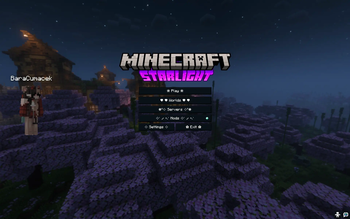
A lightweight, dark themed Fabric modpack focused on performance, technical play, and subtle quality‑of‑life improvements. It includes mods like litematica or carpet, a lot of optimalization mods, bringing Minecraft from 30 fps to around 300 fps on my Macbook M2 Air, while not loosing quality.
This modpack is build and managed by Azalea, a CLI modpack manager tool.
Install
Modrinth Launcher
- Search for Starlight, or visit the website
- Click Install
Prism Launcher
- Click on Add Instance in the top left corner
- Click on Modrinth in the left sidebar
- Search for Starlight, and look for a pink S logo
Contents
This is the list of content with links and versions. Most of it comes from Modrinth but some from Vanilla Tweaks or other places.
Modrinth content
| Name | Type | Side | Version |
|---|---|---|---|
| 1.20-panorama-with-shaders-(night) | resourcepack | client | 1.0 |
| 3dskinlayers | mod | client | 1.11.3 |
| badoptimizations | mod | client | 2.4.1 |
| bat-membrane | mod | both | v3.1.5+mod |
| better-advancements | mod | client | 0.6.0.72 |
| better-block-entities | mod | client | 1.3.8-beta.1+mc26.2 |
| better-carpet-bots | mod | both | 1.3.1 |
| bettergrassify | mod | client | 1.8.7+fabric.26.2 |
| c2me-fabric | mod | both | 0.4.2-alpha.0.52+26.2 |
| carpet-extra | mod | server | 26.2 |
| carpet | mod | both | 26.2 |
| cherished-worlds | mod | client | 17.0.0+26.2 |
| cicada | mod | both | 0.15.2+26.2 |
| clearviews | mod | client | 2.1.7+26.2 |
| clickthrough+ | mod | client | 3.6.5+26.1.2-fabric |
| cloth-config | mod | both | 26.2.155+fabric |
| command-menu | mod | client | 1.0.1 |
| continuity | mod | client | 3.0.1+26.2 |
| debugify | mod | both | 26.2.0.0 |
| entityculling | mod | client | 1.10.5 |
| fabric-api | mod | both | 0.161.0+26.2 |
| fabric-language-kotlin | mod | both | 1.14.1+kotlin.2.4.20 |
| fancymenu | mod | both | 3.9.12-26.2-fabric |
| ferrite-core | mod | both | 9.0.0-fabric |
| forge-config-api-port | mod | both | 26.2.1 |
| freecam | mod | client | 1.5.0-alpha.1 |
| gamma-utils | mod | client | 3.1.1+Fabric |
| immediatelyfast | mod | client | 1.16.5+26.2-fabric |
| inventory-profiles-next | mod | client | fabric-26.2-2.3.7 |
| ixeris | mod | client | 4.6.7+26.2-fabric |
| jade | mod | both | 26.2.11+fabric |
| konkrete | mod | both | 1.11.1-26.2-fabric |
| language-reload | mod | client | 1.7.7+26.2 |
| lib-5555ff | mod | both | v1.1.5+mod |
| libipn | mod | client | fabric-26.2-6.8.3 |
| lighty | mod | client | 4.0.1+26.2 |
| litematica | mod | client | 0.28.8 |
| lithium | mod | both | mc26.2-0.25.3-fabric |
| lower-shield | resourcepack | client | 1.0 |
| malilib | mod | client | 0.29.6 |
| mcwifipnp | mod | both | 2.1.3 |
| melody | mod | client | 1.0.17-26.2-fabric |
| minihud | mod | client | 0.40.7 |
| mob-crates | resourcepack | client | 26.2_v2.4 |
| modmenu | mod | client | 20.0.2 |
| moreculling | mod | client | 1.8.1 |
| mute-villagers | resourcepack | client | 1.3 |
| new-glowing-ores | resourcepack | client | 2.0-1.21-border |
| night-ui | resourcepack | client | v1.4.3 |
| owo-lib | mod | both | 0.13.1+26.2 |
| paginatedadvancements | mod | client | 2.8.0+26.2 |
| placeholder-api | mod | both | 3.1.0-beta.1+26.2 |
| reeses-sodium-options | mod | client | mc26.2-2.2.4+fabric |
| rrls | mod | client | 5.2.8+mc26.2 |
| serverdaycounter | mod | server | 1.1.1+26.2 |
| servermatica | mod | both | 1.2.1 |
| show-me-your-skin | mod | both | 2.0.3+26.2 |
| show-my-recipes! | mod | both | 1.1 |
| shulkerboxtooltip | mod | both | 5.4.1+26.2-fabric |
| skinrestorer | mod | server | 2.11.0+26.1-fabric |
| skyboxify | mod | client | 3.4 |
| small-low-totem | resourcepack | client | 1.4 |
| sodium-extra | mod | client | mc26.2-0.9.4+fabric |
| sodium-shadowy-path-blocks | mod | client | 7.0.0-fabric |
| sodium | mod | client | mc26.2-0.9.2-fabric |
| tweakeroo | mod | client | 0.29.5 |
| ukulib | mod | client | 2.1.1+26.2-fabric |
| ukus-armor-hud | mod | client | 0.12.0+mc26.2-fabric |
| vmp-fabric | mod | both | 0.2.0+beta.7.236+26.2 |
| worldedit | mod | server | 7.4.5 |
| xaeros-minimap | mod | both | fabric-26.2-26.5.1 |
| xaeros-world-map | mod | both | fabric-26.2-1.46.1 |
| yacl | mod | both | 3.9.6+26.2-fabric |
| zoomify | mod | client | 2.16.1+26.2 |
External content
| Name | Type | Side | Version |
|---|---|---|---|
| Alternate Bedrock | resourcepack | client | - |
| Square Plus Crosshair | resourcepack | client | - |
| Brighter Nether | resourcepack | client | - |
| Golden Carrot Hunger Bar | resourcepack | client | - |
| Purple Hearts | resourcepack | client | - |
| Quiter Minecarts | resourcepack | client | - |
| Quiter Nether Portals | resourcepack | client | - |
| Rainbow Expirience Bar | resourcepack | client | - |
| Reduce Villagers | resourcepack | client | - |
| Mod Crates | resourcepack | client | - |
| Panorama with shaders | resourcepack | client | - |
| Small totem | resourcepack | client | - |
Verfügbare Versionen
Starlight Server einrichten
Server bestellen
Wähle mindestens 4 GB RAM (6 GB empfohlen für Starlight). Je nach Spieleranzahl: +1 GB pro 8 Spieler.
Modpack im Dashboard installieren
Öffne den Modpack-Browser im Dashboard, suche nach "Starlight" und klicke "Installieren". Der fabric-Loader und Minecraft 26.2 werden automatisch konfiguriert.
Server starten & spielen
Starte den Server – alle Mods werden automatisch geladen. Teile die Server-IP mit Freunden und spielt zusammen!
Häufige Fragen
Starlight Server crasht oder startet nicht – was tun?
Häufigste Ursachen: zu wenig RAM oder falscher fabric-Loader. Prüfe latest.log auf "OutOfMemoryError" → erhöhe RAM auf mindestens 6 GB. Bei "Mixin" oder "ClassNotFoundException": Modpack-Version und Loader stimmen nicht überein. Bei Mado Hosting werden Loader und Minecraft-Version beim Modpack-Install automatisch konfiguriert – das verhindert die meisten Startprobleme.
Wie viel RAM braucht ein Starlight Server wirklich?
Minimum 4 GB, empfohlen 6 GB für stabile Performance. +1 GB pro 8 Spieler. Wichtig: Minecraft-Modpacks brauchen mehr RAM als Vanilla – plane pro zusätzlichem Spieler extra ein. Bei Mado Hosting kannst du den RAM jederzeit live hochskalieren, ohne Datenverlust (ab €5.2/Monat).
Kann ich eigene Mods zu Starlight hinzufügen, ohne Konflikte?
Ja, aber achte auf die Kompatibilität: Nutze nur Mods für den gleichen Loader (fabric) und die gleiche Minecraft-Version (26.2). Häufige Probleme: ID-Konflikte bei Rezept-Mods und inkompatible Coremod-Versionen. Im Mado Dashboard zeigt der Mod-Browser nur kompatible Mods an und warnt bei bekannten Konflikten.
Starlight Server laggt – Performance-Tipps
1) RAM auf 6 GB+ erhöhen. 2) Server-View-Distance auf 8 reduzieren (server.properties). 3) Pre-Generiere Chunks mit dem "Chunky" Plugin. 4) Prüfe mit /spark profiler welche Mods die meiste Tick-Time verbrauchen. Bei Mado Hosting laufen alle Server auf NVMe-SSDs mit dedizierten CPU-Kernen – das eliminiert Hardware als Engpass.
Ähnliche Modpacks

![Cobblemon Official Modpack [Fabric]](https://cdn.modrinth.com/data/5FFgwNNP/e7f9ee2e9d361623847853fe2ddce42f519ee64f.png)
![COBBLEVERSE - Pokemon Adventure [Cobblemon]](https://cdn.modrinth.com/data/Jkb29YJU/581ecf54530972afb18a04660afd820f2f24f6c7.png)
![Better MC [FABRIC] - BMC2](https://cdn.modrinth.com/data/shFhR8Vx/a19c2bcb51d38f32f138d3607e91cb2b7b8e387f_96.webp)


Starlight Server mieten
Starte deinen eigenen Server mit automatischer Modpack-Installation.
Unterstützte Versionen
Starte deinen Starlight Server jetzt
Ab €5.20/Monat; für die beste Performance werden 6 GB RAM empfohlen.
Server konfigurieren →